






VTrack Overhead Launch Monitor + Swing EZ AI Combo Package
Popular VTrack Accessories3 add-ons VTrack buyers order most
The Complete VTrack Build — Launch Monitor And AI Coach In One Order.
The VTrack + SwingEZ Combo Kit pairs the VTrack Overhead Launch Monitor with the SwingEZ AI Swing Analyzer Add-On Package in a single purchase. Get precise overhead ball and club tracking plus a real AI swing coach — pose analysis, diagnostic shots, and personalized drills — without configuring two separate orders.
VTrack handles ball and club data. SwingEZ adds AI-powered swing video analysis on top. Together they turn a simulator bay into a self-training system that can both run a round on GSPro and rebuild a swing — in the same room, on the same data layer.
VTrack Overhead Launch Monitor
High-speed photometric tracking. 25 data points. GSPro & E6 compatible. View standalone
SwingEZ AI Swing Analyzer Kit
Two HD swing cameras + lifetime AI license. Pose analysis. Personalized drills. View standalone
ToolKit v2.3.5 — SwingEZ Cameras Now Work Inside GSPro
The VTrack side of the combo runs on VTrack ToolKit v2.3.5, which adds direct SwingEZ simulator integration and lets the high-FPS SwingEZ cameras be used for swing replay inside GSPro and other third-party simulator software — not just the SwingEZ Unity environment. Driverless UVC USB webcam support introduced in v2.2.8 is retained.
What This Means For The Combo
The SwingEZ cameras included with the combo are no longer limited to the SwingEZ Unity environment. Use them as high-quality swing replay cameras inside GSPro and other third-party simulators through VTrack ToolKit, alongside the SwingEZ AI pose analysis and drills.
SwingEZ Cameras In GSPro
SwingEZ high-FPS cameras are now accepted in VTrack ToolKit for swing replay inside GSPro and other third-party simulators.
Driverless UVC Retained
Driverless UVC USB webcam support introduced in v2.2.8 is retained — plug-and-play webcams still work for replay.
SwingEZ Simulator Integration
Seamless integration between VTrack ToolKit and the SwingEZ simulator for a unified training workflow.
Audio Options Restored
Essential audio options are restored in v2.3.5 alongside the new camera and SwingEZ integration work.
Installation Requirement — 106″ Minimum Ceiling Height
VTrack is overhead-mounted and requires a minimum ceiling height of 106″ for proper camera angle, field of view, and consistent tracking. Plan installation around the VTrack Setup & Support page.
LCD Projector Recommended For SwingEZ
SwingEZ specifies an LCD projector. Use of other projector technologies may cause RGB flickering inside the SwingEZ Unity environment. Elite Sim Golf has seen no issues with laser projectors in our own testing — LCD remains the manufacturer-recommended choice, and projector technology should be planned during the build phase.
See Both Sides Of The Combo In Action.
Two walkthroughs cover the complete combo experience — the VTrack ToolKit swing camera workflow (now extended in v2.3.5 to accept SwingEZ cameras inside GSPro) and a first look at the SwingEZ AI coaching workflow.
VTrack — ToolKit Swing Camera Workflow
How to add mobile devices and USB webcams as swing cameras inside VTrack ToolKit for review alongside shot data. The same workflow extends to SwingEZ cameras in v2.3.5.
SwingEZ — First Look & AI Coaching For VTrack Users
A walkthrough of the SwingEZ hardware, software interface, AI pose analysis, and personalized drill workflow on top of VTrack data.
What The Combo Brings To A Simulator Build.
Overhead Launch Monitor
Clean floor-free VTrack setup with a large hitting zone and left/right-handed support.
High-Speed Photometric Tracking
Dual stereoscopic high-speed cameras capture impact for accurate ball and club data.
Markerless Club & Ball
No club stickers, dots, or special balls required for core VTrack tracking.
25 VTrack Data Points
Spin, path, face angle, attack angle, impact location, and more.
AI Pose Analysis
SwingEZ analyzes body movement, club delivery, and swing sequencing across two angles.
Personalized AI Drills
SwingEZ prescribes a structured drill series based on diagnostic shots and your faults.
GSPro & E6 Compatible
VTrack works with leading third-party simulator platforms on a capable gaming PC.
Lifetime SwingEZ License
The SwingEZ AI license is lifetime and transferable — no monthly subscription.
By The Numbers.
Open Platform.
Compatible Simulator Platforms
- GSPro — realistic ball flight, course play, and online simulator golf
- E6 Connect — premium course play and practice environments
- E6 Apex — next-generation E6 visuals and simulator experience
Included Software & Tools
- VTrack ToolKit for settings, analysis, and updates
- Practice Range for structured training
- CSV Data Export for coaching and performance review
- Swing Camera Replay in ToolKit v2.3.5 — now accepts SwingEZ cameras for GSPro
- SwingEZ AI Self-Trainer with lifetime, transferable license
25 Data Points — Then Layered With AI Pose Data.
VTrack delivers a deep set of ball and club performance metrics for practice, fitting, and coaching — 9 measured club data points, 8 measured ball data points, and 8 calculated ball flight data points, plus impact-point video on every shot. SwingEZ then layers AI body and club pose analysis on top of that data layer.
9 Club Data (Measured)
Captured directly by the dual stereoscopic cameras.
- Club Speed
- Club Path
- Face Angle
- Face-To-Path
- Attack Angle
- Dynamic Loft
- Smash Factor
- Horizontal Impact
- Vertical Impact
8 Ball Data (Measured)
Captured directly at impact.
- Ball Speed
- Back Spin
- Side Spin
- Total Spin
- Spin Axis
- Rifle Rotation
- Launch Direction
- Launch Angle
8 Ball Data (Calculated)
Derived from measured inputs.
- Apex Height
- Side Total
- Side Angle
- Total Distance
- Carry Distance
- Flight Time
- Run
- Land Angle
Plus: Impact-Point Video, Swing Replay & AI Pose Layer
Slow-motion impact-point video on every shot, open swing camera replay through VTrack ToolKit v2.3.5 (which now accepts the high-FPS SwingEZ cameras inside GSPro and other third-party sims), and a dedicated SwingEZ AI pose layer covering body movement, club delivery, and swing sequencing across two HD camera angles.
SwingEZ — The AI Self-Trainer Built Around VTrack.
SwingEZ analyzes VTrack ball and club data alongside front and side swing video, then uses AI pose analysis to identify swing faults and prescribe personalized drills. With the combo, it ships in the same order as VTrack — no separate add-on purchase required.
More Than Data. A Real Coach In Your Sim.
Three diagnostic swings calibrate a baseline, then SwingEZ prescribes a structured drill series tuned to the swing fault it identifies — all built around the VTrack data layer.
- AI Pose AnalysisBody movement, club delivery, and swing sequencing.
- Diagnostic ShotsThree swings calibrate the current swing baseline.
- Personalized DrillsAI prescribes a structured drill series for identified faults.
- Triple Data LayerBall + club + swing pose, analyzed together.
SwingEZ
The world’s only AI self-training golf solution — built around VTrack.
Two Primary Modules Drive Every Practice Session.
SwingEZ is built around two daily-driver modules that turn VTrack data and the two HD cameras into a full self-coaching workflow. AI Pose Analysis & Diagnosis identifies swing faults across seven body and club categories and segments every swing into eight phases. SwingEZ Range is the live driving range where every shot is paired with synced video and a full club and ball data panel.
AI Pose Analysis & Diagnosis.
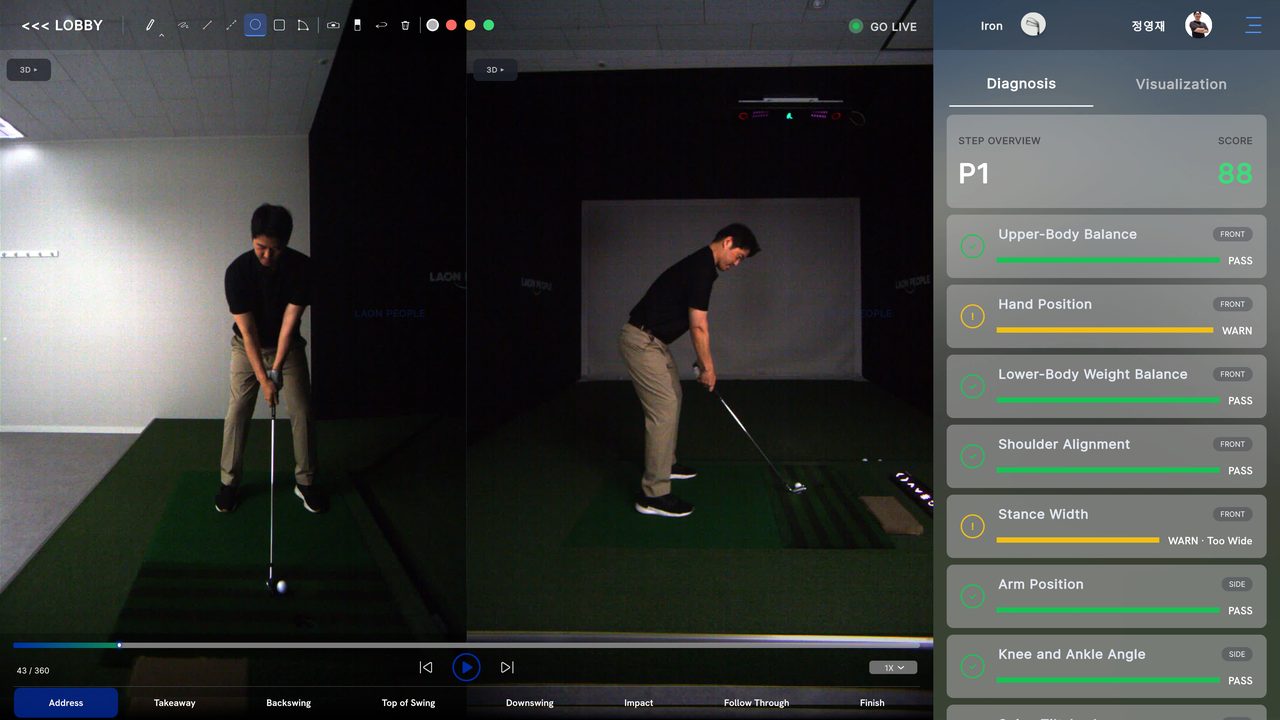
Three diagnostic swings calibrate a baseline. SwingEZ then segments every swing into eight phases — from Address through Finish — and grades the body and club through seven diagnostic categories using both Front and Side camera views simultaneously.
Seven Diagnostic Categories
Each swing is analyzed across upper body, lower body, hands, shoulders, stance, arms, and lower joints — tagged FRONT or SIDE depending on which camera angle delivers the best read.
- Upper-Body BalanceFront-view spine and torso stability through the swing.
- Hand PositionSide-view grip and hand path at key swing checkpoints.
- Lower-Body Weight BalanceFront-view weight transfer through transition and impact.
- Shoulder AlignmentSide-view shoulder turn and tilt versus the target line.
- Stance WidthFront-view foot positioning relative to shoulder width.
- Arm PositionSide-view arm structure through backswing and downswing.
- Knee & Ankle AngleLower-joint loading and stability through the strike.
- 8-Step SegmentationAddress, Take-Away, Backswing, Top, Transition, Down, Impact, Finish.
SwingEZ Range — Live Driving Range With Synced Video.
SwingEZ Range pairs every shot with a synced video replay and a live ShotData panel pulling directly from VTrack. The MySwing tab keeps each captured swing in a session library, and a frame scrubber walks any replay through every phase of the motion.
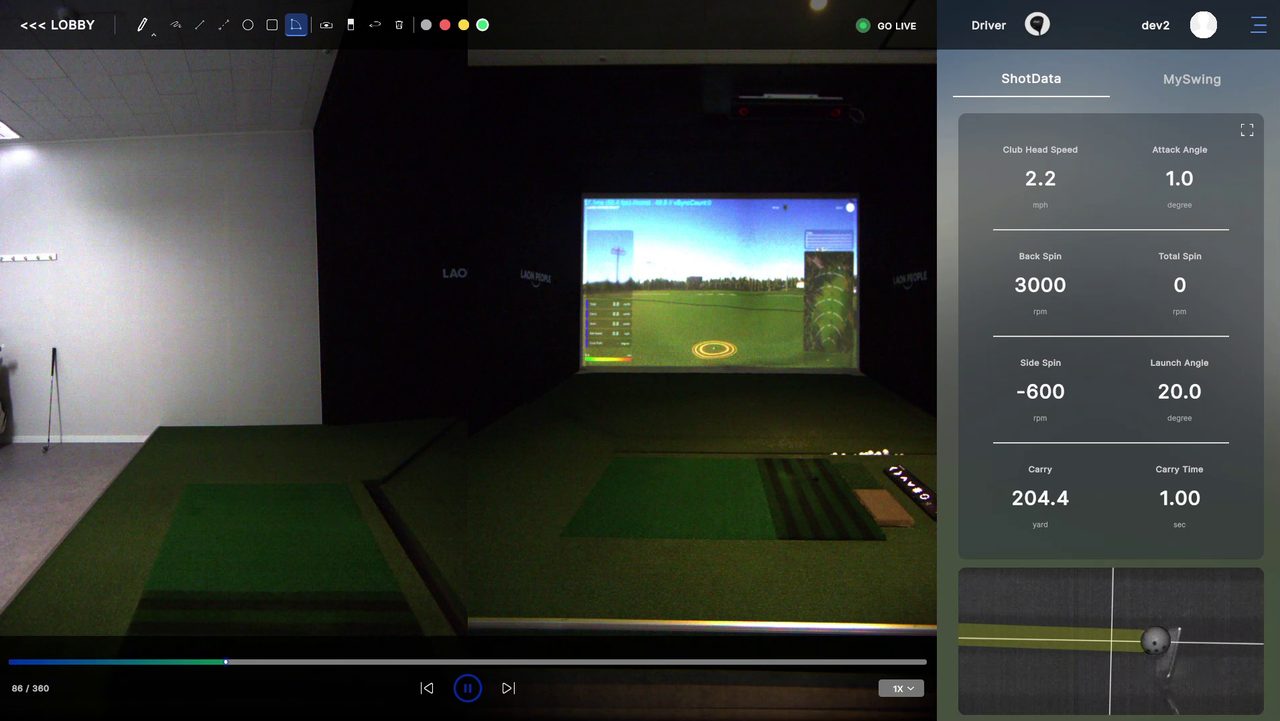
Live ShotData Panel
Every shot in SwingEZ Range writes a full data row pulled directly from VTrack — visible at the side of the replay, not buried in a menu.
- Club Head SpeedVTrack-measured speed at the moment of impact.
- Attack AngleVertical club path entering the strike zone.
- Back SpinVertical spin component from VTrack ball read.
- Total SpinTotal ball rotation including spin axis.
- Side SpinHorizontal spin component driving shot shape.
- Launch AngleInitial vertical ball flight angle off the face.
- CarryCarry distance projected from VTrack ball flight.
- Carry TimeTotal time the ball stays in flight before landing.
Replay Controls Built For Practice
The MySwing tab stores every captured swing in the active session. A frame scrubber walks any replay through every phase, and session history lets a SwingEZ Range workout be revisited days later with full data intact.
Camera Layout & Distance Requirements.
SwingEZ uses two HD cameras — a front-view and a side-view — mounted at specific distances and heights for AI pose tracking to work reliably. Plan the room layout around the diagram below during the build phase.
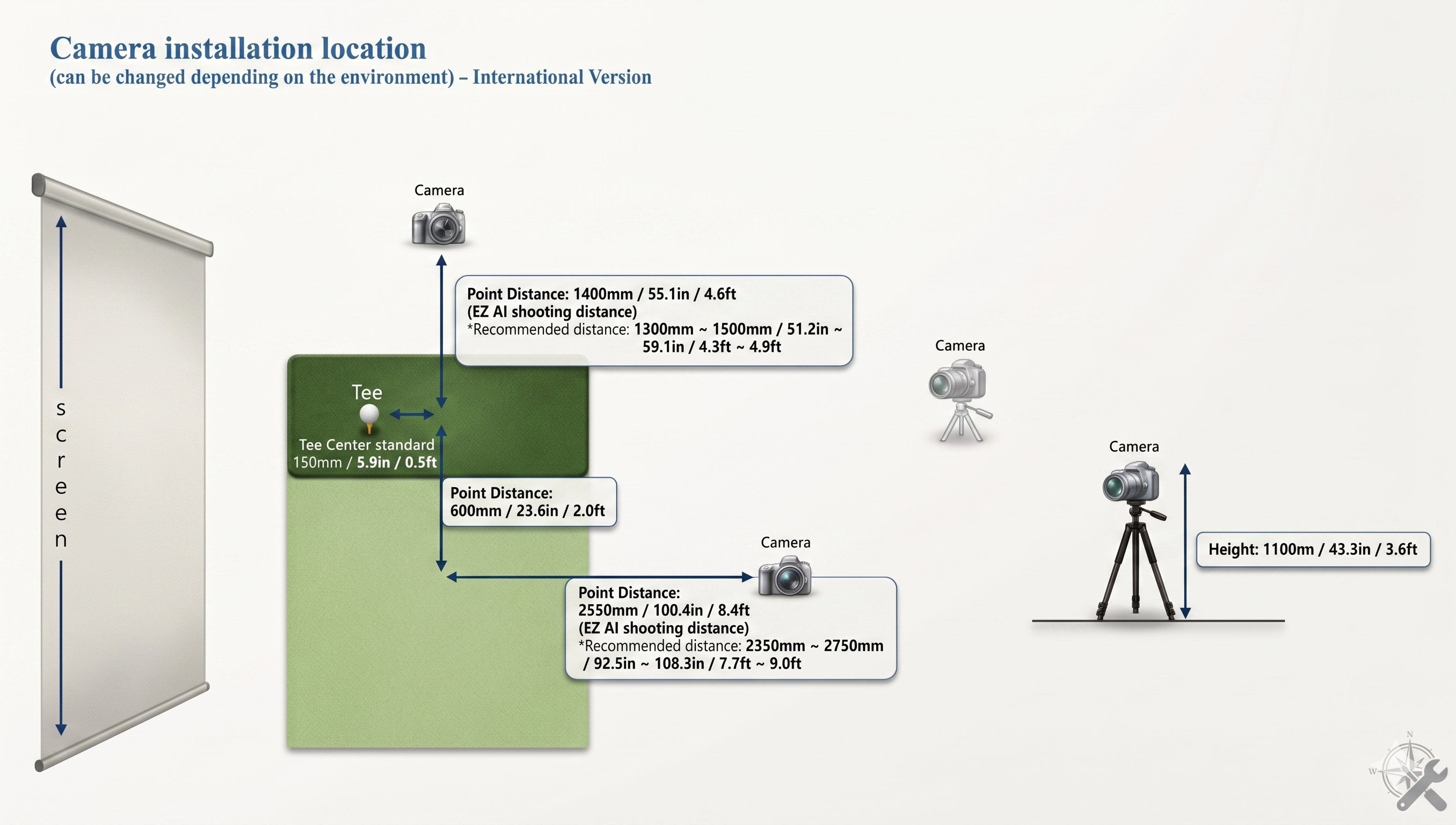
Reference SwingEZ camera installation diagram — front and side camera placement with required distances and mounting heights.
Room Sizing Reality Check
Combine VTrack’s 106″ minimum ceiling with the SwingEZ camera layout above before committing to a room. Insufficient distance to the front or side camera reduces SwingEZ pose-tracking accuracy.
If This Sounds Like Your Build, You Are In The Right Place.
Self-Coached Improvers
Golfers who want a real AI coach in the bay — not just shot numbers on a screen.
Data-Driven Practice
For players who want ball, club, impact, swing video, and AI pose analysis in one workflow.
Lefty + Righty Households
Overhead VTrack supports both hands without repositioning, and SwingEZ analyzes both.
One-Order Builders
For buyers who want to skip ordering the monitor and the AI add-on as two separate transactions.
Two Complete Packages — Shipped Together.
The combo includes everything in the standalone VTrack Overhead Launch Monitor order plus the full SwingEZ AI Swing Analyzer Add-On Package, with the lifetime SwingEZ AI license attached to your order.
- VTrack Launch Monitor
- Mounting Bracket
- Mounting Hardware
- 65ft Ethernet Cable
- 65ft Power Cable
- Installation Instructions
- Front-View HD Swing Camera
- Side-View HD Swing Camera
- Camera Mounts & Cables
- SwingEZ AI Software License
- Lifetime, Transferable License
- SwingEZ Setup Documentation
Walk through every step on the VTrack Setup & Support page, and reference the SwingEZ camera installation diagram for camera placement.
Add The VTrack Impact Protector.
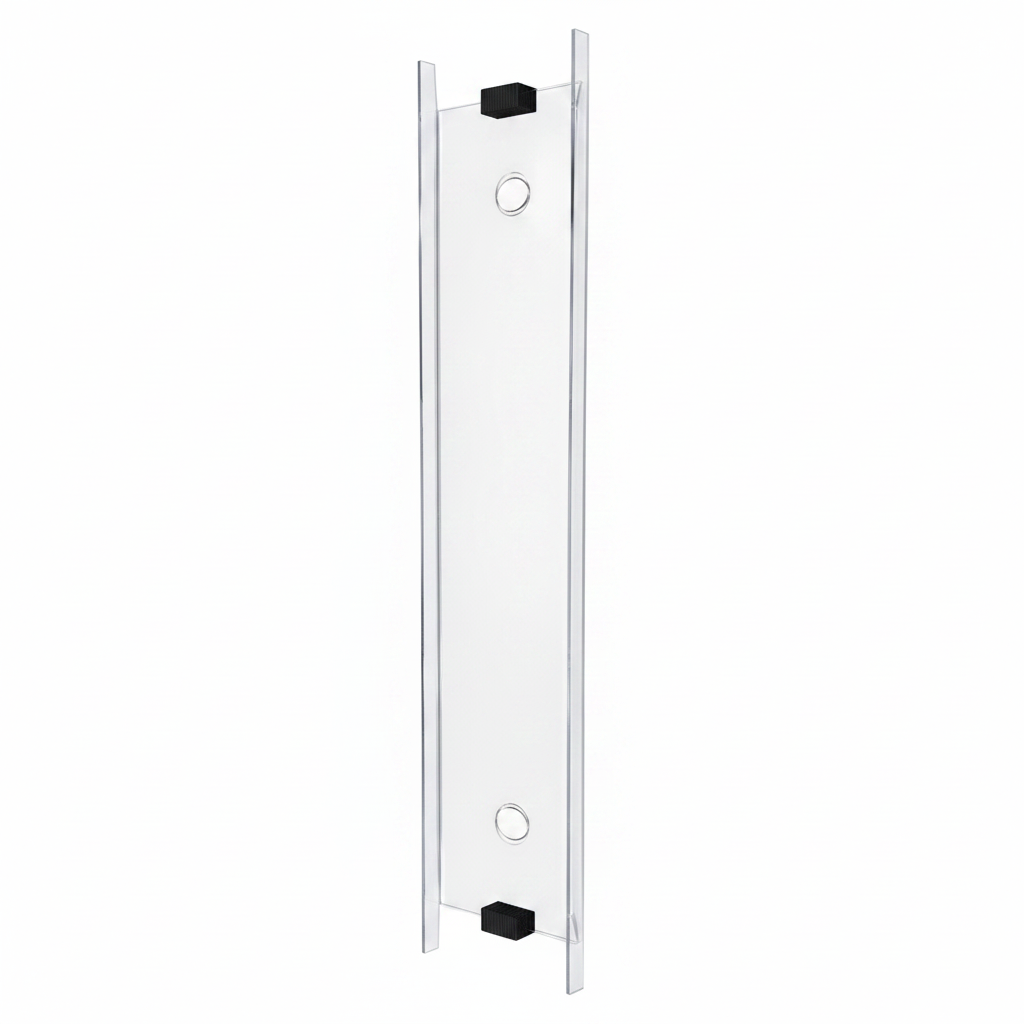
VTrack lives directly above the hitting bay. The VTrack Impact Protector is a clear impact shield, manufactured in-house by Elite Sim Golf, that defends the launch monitor from mishits and stray drives — without blocking the cameras.
Clear Impact Shield Built For VTrack.
Engineered specifically for the VTrack overhead form factor. The clear shield sits inline with the monitor housing, preserves the unit’s field of view, and absorbs direct ball strikes that would otherwise hit the lenses or camera bezel.
- Clear ShieldOptically clear so VTrack’s cameras keep a full unobstructed view of the hitting area.
- Direct-Hit DefenseDesigned to take ball strikes that would otherwise damage the launch monitor.
- Made In-HouseManufactured in-house by Elite Sim Golf for better availability and faster support.
- VTrack-Specific FitBuilt around the VTrack housing — not a generic universal shield.
Going Further? Build A Full SimKit.
Prefer a complete simulator package — enclosure, projector, hitting mat, and accessories — instead of just the monitor and AI coach? Pair this combo with a VTrack SimKit Bundle, or configure a custom build.
VTrack Pre-Built SimKit Bundles
Ready-made VTrack simulator packages curated by Elite Sim Golf. Each pre-built SimKit pairs VTrack with a matched enclosure, projector, BeaverTail Hitting Mat, and accessories — no sourcing required.
Build Your Own VTrack SimKit
Configure a custom VTrack SimKit from the ground up. Pick enclosure size, projector tier, hitting mat, and add-ons like SwingEZ or the VTrack Protector — built around the room and budget.
Prefer to keep the products separate? Order the VTrack Overhead Launch Monitor and the SwingEZ Add-On Package individually instead of this combo.
Setup, Support, And Partner Resources.
Everything needed before and after purchase — mounting guidance, SwingEZ camera placement, free remote setup help, and reseller / installer opportunities.
VTrack Setup & Support
Step-by-step mounting, calibration, and ToolKit setup guides, plus free remote setup help and 8-step troubleshooting for VTrack owners.
Open Setup & Support →SwingEZ Standalone Product Page
Full SwingEZ AI Swing Analyzer add-on detail — cameras, AI workflow, license, and FAQ — for buyers comparing the combo to the standalone path.
View SwingEZ Standalone →VTrack Reseller & Installer Program
Sell or install VTrack. Dealer pricing, factory-direct BenQ & Optoma projector pricing, and deep discounts on Elite Sim Golf enclosures.
Become A Partner →VTrack + SwingEZ Combo Buyer FAQ.
What is included in the VTrack + SwingEZ Combo?
The combo includes the full VTrack Overhead Launch Monitor package (launch monitor, mounting bracket, mounting hardware, 65ft Ethernet cable, 65ft power cable, installation instructions) and the full SwingEZ AI Swing Analyzer Add-On Package (front-view HD swing camera, side-view HD swing camera, mounts and cables, SwingEZ AI software with a lifetime, transferable license, and setup documentation).
Is the combo cheaper than buying both products separately?
The combo price matches the total of the standalone VTrack Overhead Launch Monitor and standalone SwingEZ Add-On Package due to MAP pricing rules. The advantage of the combo is a single checkout, a single order to track, and a coordinated VTrack + SwingEZ build — not a lower price.
How does the combo ship?
The combo ships in two shipments. The VTrack hardware ships free via UPS Next Day Air Saver where available, automatically downgrading to UPS 2nd Day Air at no extra cost if Next Day Air Saver is not available to the ZIP code. The SwingEZ AI Swing Analyzer Kit ships separately on standard carrier shipping options selected at checkout. SwingEZ does not qualify for the free Next Day Air Saver promotion on its own.
What ceiling height does the combo require?
The combo requires the same 106″ minimum ceiling height as VTrack on its own, because VTrack is overhead-mounted. SwingEZ cameras are floor-or-wall mounted and do not change the ceiling requirement. See the VTrack Setup & Support page for installation specifics.
Does the combo require a subscription?
No. Core VTrack tracking, ToolKit, Practice Range, CSV export, and the SwingEZ AI software all use a no-required-subscription model. SwingEZ specifically ships with a lifetime, transferable AI license. Third-party simulator software such as GSPro or E6 Connect may require its own separate license.
Does SwingEZ require a specific projector type?
SwingEZ specifies an LCD projector. Use of other projector technologies may cause RGB flickering inside the SwingEZ Unity environment. Elite Sim Golf has seen no issues with laser projectors in our own testing, but LCD remains the manufacturer-recommended choice. Plan the projector choice during the build phase.
What are the two primary SwingEZ modules?
SwingEZ is built around two daily-driver modules. AI Pose Analysis & Diagnosis uses the two HD cameras to grade every swing across seven body and club categories — Upper-Body Balance, Hand Position, Lower-Body Weight Balance, Shoulder Alignment, Stance Width, Arm Position, and Knee & Ankle Angle — with FRONT and SIDE camera tags, and segments each swing into eight phases from Address to Finish. SwingEZ Range is the live driving range where every shot is paired with a synced video replay and a live ShotData panel pulled from VTrack (Club Head Speed, Attack Angle, Back Spin, Total Spin, Side Spin, Launch Angle, Carry, Carry Time), with a MySwing library and frame scrubber for review.
Where do the SwingEZ cameras need to be placed?
SwingEZ uses two HD cameras — a front-view and a side-view — mounted at specific distances and heights for AI pose tracking. Reference the SwingEZ camera installation diagram while planning the room.
Is VTrack compatible with GSPro and E6?
Yes. VTrack is compatible with GSPro, E6 Connect, and E6 Apex on a capable Windows gaming PC. Setup steps are covered on the Setup & Support page.
Do I need special golf balls or club stickers?
No. VTrack uses markerless high-speed photometric tracking, so no stickers, dots, or branded marked balls are required for core ball and club data. SwingEZ analyzes body and club pose visually and also does not require markers.
Does the combo work for both right- and left-handed golfers?
Yes. VTrack is mounted overhead, so both right- and left-handed players can use the same setup without moving the unit. SwingEZ AI pose analysis supports both swing directions.
Is the SwingEZ license transferable if I sell the system?
Yes. The SwingEZ AI license is lifetime and transferable, so it stays with the hardware if the system is ever resold to another VTrack owner.
Can I buy the products separately instead of as a combo?
Yes. The standalone VTrack Overhead Launch Monitor and the standalone SwingEZ AI Swing Analyzer Add-On Package are also available as individual products.
Does VTrack need an impact protector?
VTrack mounts directly above the hitting bay, so a clear impact shield is strongly recommended to defend the launch monitor from mishits and stray drives. The VTrack Impact Protector is manufactured in-house by Elite Sim Golf and built specifically for the VTrack housing.
What kind of post-purchase support does Elite Sim Golf provide?
Elite Sim Golf provides direct VTrack and SwingEZ support including mounting guidance, software setup, ToolKit help, SwingEZ camera placement guidance, and free remote setup assistance for ESG customers. Details are on the Setup & Support page.
One Order. Two Complete Packages. Coordinated Support.
Where the combo is purchased matters as much as the components themselves. Elite Sim Golf is built around fast fulfillment, real product knowledge, and post-purchase support that helps every VTrack and SwingEZ owner get the most from the system.
Free Next Day Air On VTrack
FREE UPS Next Day Air Saver on the VTrack portion of the combo (where available), auto-downgrading to UPS 2nd Day Air at no extra cost if Next Day Air Saver is not available to the ZIP code. This is a value-added service — if UPS does not deliver in 1 business day, no shipping refund is issued.
SwingEZ Standard Shipping
The SwingEZ AI Swing Analyzer Kit ships separately via standard carrier shipping options selected at checkout. SwingEZ does not qualify for the VTrack free Next Day Air Saver promotion.
Lifetime SwingEZ License
The SwingEZ AI license is lifetime and transferable — no monthly subscription, and the license stays with the hardware if the system is ever resold.
Real Post-Purchase Support
From mounting questions to SwingEZ camera placement and ToolKit setup, the ESG team is known for responsive support after the sale.