






Eagle 12 Premium Golf Simulator Enclosure by Elite Sim Golf
The Most Popular 12-Foot Simulator Bay
At 12 feet wide and 8’2″ tall, the Eagle 12 is the most widely installed enclosure in the lineup. The 4:3 screen ratio is the standard for golf simulation software — the wider bay accommodates right- and left-handed players, full swing follow-through, and popular overhead launch monitors without compromise. Built on the same 1-1/4″ powder-coated steel frame as the rest of the lineup, snaps together in under an hour, no tools required.
Eagle 12 — Premium Construction for a 12-Foot Bay
Heavy-Duty Steel Frame
1-1/4″ thick-wall powder-coated steel. The frame holds its geometry shot after shot without flex or racking.
4K Triple-Layer Impact Screen
Three-layer construction absorbs ball impact, maintains even tension across the 12-foot bay, and holds a flat projection surface for consistent image quality.
Velvet-Lined Enclosure
Premium velvet inner lining keeps ambient light out of the hitting zone. The dark interior improves perceived contrast and frames the screen for a focused sim environment.
Seamless Screen Integration
Velvet flaps with hook-and-loop attachment wrap the screen perimeter, eliminating light gaps and creating a clean transition between the screen and enclosure surround.
Anti-Collision Top Rail Padding
Foam-padded top rail protects follow-through on full swings. The 12-foot bay provides more lateral clearance than narrower enclosures, but the padding remains standard across the lineup.
Tool-Free Assembly
Numbered snap-together poles require no tools and no hardware. Most two-person builds complete in 45–60 minutes.
Built for the Golfer with Space and a High Standard
The Dedicated Sim Room
A 12-foot bay turns a standard single-car garage or bonus room into a proper sim studio. The Eagle 12 fills the space without wasted width, and the 4:3 screen keeps every inch of projection area in the golf sim view.
Overhead Launch Monitor Builds
The Eagle 12’s 12-foot width and 8’2″ height give ceiling-mounted overhead monitors like the VTrack plenty of room to operate. No lateral squeeze, no ceiling clearance tradeoffs.
Right- and Left-Handed Setups
12 feet of lateral bay space accommodates both orientations and full follow-through on driver swings without repositioning side walls or adding padding.
Upgraders from Portable Nets
Moving from a standalone net to the Eagle 12 is the typical first real enclosure upgrade. The velvet lining, steel frame, and full surround immediately change how the space feels and performs.
Eagle 12 — Full Specification
Core Dimensions
| Model | Eagle 12 Premium Golf Simulator Enclosure |
| Manufacturer | Elite Sim Golf |
| Screen Aspect Ratio | 4:3 (optimized for golf simulation) |
| Outside Dimensions (Frame) | 12’ W × 8’2″ H × 5’ D (approx. 3.6 m × 2.5 m × 1.5 m) |
| Simulator Footprint — Enclosure | Approx. 12’ W × 5’ D floor space required for the enclosure frame |
| Typical Room Fit (Guideline) | Works best in rooms ~12’–15’ wide with at least 9’ ceilings and sufficient depth for player, launch monitor, and projector |
Impact Screen & Image Area
| Impact Screen Panel Size (nominal) | Approx. 141″ W × 98″ H overall panel, designed for 4:3 projection |
| Recommended Max Projected Image Area | Up to approx. 131″ W × 98″ H in a 4:3 ratio, leaving a small velvet border. Actual area may vary slightly based on installation and tension. |
| Screen Construction | 4K ULTRA premium triple-layer impact screen for simulator use |
Frame & Enclosure Materials
| Frame Tubing | 1-1/4″ (32 mm) thick-wall powder-coated steel tubing |
| Enclosure Lining | Premium velvet inner lining with durable vinyl exterior |
| Enclosure Flaps | Velvet flaps with hook-and-loop attachment for seamless transition to the impact screen |
| Collision Protection | Anti-collision padding along top rail and lower rear frame sections |
Assembly
| Assembly Method | Tool-free, snap-together frame design with numbered poles |
| Estimated Assembly Time | Approx. 45–60 minutes with two people recommended |
| Included With Enclosure | Steel frame, velvet enclosure, triple-layer impact screen, mounting hardware, collision padding. Hitting mat and landing pad sold separately. |
Choose the Right Bay for Your Space
Three standard enclosures. Same frame construction, same screen quality — the choice is bay width and screen format.

Birdie 10
10’ W × 8’2″ H × 5’ D
Screen: 4:3
- Compact single-stall garage fit
- 4:3 impact screen
- Best for tight rooms
- 45–60 min assembly

Eagle 12
12’ W × 8’2″ H × 5’ D
Screen: 4:3
- Most popular sim bay width
- 4:3 impact screen
- Best for dedicated sim rooms + standard garages
- 45–60 min assembly

Albatross 13
13’ W × 8’2″ H × 5’ D
Screen: 16:9
- Widest standard bay
- 16:9 widescreen impact screen
- Best for bonus rooms + commercial bays
- 60–90 min assembly
High Contrast Gray Triple-Layer Screen
Premium gray impact screen, not the standard white on the Eagle 12, Birdie 10, and Albatross 13. Deeper blacks, better ambient light rejection, improved contrast for serious sim use.
Built-In 1FT Wall Stand-Off
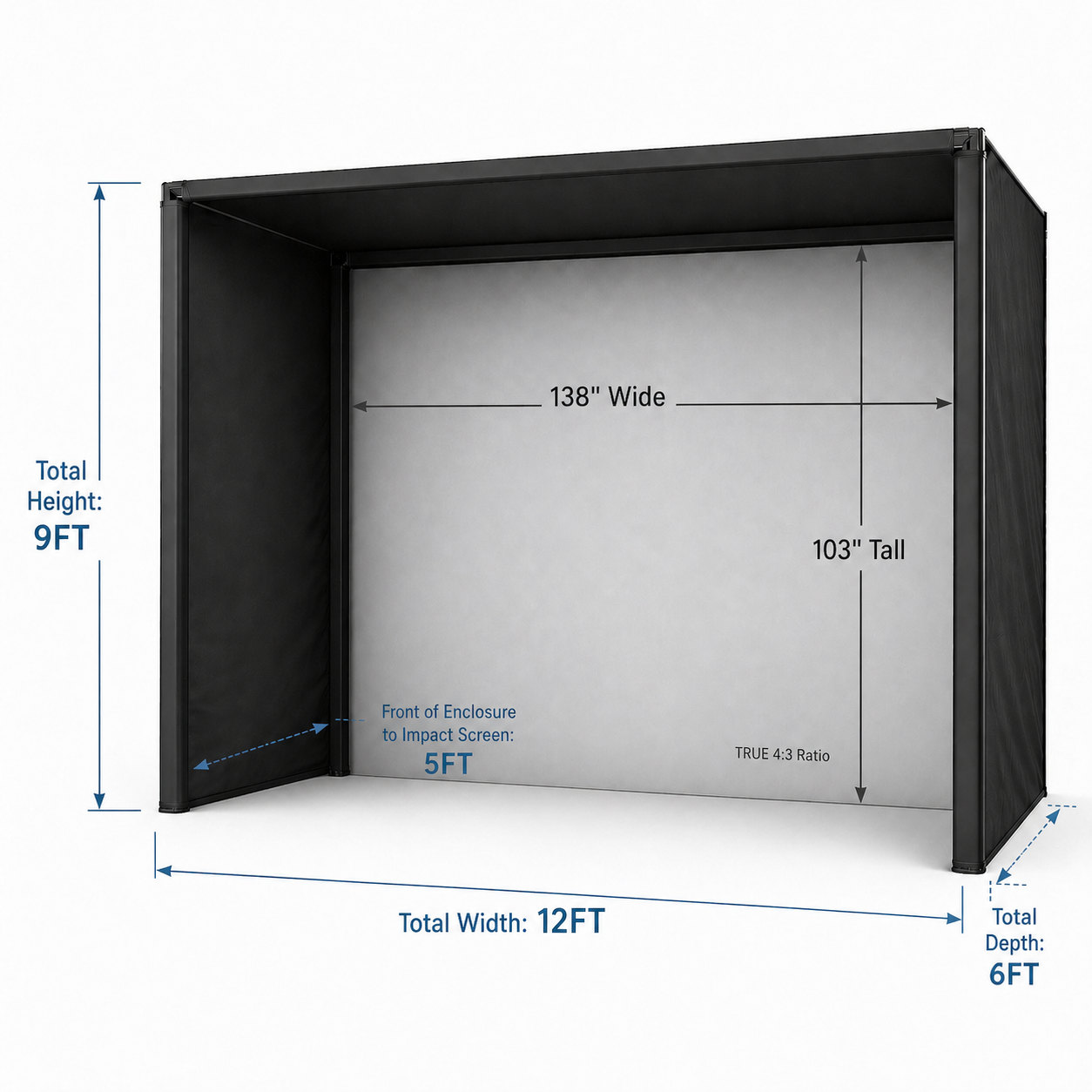
12’ W × 9’ H × 6’ D total footprint with the stand-off built in. Installs directly against the wall — no additional rear clearance calculation needed.
EMT Pipe Frame Kit Included Standard
Frame pipes included in the box. No sourcing EMT pipe locally or separately.
Larger Viewable Image Area
True 4:3 viewable area of 138″ W × 103″ H. Taller bay at 9’ height vs. 8’2″ on the standard lineup.
What’s Included Standard
- PRO Series 12x9 enclosure frame (12’ W × 9’ H × 6’ D)
- High Contrast Gray Triple-Layer impact screen
- EMT Pipe Frame Kit
- RipStop Fabric Surround for total ball containment
- Bungee bottom for screen-to-turf transition
- Heavyweight foam-lined flaps (no upgrade required)
- Blackout sheet to eliminate bottom light bleed
Real Bay. Real Results.

“Great product and very sturdy. Patience required in setup, but once completed it was worth it. Very happy with the quality and would purchase again.”
Choose a Projector for the Eagle 12
The right projector depends on room depth, ceiling height, and whether a ceiling-mounted overhead launch monitor will be installed. Use the Projector Fitment Tool to confirm mounting distance before purchasing.
BenQ AK700ST
- Resolution4K UHD (3840×2160)
- Brightness4,000 ANSI lumens
- Throw Ratio0.69–0.83 (short throw, 1.2× motorized zoom)
- Light SourceLaser — 20,000-hour lifespan
- SpecialAuto Screen Fit, Quick Focus, Golf Mode color profiles, IP5X dust-sealed
Optoma GT2400HDR
- Resolution1080p Full HD (1920×1080)
- Brightness4,200 ANSI lumens
- Throw Ratio0.496:1 (ultra-short throw — fixed)
- Light SourceDuraCore Laser — 30,000-hour lifespan
- Special8.4ms input lag, IP6X dust-sealed, HDR10/HLG, 360° operation
Not Sure Which Projector Fits Your Room?
Enter room depth and ceiling height into the Projector Fitment Tool to get compatible projector recommendations and exact mounting distances for the Eagle 12’s 12-foot bay.
Use the Projector Fitment ToolPair the Eagle 12 with a Complete SimKit
The Eagle 12 is the enclosure foundation. These pre-configured SimKit packages pair it with a launch monitor, projector, and hitting mat — everything needed for a complete simulator in one order.
VTrack Premium 4K SimKit
The complete overhead build. VTrack ceiling-mount launch monitor + 4K projector, pre-configured and ready to install. Choose the Eagle 12 enclosure at checkout.
- VTrack Overhead Launch Monitor — ceiling-mounted, markerless tracking
- BenQ AK700ST 4K laser projector with Golf Mode color profiles
- Enclosure choice at checkout — select the Eagle 12
- Ideal for dedicated sim rooms where a clean, floor-free launch monitor setup is the priority
Eye Mini Lite 12FT SimKit
A clean floor-based alternative for the 12-foot bay. No ceiling mount required — the Uneekor Eye Mini Lite sits beside the hitting area for repeatable alignment without any overhead installation.
- Uneekor Eye Mini Lite — ground-based, camera-driven tracking
- BenQ AH700ST 1080p laser projector — bright, short-throw, no 4K required
- Eagle 12 enclosure + Elite ProTee 5×5 mat + 6×12 landing pad included
- Best for rooms where ceiling mounting is not practical or preferred
Want a different launch monitor or projector combination?
Build Your Own Bundle →Talk to a Simulator Specialist
Questions about room fit, projector compatibility, or launch monitor pairings for the Eagle 12 — reach out directly. Every order is backed by real simulator expertise, not a chatbot.
Contact UsEagle 12 — Common Questions
How much room do I need for the Eagle 12?
What screen aspect ratio does the Eagle 12 use and why does it matter?
What is included with the Eagle 12?
Is a hitting mat included?
Can the Eagle 12 be used with any launch monitor?
What projector works with the Eagle 12?
How long does the Eagle 12 take to assemble?
Can the Eagle 12 be disassembled and moved?
Does the Eagle 12 work for both right- and left-handed golfers?
Can I upgrade the Eagle 12 to a complete simulator package?
What is the difference between the standard enclosures and the PRO Series 12x9?
Very nice enclosure. Well built. Needs better directions however.
Hi there, thank you for your kind words! We appreciate your feedback on the instructions and will consider it for future improvements. Glad you're happy with the enclosure!
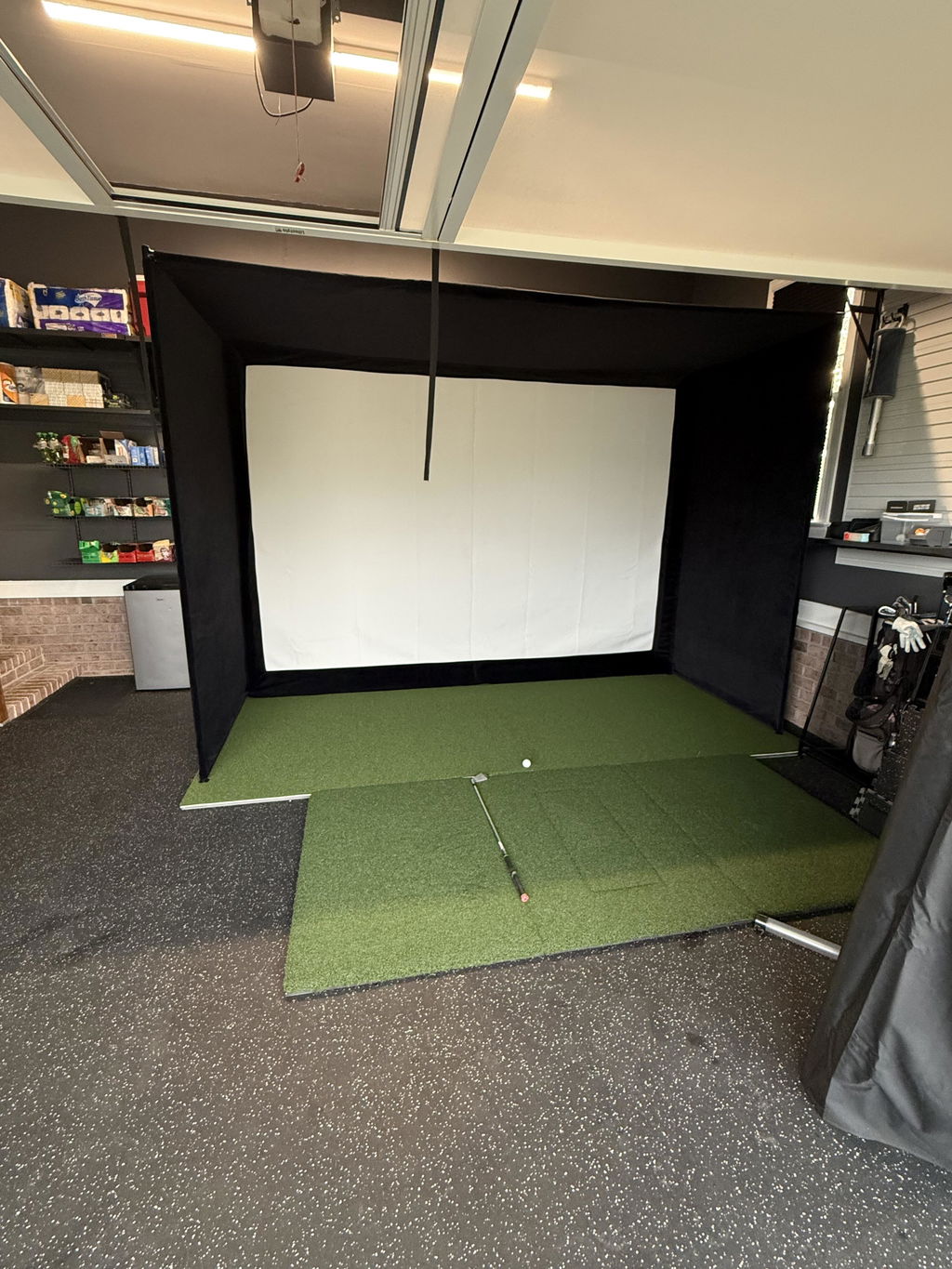
This enclosure is awesome!!! I customized the depth by removing the small piece on the bottom and top bars because of space constrictions. I wasnt sure if it would work or not but it looks amazing. I just rolled the top fabric taught and clamped with tarp clips. I am 8.5ft from center of mat to screen. Bounce back is minimal if configured properly. Elite sim was also really personable when it came to the purchase. I expressed my concerns with my existing screen and this was the solution. I even reached out last minute to upgrade to the 12ft because i noticed last minute it was only 100 dollar difference. If you have the space I highly recommend!!! Excited to see this one last compared to my previous screen setup!
Great product and very sturdy. Patience required in setup.but once completed it was worth it. Very happy with the quality and would purchase again.
Couldn’t be happier with this purchase. It’s sturdy, looks great, and performs exactly as advertised. They answered my questions quickly and made sure I ordered the right setup. Five stars all around.
John and the team were great to work with. Ordering was easy and communication was solid. Everything lined up perfectly and the screen tension is solid. I’d buy from them again without hesitation.
Super well built and designed. Had it put together in under 30 mins
John and the team were great to work with. Top-notch service and a great product. Fit and finish is excellent and setup was straightforward. 5 stars all around.
Excellent product. Great quality
John and the team were great to work with. Top-notch service and a great product. The enclosure looks premium and really finishes the room. Five stars all around.
Couldn’t be happier with this purchase. The enclosure looks premium and really finishes the room. They answered my questions quickly and made sure I ordered the right setup. Exactly what I was hoping for.
The golf enclosure arrived on time and was very easy to setup! I appreciate the seller working with me and being flexible, I would def buy from them again.