VTRACK Swing EZ Add-On Package

$1,199.99 $1,399.99
Shipping calculated at checkout.

Save up to 15% on a Full Setup

Build Your Dream Home Golf Simulator

Turn the VTRACK Swing EZ Add-On Package into a complete setup. Custom-fit your enclosure, projector, and hitting mat with the Elite Sim Golf SIMKIT Builder — save up to 15% off bundles. (Excludes launch monitors)
Open SIMKIT Builder
Authorized LAON SWINGCRAFT Dealer
Premier LAON SWINGCRAFT partner with full warranty support.
Golf Sim Pros
Questions? Chat or call to speak with a real golf pro.
Price Match Guarantee
Find a lower price and we'll match or beat it — no questions asked.
Financing Available
Pay over time with Shop Pay, Affirm, or Klarna.
Why VTrack Owners Add SwingEZ

Turn Launch Monitor Data Into A Full AI Self-Training System.

Launch monitor numbers tell you what the ball did. SwingEZ tells you why. This add-on package pairs VTrack’s ball and club data with two high-definition swing cameras and an industry-leading AI engine that diagnoses, segments, and coaches every swing inside a Unity-based simulator environment.

The package includes (2) SwingEZ cameras for Face-On and Down-The-Line capture, plus a lifetime, transferable license to the SwingEZ AI Swing Analyzer. One purchase, no recurring fees, no monthly subscription — the license stays with the hardware.

Lifetime AI License
Transferable License
No Monthly Fees
ESG-Backed Support
Latest VTrack ToolKit Update · June 15, 2026

ToolKit v2.3.5 — SwingEZ Cameras Now Work Inside GSPro.

The June 15, 2026 release of VTrack ToolKit (v2.3.5) adds first-party SwingEZ support. ToolKit now accepts the high-FPS SwingEZ cameras for swing replay inside GSPro and other third-party simulator software — not just the SwingEZ Unity environment. The same cameras serve double duty: AI pose analysis and personalized drills inside SwingEZ, plus high-quality swing replay inside the simulator software already in use.

SwingEZ Cameras In GSPro

High-FPS SwingEZ cameras now accepted inside VTrack ToolKit for swing replay in GSPro and other third-party simulator software.

Direct Simulator Integration

SwingEZ simulator integration is now wired directly into ToolKit — less hand-off, fewer configuration steps.

Driverless UVC Retained

Driverless UVC USB webcam support from v2.2.8 is retained as a fallback — mix high-FPS SwingEZ cameras with existing UVC webcams as needed.

Audio Options Restored

Essential audio options have been restored in this release for better in-bay feedback during practice and replay.

Why This Matters For SwingEZ Buyers

Before v2.3.5, the SwingEZ high-FPS cameras were primarily used inside the SwingEZ Unity environment. With ToolKit v2.3.5, those same cameras can now drive swing replay inside GSPro and other third-party simulator software — so SwingEZ buyers get AI coaching and high-quality replay in the simulator software they already use.

Now Shipping

SwingEZ Add-On Package Is In Stock And Shipping.

The SwingEZ Add-On Package is now shipping. Orders include (2) SwingEZ cameras for Face-On and Down-The-Line capture plus a lifetime, transferable license to the SwingEZ AI Swing Analyzer. Order today and add AI swing analysis to a VTrack build — either an existing setup or a new VTrack Launch Monitor purchased on the same order.

Why Add It Now

SwingEZ is the only AI self-training golf solution built around VTrack. The lifetime, transferable license stays with the hardware for the life of the system.

(2) SwingEZ Cameras

Face-On and Down-The-Line capture for full-body, full-club AI swing analysis.

Lifetime AI License

One-time purchase. No monthly fees and no annual renewal for the SwingEZ AI engine.

Transferable

The lifetime license stays with the hardware and transfers if the system is ever sold.

Built Around VTrack

Designed to integrate directly with VTrack ball and club data — not a generic third-party tool.

VTrack Launch Monitor Required

This is an add-on package. A VTrack Overhead Launch Monitor is required for SwingEZ to function. See the VTrack Launch Monitor product page and the VTrack Setup & Support page for mounting and clearance requirements.

LCD Projector Recommended For SwingEZ

The manufacturer specifies an LCD projector and notes that other projector technologies may cause RGB flickering inside the SwingEZ Unity environment. In Elite Sim Golf’s in-house testing, no flickering issues have been observed with laser projectors — so laser remains a viable option for VTrack + SwingEZ builds.

SwingEZ Overview

See How SwingEZ Adds AI Swing Analysis To A VTrack Setup.

Watch the SwingEZ overview to see how the system combines multi-angle camera capture, AI swing analysis, and simulator feedback. With Face-On and Down-The-Line views, SwingEZ gives VTrack owners a more complete training experience beyond launch monitor data alone.

Face-On + Down-The-Line capture
AI pose & swing diagnosis
8-step swing segmentation
Unity-based simulator environment
Watch On YouTube
Inside The SwingEZ Software

The Two Primary SwingEZ Modules.

SwingEZ ships with two core modules that VTrack owners use every session: AI Pose Analysis & Diagnosis for fault-finding and personalized drills, and the SwingEZ Range for shot-by-shot practice with full launch data and synced swing video. Together they cover both sides of indoor practice — fix the swing and play the shot.

Module 01 AI Pose Analysis & Diagnosis

Eight-Step Swing Diagnosis With Pass / Warn Scoring.

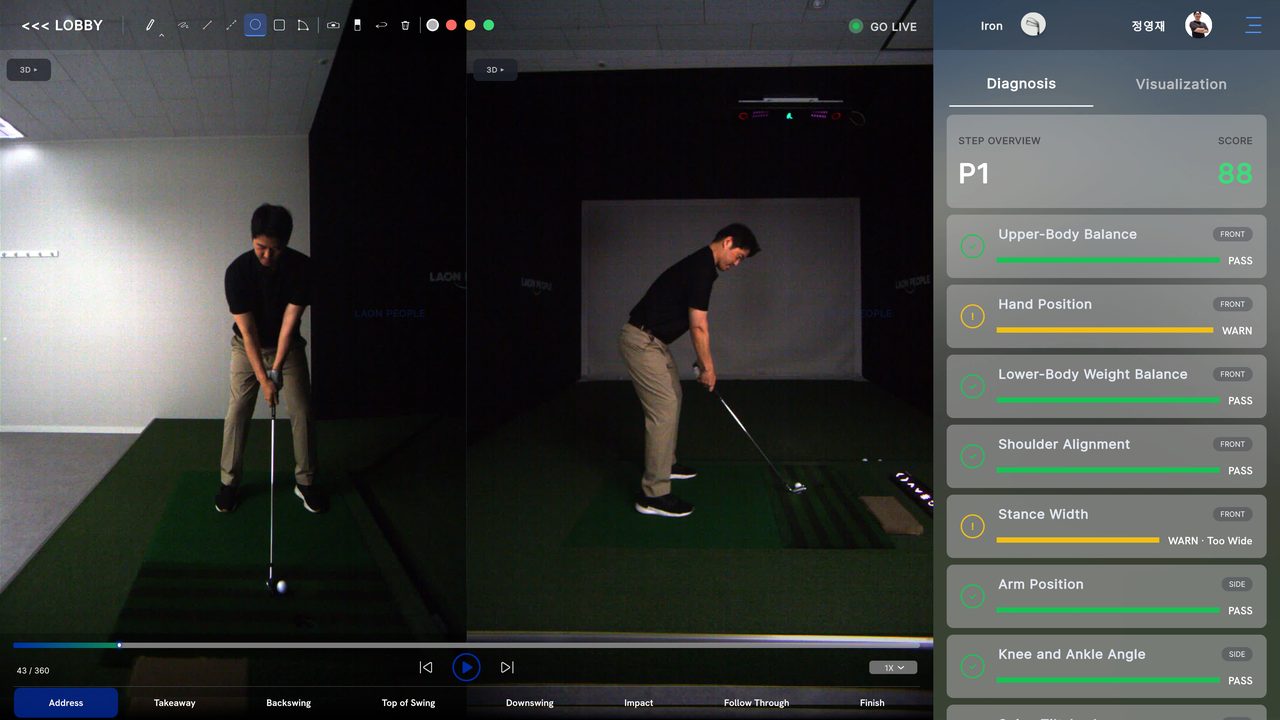
The AI Pose Analysis module is the heart of SwingEZ. After every swing, the engine compares the Face-On and Down-The-Line capture against a clean motion model, segments the swing into eight key positions, and grades each position for body line, hand path, weight, shoulder, stance, arm, and lower-body angles. Faults surface as WARN with a short reason. Cleaner positions surface as PASS. A composite score lands at the top of the panel so progress is visible session to session.

SwingEZ AI Pose Analysis & Diagnosis module showing dual-camera Face-On and Down-The-Line views, P1 step overview with composite score, and per-segment diagnostic bars including Upper-Body Balance, Hand Position, Lower-Body Weight Balance, Shoulder Alignment, Stance Width, Arm Position, and Knee and Ankle Angle with pass and warn indicators

SwingEZ AI Pose Analysis — dual-camera diagnosis with per-segment scoring

What The AI Actually Grades

SwingEZ does not just record video — it reads body and club lines from both camera angles and grades the swing across measurable categories. Each diagnostic bar is tagged FRONT (read from the Face-On camera) or SIDE (read from the Down-The-Line camera) so it’s clear which view the AI used to make the call.

  • Upper-Body BalanceFront view check on spine tilt and shoulder level at address and through the swing.
  • Hand PositionFront view check on hand height and lead-arm relationship through the takeaway.
  • Lower-Body Weight BalanceFront view read on weight distribution between lead and trail leg.
  • Shoulder AlignmentFront view read on shoulder line vs. target at address and impact.
  • Stance WidthFront view check on stance width vs. recommended range — flags “too wide” or “too narrow”.
  • Arm PositionDown-the-line check on arm structure and elbow tuck through the swing.
  • Knee And Ankle AngleDown-the-line read on lower-body posture and ground stability.
  • 8-Step SegmentationEvery swing is sliced into eight positions (P1–P8) so each one can be reviewed in isolation.
Built For Self-Coached Improvement

For golfers practicing alone, the diagnostic bars replace guesswork. PASS / WARN labels make it obvious which segment of the swing actually needs work, and the per-step scoring at the top of the panel (P1 step overview with a 0–100 composite score) lets users track improvement over time rather than chasing a feeling.

For coaches working remotely with a SwingEZ-equipped student, the same dashboard becomes a lesson tool — pull up any swing, jump to the warn segments, and use overlay and drawing tools to walk through corrections.

Module 02 SwingEZ Range

Shot-By-Shot Practice With Full Launch Data + Synced Swing Video.

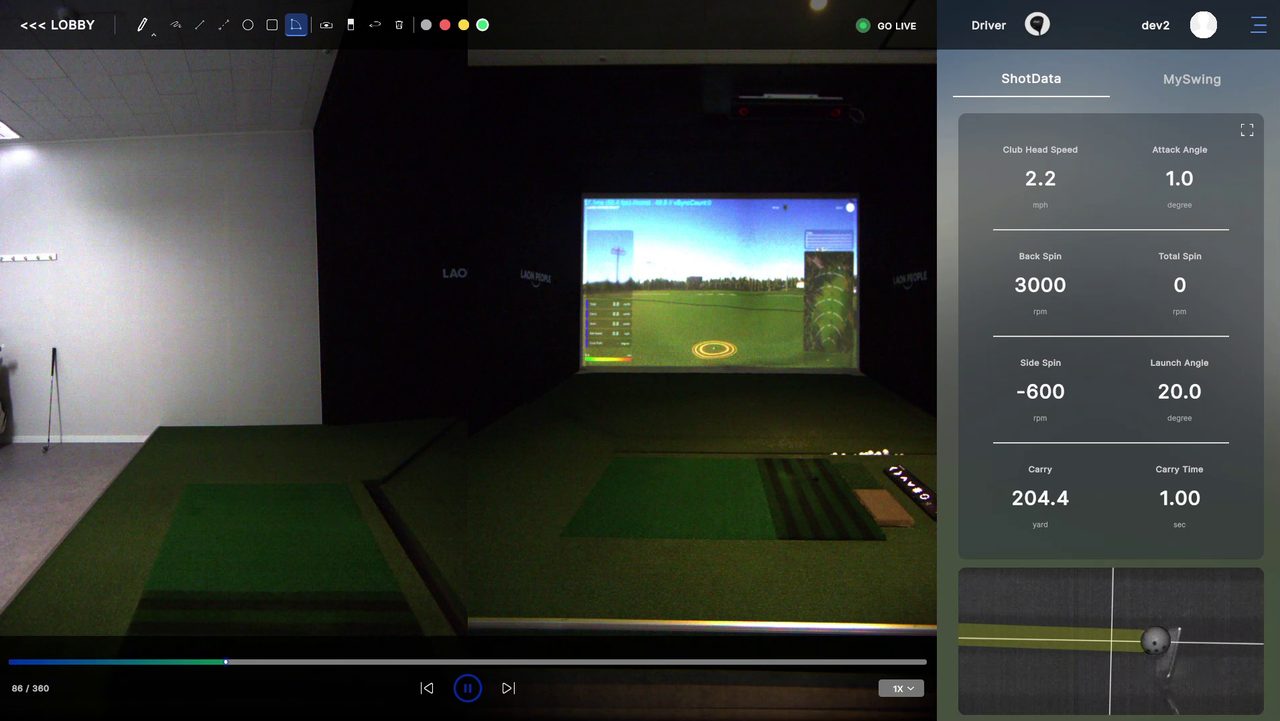
The SwingEZ Range module is the practice-bay companion to AI Pose Analysis. Every shot is captured with full VTrack launch numbers plus synced Face-On and Down-The-Line swing video, displayed side-by-side with the in-sim driving range view. Use it for warm-ups, club fitting, distance gapping, or any session where the focus is hitting shots rather than dissecting mechanics.

SwingEZ Range module showing synced Face-On and Down-The-Line swing replay alongside the in-sim driving range view, with the ShotData panel displaying Club Head Speed, Attack Angle, Back Spin, Total Spin, Side Spin, Launch Angle, Carry, and Carry Time

SwingEZ Range — synced swing video + full VTrack launch data on every shot

Every Shot, Fully Documented

The right-hand ShotData panel surfaces the full VTrack launch picture on every shot — Club Head Speed, Attack Angle, Back Spin, Total Spin, Side Spin, Launch Angle, Carry, and Carry Time. The center panel plays the in-sim driving range view. The left panel plays the synced Face-On swing video. Everything is tied to the same swing, so it’s easy to connect what the ball did to what the body did.

  • ShotData PanelClub head speed, attack angle, spin axis components, launch angle, carry, and carry time on every shot.
  • Synced ReplayFace-On and Down-The-Line swing video play in sync with the in-sim driving range ball flight.
  • Driving Range ViewFull simulator driving range visualization — useful for distance gapping and shot shaping work.
  • MySwing TabSwitch to the MySwing tab to flip into pose-analysis context from the same shot.
  • Frame ScrubberStep through the swing frame by frame at 1X / 0.5X / 0.25X via the bottom timeline.
  • Saved To HistoryEvery shot lands in the session history for later review, comparison, or coach hand-off.
Practice That Builds Sessions Of Data

Because SwingEZ Range writes video + launch data to the same record on every shot, a 30-minute practice session becomes a searchable library. Tag the swing that pured a 7-iron, jump back to it next session, overlay it against today’s 7-iron, and the comparison is immediate — no scrubbing through clips, no guesswork on which numbers belonged to which swing.

Pair the SwingEZ Range module with the AI Pose Analysis module and the workflow becomes hit shots in Range → diagnose problem swings in Pose Analysis → assign drills → back to Range. It is the practice loop a coach would build, automated inside the simulator.

Both Modules Use The Same Two Cameras

The same Face-On and Down-The-Line cameras drive both modules — no extra hardware purchase, no separate license. AI Pose Analysis and SwingEZ Range are both included in the lifetime, transferable SwingEZ AI license that ships with this add-on package.

Key Features At A Glance

Real AI Coaching. Not Just More Data.

Real-Time AI Analysis

SwingEZ processes camera feeds and VTrack data on-the-fly for immediate post-shot feedback.

Automatic Swing Detection

No manual triggers. The AI engine auto-detects the start and end of every swing.

8-Step Swing Analysis

Every swing is segmented into eight key positions for precise diagnosis and consistent feedback.

Low-Light Performance

Engineered for indoor simulator rooms — clean analysis even in dim projector lighting.

Compare & Overlay

Stack swings side-by-side or overlay them to see small posture and tempo differences clearly.

Personalized Drills

The AI prescribes training missions and drills built around the specific faults it identifies.

Coaching & Drawing Tools

On-screen drawing for swing plane, alignment, and shaft angle — useful for self-coaching or lessons.

Unity 6 Simulator

SwingEZ runs in a realistic Unity 6 simulator environment for shot feedback and training.

Quick Specs

By The Numbers.

Cameras Included
(2) SwingEZ Cameras
Camera Angles
Face-On + Down-The-Line
AI License
Lifetime, Transferable
Swing Segmentation
8-Step Analysis
Simulator Engine
Unity 6
Required Launch Monitor
VTrack Overhead
VTrack ToolKit
v2.3.5 or Newer
Projector Type
LCD Recommended
What SwingEZ Does

Three Pillars Of AI Self-Training.

Triple Data Layer

  • Ball Data — pulled directly from VTrack’s photometric tracking
  • Club Data — impact and delivery captured by VTrack
  • Swing Video — Face-On + Down-The-Line camera capture

What The AI Delivers

  • Diagnosis of swing faults across 8 swing segments
  • Customized lessons — intuitive, data-driven guidance
  • Training missions with measurable, real-game progress
  • Overlay & comparison for session-over-session tracking
  • Drawing tools for self-coaching and lesson review
How SwingEZ Works

Three Inputs. One AI. A Smarter Swing.

SwingEZ is positioned by the manufacturer as the world’s only AI self-training golf solution. It seamlessly integrates VTrack’s precise ball and club data, Swing Cam high-definition video capture, and industry-leading AI algorithms inside a Unity 6 simulator environment.

01 Diagnose

High-speed image processing + industry-leading AI.

The system divides every swing into eight precise segments, providing detailed diagnosis to accurately identify swing issues across body, club delivery, and tempo.

02 Customize

Data-driven guidance — no instructor required.

Based on the swing analysis, SwingEZ provides intuitive guidance that helps users identify and correct issues independently with a personalized training solution.

03 Train

Personalized missions with measurable progress.

The AI assigns personalized training missions inside a real-game practice flow, producing tangible session-over-session improvement that can be tracked over time.

Plus: Overlay, Compare, And Draw On The Swing

Stack two swings to see exactly what changed, overlay swing planes, and draw directly on the video for self-coaching or lesson review. Useful for golfers working alone, and for coaches working remotely with a SwingEZ-equipped student.

Camera Placement Matters

SwingEZ Requires Proper Camera Placement To Analyze Correctly.

SwingEZ is an AI-powered swing analysis system, which means the cameras need a clear view of the body, club, and swing motion. For the AI engine to properly identify swing mechanics, the two cameras must sit in the correct Face-On and Down-The-Line positions with enough room behind and beside the golfer.

Camera Layout Guidance

Face-On + Down-The-Line, Locked And Consistent.

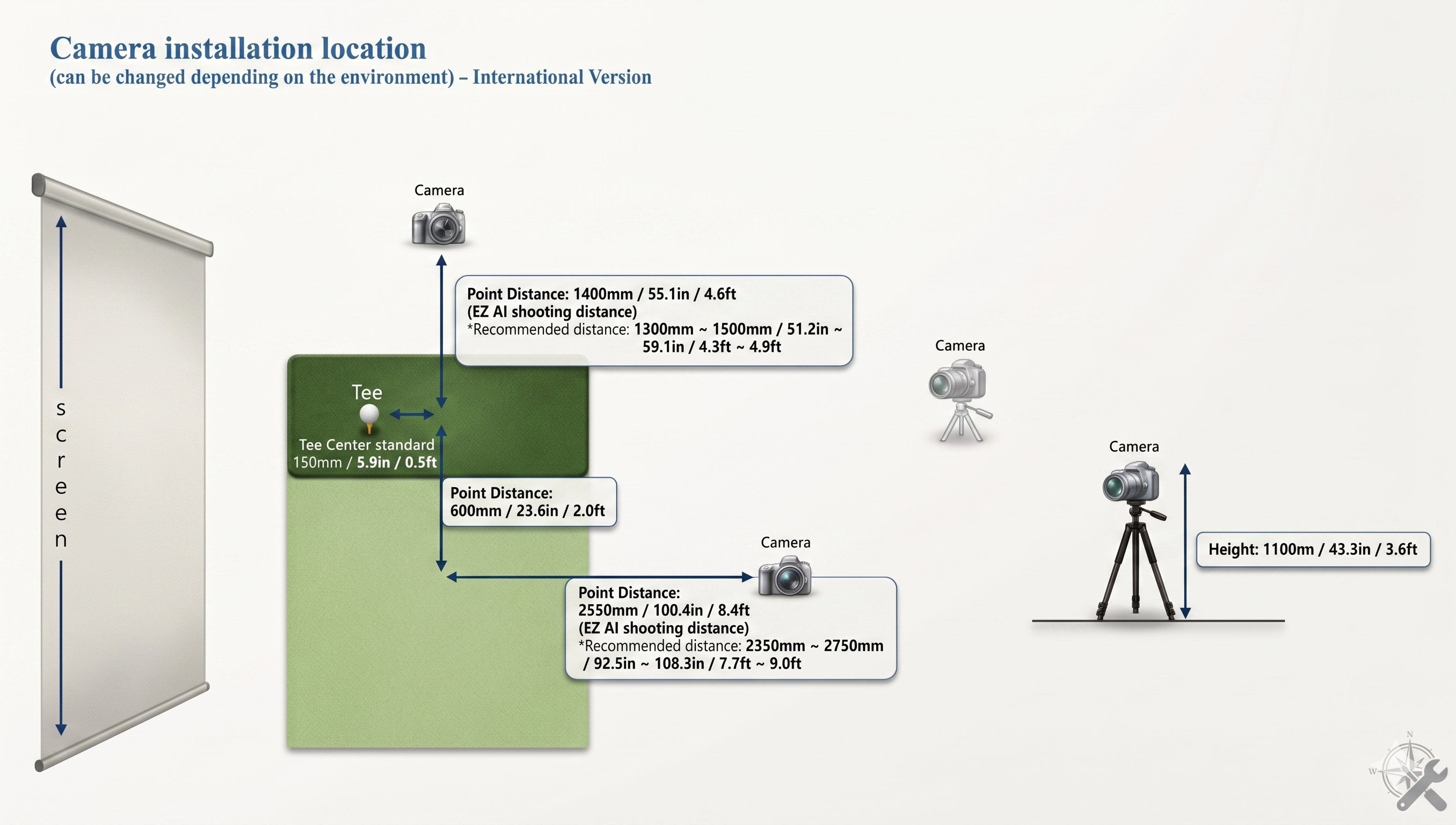
One camera is positioned Face-On, centered on the body line. The other is positioned Down-The-Line, aligned with the target line. Keep camera height, distance, and angle consistent so swing comparisons remain meaningful session to session.

  • Face-On ViewCentered on body line. Captures hip rotation, spine angle, and weight shift.
  • Down-The-Line ViewAligned with target line. Captures swing plane, shaft angle, and path.
  • Consistent SetupLock camera height, distance, and angle for session-over-session comparison.
  • Clear SightlinesKeep room behind and beside the golfer free of obstructions.
Open VTrack Setup & Support

SwingEZ

Two cameras. One AI engine. A complete picture of every swing.

2
Cameras
8
Swing Steps
AI
Pose Analysis
Camera Layout & Distance Diagram

Official SwingEZ Camera Installation Reference.

Use this diagram from the SwingEZ install reference to plan exact camera placement, height, and distance during the simulator build. The Face-On camera is centered on the body line. The Down-The-Line camera is aligned with the target line. Match these dimensions during install for the cleanest AI swing analysis.

SwingEZ camera installation diagram showing Face-On and Down-The-Line camera placement, height, and distance requirements for VTrack simulator builds

Room Sizing Reality Check

SwingEZ requires enough room for both the Face-On and Down-The-Line cameras to capture the full swing. If a room cannot support the required camera layout, the AI engine may not be able to see the proper swing mechanics. Plan camera positions during the simulator build — not after.

Who SwingEZ Is Built For

If This Sounds Like The Goal, SwingEZ Fits.

Self-Coached Golfers

For golfers practicing alone who want AI to diagnose faults and prescribe drills instead of guessing.

Data-Plus-Video Players

For VTrack owners who want swing video synced to launch monitor data on every shot.

Remote Coaching

Coaches working with a SwingEZ-equipped student get overlay, comparison, and drawing tools out of the box.

Long-Term Practice

Session-over-session comparison and personalized training missions reward consistent practice.

What’s In The Package

Everything Needed To Add AI Swing Analysis To VTrack.

The VTrack SwingEZ Add-On Package ships with both cameras and the lifetime AI license. The VTrack Launch Monitor itself and the host PC are not included — the cameras pair with an existing VTrack build.

  • (2) SwingEZ Cameras
  • Face-On + Down-The-Line
  • Lifetime SwingEZ AI License
  • Transferable License Terms
  • SwingEZ Software Access
  • Setup Documentation

Need help wiring it into a VTrack build? Walk through every step on the VTrack Setup & Support page.

Recommended PC Requirements

Plan The Build PC With SwingEZ In Mind.

SwingEZ runs alongside VTrack ToolKit and the Unity 6 simulator. The manufacturer publishes the following recommended PC specifications for SwingEZ. Use this as the target spec when planning or upgrading a VTrack build PC.

Operating System
Windows 10 / 11 (64-bit)
CPU
Intel Core i7-14700K
GPU
NVIDIA GeForce RTX 4060 Ti
RAM
32GB DDR4 or higher
Storage (SSD)
30GB Free Minimum
USB Ports
(2) USB 3.0 Minimum
Resolution
FHD 1920 × 1080 (Dual Monitors)
Projector
LCD (Recommended)

Projector Compatibility Note

The manufacturer recommends an LCD projector and notes that other projector technologies may cause RGB flickering inside the SwingEZ Unity environment. Elite Sim Golf has tested laser projectors with SwingEZ and has not seen flickering in real-world VTrack builds — laser is a viable alternative if LCD is not preferred.

Building A Full SimKit

Or Add SwingEZ Inside A Complete VTrack SimKit.

Prefer a complete simulator package instead of piecing everything together? Pair the VTrack SwingEZ Add-On with a full VTrack SimKit — enclosure, projector, BeaverTail Hitting Mat, and accessories included.

VTrack Pre-Built SimKit Bundles

Ready-made VTrack simulator packages curated by Elite Sim Golf. Add the SwingEZ Add-On to any pre-built SimKit during checkout to layer in AI swing analysis on top of a complete build.

Browse Pre-Built SimKit Bundles →

Build Your Own VTrack SimKit

Configure a custom VTrack SimKit from the ground up. Pick the enclosure, projector tier, hitting mat, and add-ons — SwingEZ slots in as the AI training layer on top of the build.

Open The SimKit Bundle Builder →

Already have a VTrack? Add SwingEZ to an existing build by starting with the VTrack Overhead Golf Launch Monitor product page and pairing this add-on package.

Frequently Asked Questions

VTrack SwingEZ Buyer FAQ.

What is included in the VTrack SwingEZ Add-On Package?

The package includes (2) SwingEZ cameras configured for Face-On and Down-The-Line capture, plus a lifetime, transferable license to the SwingEZ AI Swing Analyzer software. The VTrack Launch Monitor itself is not included — this is an add-on to an existing or newly purchased VTrack build.

What are the two primary SwingEZ modules?

SwingEZ ships with two core modules. AI Pose Analysis & Diagnosis segments every swing into eight steps and grades positions like Upper-Body Balance, Hand Position, Lower-Body Weight Balance, Shoulder Alignment, Stance Width, Arm Position, and Knee and Ankle Angle with PASS / WARN scoring. SwingEZ Range is the practice-bay module that records every shot with full VTrack launch data (Club Head Speed, Attack Angle, Back Spin, Total Spin, Side Spin, Launch Angle, Carry, Carry Time) plus synced Face-On and Down-The-Line swing video.

Is a VTrack Launch Monitor required to use SwingEZ?

Yes. SwingEZ is built around VTrack and uses VTrack’s ball and club data as one of its three input layers. Without a VTrack Launch Monitor, the SwingEZ cameras and AI engine cannot function as designed. The required base unit is the VTrack Overhead Launch Monitor.

Can the SwingEZ cameras be used inside GSPro or other third-party simulators?

Yes, as of VTrack ToolKit v2.3.5 (June 15, 2026). ToolKit now accepts the high-FPS SwingEZ cameras for swing replay inside GSPro and other third-party simulator software, not just the SwingEZ Unity environment. The cameras serve double duty — AI pose analysis and personalized drills inside SwingEZ, plus high-quality swing replay inside the simulator software already in use. Driverless UVC USB webcam support from v2.2.8 is retained.

Is the SwingEZ AI license a one-time purchase or a subscription?

The SwingEZ AI license included with this package is a lifetime, transferable license. There are no monthly fees and no annual renewal for the SwingEZ AI engine itself. The license transfers with the hardware if the system is ever resold.

Where do the SwingEZ cameras need to be placed?

One camera is positioned Face-On, centered on the golfer’s body line. The other is positioned Down-The-Line, aligned with the target line. The room must have enough space behind and beside the golfer for both cameras to capture the full swing. Camera height, distance, and angle should be kept consistent so swing comparisons stay meaningful session to session.

Does SwingEZ work for both right- and left-handed golfers?

Yes. Like VTrack, SwingEZ supports both right- and left-handed players. The Face-On camera mirrors with the body line and the Down-The-Line camera aligns with the target line, so the layout adapts to either handed setup.

What kind of swing analysis does the AI deliver?

The SwingEZ AI engine segments every swing into eight precise steps and identifies issues across body movement, club delivery, and tempo. It then delivers customized lessons, training missions, and overlay comparison tools to help users improve session over session.

What projector type does SwingEZ recommend?

SwingEZ runs inside a Unity 6 simulator environment. The manufacturer recommends an LCD projector and notes that other projector technologies may cause RGB flickering. In Elite Sim Golf’s in-house testing, no flickering issues have been observed with laser projectors, so both LCD and laser are viable for VTrack + SwingEZ builds. DLP and other technologies should be evaluated case by case.

What PC specs are recommended for SwingEZ?

The manufacturer recommends Windows 10 or 11 (64-bit), an Intel Core i7-14700K CPU, an NVIDIA GeForce RTX 4060 Ti GPU, 32GB DDR4 RAM or higher, 30GB free SSD storage, two USB 3.0 ports, and dual FHD (1920 × 1080) monitors. Plan the build PC around these specs for the best SwingEZ experience.

Can SwingEZ be added later to an existing VTrack setup?

Yes. The SwingEZ Add-On Package is designed to integrate with an existing VTrack build at any time. The cameras connect via USB 3.0, the AI license activates the SwingEZ software, and the cameras need to be positioned for proper Face-On and Down-The-Line capture.

Is the SwingEZ Add-On Package in stock?

Yes. The SwingEZ Add-On Package is now shipping. Orders include both SwingEZ cameras and the lifetime, transferable AI license.

Does SwingEZ work without VTrack ToolKit?

SwingEZ is designed to integrate with VTrack data, which is delivered through VTrack ToolKit. Keep ToolKit installed and updated on the build PC (v2.3.5 or newer recommended) alongside the SwingEZ software so the AI engine has full access to VTrack ball and club data on every swing.

What kind of post-purchase support does Elite Sim Golf provide for SwingEZ?

Elite Sim Golf provides direct VTrack and SwingEZ support including camera placement guidance, software setup, and free remote setup assistance for ESG customers. Details are on the VTrack Setup & Support page.

How does Elite Sim Golf ship SwingEZ orders?

The SwingEZ Add-On Package ships using standard carrier shipping options at checkout. SwingEZ does not qualify for the free UPS Next Day Air Saver promotion that applies to the VTrack Launch Monitor. Shipping rates and delivery estimates are calculated at checkout based on the destination ZIP code.

The Elite Sim Golf SwingEZ Advantage

A Smoother SwingEZ Experience — From Order To AI Training.

Where SwingEZ is purchased matters as much as the package itself. Elite Sim Golf is built around fast fulfillment, real product knowledge, and post-purchase support that helps every VTrack and SwingEZ owner get the most from the system.

In Stock And Shipping

SwingEZ Add-On Packages are in stock and shipping now. Orders move out of the ESG warehouse on standard carrier shipping options selected at checkout — no backorder queue, no estimated ship windows.

Lifetime License Included

Every order includes the lifetime, transferable SwingEZ AI license. No surprise renewal fees and no monthly subscription down the road.

VTrack-Native Setup Help

Elite Sim Golf supports VTrack and SwingEZ as a connected system — one team, one setup workflow, one support contact.

Real Post-Purchase Support

From camera placement questions to PC spec planning, the ESG team is known for responsive support after the sale.

Bottom Line: When ordering SwingEZ from Elite Sim Golf, the buyer gets a lifetime, transferable AI license, VTrack-native setup support, and a team that knows how to wire SwingEZ into a working simulator build.