






Birdie 10 Golf Simulator Enclosure by Elite Sim Golf
A Full Sim Bay in a Single Garage Stall
At 10 feet wide and 8’2″ tall, the Birdie 10 delivers a real enclosed simulator experience in the tightest residential spaces — single-car garages, compact bonus rooms, or basement builds where width is the primary constraint. The 4K ULTRA triple-layer impact screen is tensioned across a 1-1/4″ powder-coated steel frame that snaps together in under an hour, no tools required.
Birdie 10 — Premium Construction for a 10-Foot Bay
Heavy-Duty Steel Frame
The 1-1/4″ (32 mm) thick-wall powder-coated steel tubing locks into a rigid structure that stays square under repeated ball strikes. The frame is built to outlast the electronics in any sim setup.
4K Triple-Layer Impact Screen
The 4K ULTRA premium impact screen uses a multi-layer construction engineered to absorb and spread ball impact energy across the face, preventing tears and maintaining a flat projection surface session after session.
Velvet-Lined Enclosure
Dark premium velvet lines the interior surfaces, absorbing stray light and reducing ambient reflection. The result is better perceived image contrast without changing projector settings.
Seamless Screen Integration
Velvet enclosure flaps attach via hook-and-loop to create a flush transition from the enclosure walls directly to the screen edge, minimizing light bleed and giving the bay a finished, professional appearance.
Anti-Collision Top Rail Padding
Foam padding runs along the top rail of the frame — protecting both the club and the frame on high backswings. A practical detail that matters in a tight 10-foot bay where overhead clearance is closer.
Fast, Tool-Free Assembly
Numbered poles snap together without any tools. Most two-person builds are complete in 45–60 minutes. The frame also disassembles cleanly if the bay needs to be moved or relocated.
Built for the Golfer with a Tight Space and High Standards
The Single-Stall Garage Golfer
A two-car garage means one stall dedicated to the car and one to the sim. The Birdie 10 is sized precisely for a single-stall garage bay — wide enough for a full swing, compact enough to leave room on both sides for the rest of the garage to function. No major renovation, no structural changes.
The Compact Sim Room Builder
A smaller bonus room, a narrow basement section, or a bedroom conversion where a 12-foot enclosure simply will not fit. The Birdie 10 gives builders working in constrained footprints a real enclosed bay with a 4:3 screen, professional construction, and a 141″ diagonal viewable image — without sacrificing the feel of a proper simulator.
The Value-Focused Buyer
The same steel frame, same velvet lining, and same triple-layer impact screen as the larger enclosures in the lineup — at a lower price point due to the narrower bay. For golfers whose priority is getting a quality enclosed simulator built and operational without stepping up to a wider, more expensive bay they do not need.
Birdie 10 — Full Specification
| Model | Birdie 10 Golf Simulator Enclosure |
| Manufacturer | Elite Sim Golf |
| Screen Aspect Ratio | 4:3 (optimized for golf simulation) |
| Outside Frame Dimensions | Approx. 10’ W × 8’2″ H × 5’ D |
| Simulator Footprint — Enclosure | Approx. 10’ W × 5’ D floor space for the enclosure frame |
| Typical Room Fit (Guideline) | Ideal for single-car garages and smaller sim rooms with ~9’ ceilings or higher |
| Impact Screen Panel Size | Approx. 143″ W × 96″ H |
| Recommended Viewable Image Area | 4:3 image approx. 112″ W × 87″ H (141″ diagonal), centered with a small velvet border. Actual area may vary slightly based on installation and projector throw. |
| Screen Construction | 4K ULTRA premium triple-layer impact screen |
| Frame Material | 1-1/4″ (32 mm) thick-wall powder-coated steel tubing |
| Enclosure Lining | Premium velvet inner lining with durable vinyl exterior |
| Enclosure Flaps | Velvet flaps with hook-and-loop attachment for a seamless screen border |
| Collision Protection | Anti-collision padding along the top rail |
| Assembly Method | Tool-free, snap-together frame design with numbered poles |
| Estimated Setup Time | Approx. 45–60 minutes; two people recommended for easiest assembly |
| Assembly Instructions | Download Assembly PDF |
| Assembly Video | Watch Assembly Video |
What’s Included
- Birdie 10 Simulator Enclosure with 10’ W × 8’2″ H × 5’ D frame footprint
- 4K ULTRA premium triple-layer impact screen
- Velvet-lined enclosure with durable vinyl exterior
- Velvet enclosure flaps for a seamless wall-to-screen transition
- 1-1/4″ (32 mm) powder-coated steel frame with anti-collision padding along the top rail
- Mounting hardware
Hitting mat and landing pad are not included and are sold separately, allowing selection of the hitting surface that best fits the budget, space, and performance needs.
Choose the Right Bay for Your Space
All three enclosures share the same steel frame, triple-layer screen, and velvet lining — the difference is bay width, screen ratio, and the room they fit best.

Eagle 12
12’ W × 8’2″ H × 5’ D
4:3 Screen
- Most popular size in the lineup
- Dedicated rooms and two-car garages
- 4:3 screen, proven for golf simulation
- 45–60 min tool-free assembly

Birdie 10
10’ W × 8’2″ H × 5’ D
4:3 Screen
- Single-stall garages and compact rooms
- 4:3 screen optimized for golf simulation
- 45–60 min tool-free assembly
- Entry point into the ESG enclosure lineup

Albatross 13
13’ W × 8’2″ H × 5’ D
16:9 Screen
- Widest bay in the lineup
- Commercial-style feel at home
- 16:9 widescreen for golf and entertainment
- 60–90 min tool-free assembly
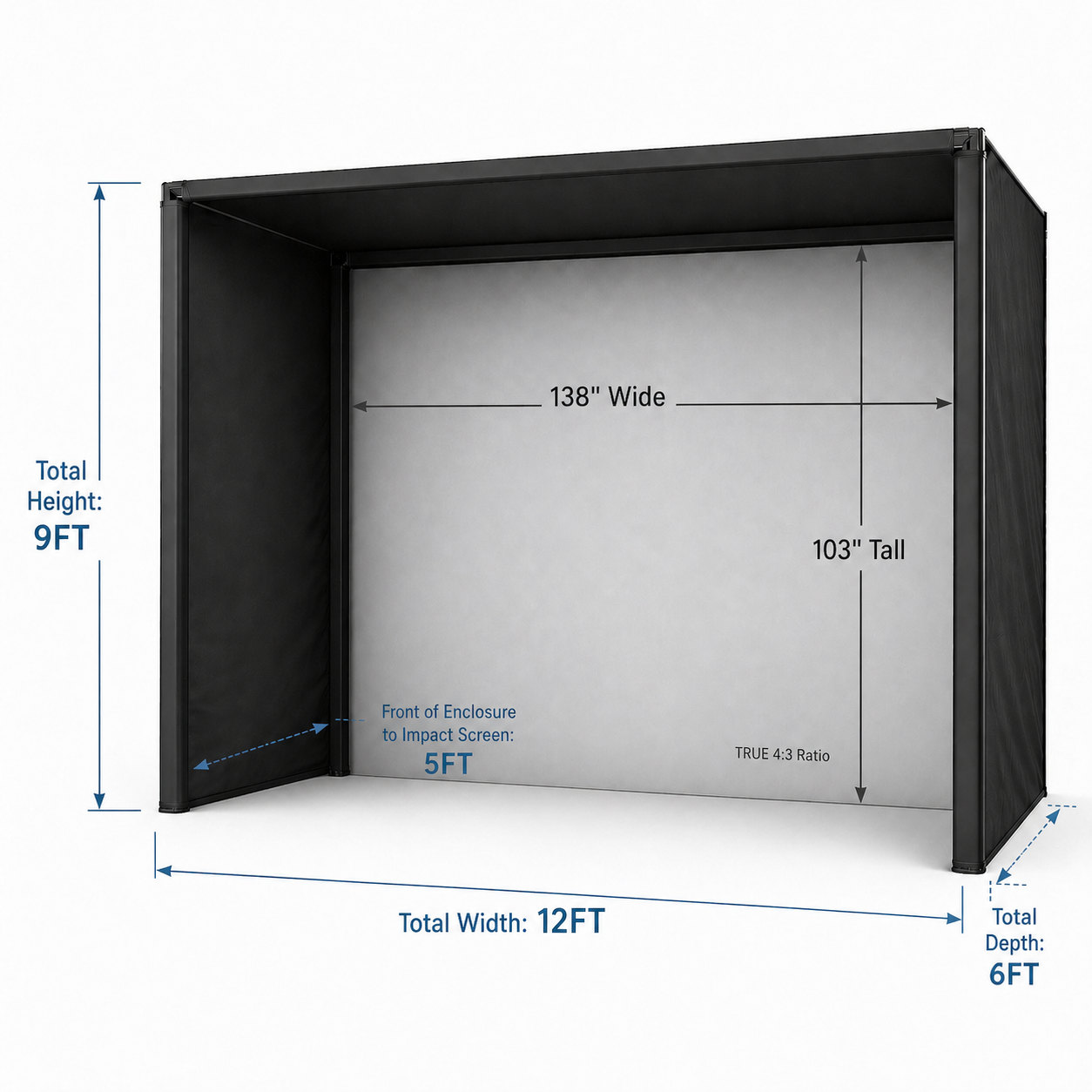
Premium gray impact screen material, not the standard white found on the Birdie 10, Eagle 12, and Albatross 13. Deeper blacks, better ambient light rejection, and improved visual contrast for serious sim use.
12’ W × 9’ H × 6’ D total footprint with the stand-off built into the frame design. Installs directly against the wall — no additional rear clearance calculation needed.
Frame pipes are included in the box — no sourcing EMT pipe locally or separately. Pick up, assemble, and hit.
True 4:3 viewable area of 138″ W × 103″ H — significantly larger than the Birdie 10’s 112″ × 87″ window and taller than standard-lineup bays at 9’ height.
What’s Included Standard
- PRO Series 12x9 enclosure frame (12’ W × 9’ H × 6’ D)
- High Contrast Gray Triple-Layer impact screen
- EMT Pipe Frame Kit
- RipStop Fabric Surround for total ball containment
- Bungee bottom for screen-to-turf transition
- Heavyweight foam-lined flaps (no upgrade required)
- Blackout sheet to eliminate bottom light bleed
Real Bay. Real Results.

“Was curious how the velvet enclosure would look, but I’m pumped about it. If your goal is a simulator/movie room, then this is the way. Reminds me of a movie theatre and keeps all the ambient light out of the enclosure so you can get away with a lower lumen projector if that’s what your budget allows. Set up was simple and easy. The included pipes for framing is amazing and I can’t believe other companies get away with charging an extra $400–$700 on top of a $2K enclosure. Would recommend 10/10 times.”
— Gunner, Verified Buyer
Choose a Projector for the Birdie 10
The right projector depends on room depth, ceiling height, and whether a ceiling-mounted overhead launch monitor will be installed. Use the Projector Fitment Tool to confirm mounting distance before purchasing.
BenQ AK700ST
Best-in-class 4K image with BenQ Golf Mode color science, motorized Auto Screen Fit for precise alignment, and full compatibility with overhead launch monitors.
- Resolution 4K UHD (3840×2160)
- Brightness 4,000 ANSI lumens
- Throw Ratio 0.69–0.83 (short throw, 1.2× motorized zoom)
- Light Source Laser — 20,000-hour lifespan
- Special Features Auto Screen Fit, Quick Focus, Golf Mode, Golf Color modes, IP5X dust-sealed
Optoma GT2400HDR
Exceptional brightness at 4,200 lumens with a 30,000-hour laser lifespan. Outstanding choice for rooms without a ceiling-mounted overhead monitor, or where throw distance and mounting have been confirmed with the fitment tool.
- Resolution 1080p Full HD (1920×1080)
- Brightness 4,200 ANSI lumens
- Throw Ratio 0.496:1 (ultra-short throw — fixed)
- Light Source DuraCore Laser — 30,000-hour lifespan
- Special Features 8.4ms input lag, IP6X dust-sealed, HDR10/HLG, 360° operation
Not Sure Which Projector Fits Your Room?
Enter room depth and ceiling height into the Projector Fitment Tool to get projector recommendations and exact mounting distances for the Birdie 10’s 10-foot bay.
Pair the Birdie 10 with a Complete SimKit
The Birdie 10 is the enclosure foundation. These pre-configured SimKit packages pair it with a launch monitor, projector, and hitting mat — everything needed for a complete simulator in one order.
VTrack Premium 4K SimKit
The complete overhead build. VTrack ceiling-mount launch monitor + 4K projector, pre-configured and ready to install. Choose the Birdie 10 enclosure at checkout.
- VTrack Overhead Launch Monitor — ceiling-mounted, markerless tracking
- 4K short-throw projector pre-matched to the 10-foot bay
- Enclosure choice at checkout — select the Birdie 10
- Ideal for single-stall garages where a clean, floor-free setup is the priority
Spica 3 SimKit
A clean floor-based alternative. No ceiling mount required — the Spica 3 monitor sits behind the golfer for a straightforward, ceiling-free setup with the Birdie 10 bay.
- Spica 3 Launch Monitor — floor or mat-based, no ceiling work needed
- Projector included and matched to the 10-foot bay
- Birdie 10 enclosure with 4:3 triple-layer impact screen
- Best for rooms where ceiling mounting is not practical or preferred
Want a different launch monitor or projector combination?
Build Your Own Bundle →Talk to a Simulator Specialist
The team at Elite Sim Golf configures Birdie 10 bays regularly and can assist with room fit, launch monitor pairing, projector selection, and throw distance confirmation for the 10-foot bay.
Room Planning Help
Layout guidance, ceiling height requirements, recommended buffer space between the hitting position and the enclosure, and whether the Birdie 10 or a larger model fits the specific room better.
Component Matching
Launch monitor and projector pairing based on room depth, swing style, software goals, and budget. Includes projector throw confirmation for the Birdie 10’s 10-foot bay before purchase.
Birdie 10 — Common Questions
How much room do I need for the Birdie 10?
The enclosure frame footprint is approximately 10’ wide by 5’ deep, and 8’2″ tall. Plan for additional room in front of the enclosure for the player’s swing, behind the player for the launch monitor, and overhead for projector mounting. A single-car garage bay with a 9’ ceiling or higher is the typical installation environment. Total room depth needed will vary based on projector throw distance and launch monitor placement — the Projector Fitment Tool can help confirm whether the full layout fits the room.
What screen aspect ratio does the Birdie 10 use and why does it matter?
The Birdie 10 uses a 4:3 aspect ratio, which is the format most golf simulation software is designed around. The 4:3 format fills more of the screen with the course view compared to a 16:9 widescreen format when running golf sim software, making it the preferred ratio for a dedicated golf simulator. The viewable image area is approximately 112″ wide by 87″ high (141″ diagonal).
What is included with the Birdie 10?
The Birdie 10 includes the 1-1/4″ powder-coated steel frame, 4K ULTRA premium triple-layer impact screen, velvet-lined enclosure with vinyl exterior, velvet flaps with hook-and-loop attachment, anti-collision padding along the top rail, and mounting hardware. Everything needed to assemble a fully enclosed simulator bay is in the box.
Is a hitting mat included with the Birdie 10?
No. The hitting mat and landing pad are sold separately. This is intentional — hitting mat preferences vary significantly based on playing style, simulator software, and budget. Separating the mat from the enclosure allows selection of the surface that best matches those needs without being locked into a bundled option.
Can the Birdie 10 be used with any launch monitor?
Yes. The Birdie 10 is compatible with any launch monitor — radar-based side monitors, forward-facing camera monitors, and ceiling-mounted overhead monitors all work with the enclosure. The key variable is room depth: some launch monitors require specific distances between the hitting position and the screen, so confirming the total room layout before purchase is recommended.
What projector works with the Birdie 10?
Two projectors are recommended for the Birdie 10. The BenQ AK700ST is the premium option — 4K UHD, 4,000 lumens laser, with dedicated Golf Mode color profiles and motorized Auto Screen Fit. Its short-throw lens and rear ceiling-mount position provide full compatibility with ceiling-mounted overhead launch monitors such as the VTrack. The Optoma GT2400HDR is the best-value option — 1080p, 4,200 lumens, DuraCore laser with a 30,000-hour lifespan. Its 0.496:1 ultra-short throw ratio mounts very close to the screen, so buyers using a ceiling-mounted overhead launch monitor should verify projector placement using the Projector Fitment Tool before purchasing. Projector throw math should always be confirmed with the fitment tool rather than estimated manually.
How long does the Birdie 10 take to assemble?
Estimated assembly time is 45–60 minutes with two people. The frame uses numbered poles that snap together without tools, so no special skills or equipment are needed. Two people are recommended for holding frame sections during assembly and for tensioning the enclosure fabric over the frame.
Can the Birdie 10 be disassembled and moved?
Yes. The snap-together, tool-free design means the Birdie 10 can be fully disassembled, moved, and reassembled in a new location. This makes it practical for seasonal use (garages that need floor space back in summer), rentals, or moves where the installation space will change.
Does the Birdie 10 work for both right- and left-handed golfers?
Yes. The enclosure is symmetrical and imposes no preference for handedness. The 10-foot bay is narrower than the 12-foot Eagle 12, so left-handed and right-handed golfers with wider swings should confirm the lateral clearance fits their setup before purchasing.
Can the Birdie 10 be upgraded to a complete simulator package?
Yes. The SimKit Bundle Builder allows combining the Birdie 10 with a launch monitor, projector, and hitting mat in a single order. Pre-configured bundles built around the Birdie 10 are also available for buyers who want a curated complete setup rather than building from scratch.
What is the difference between the standard enclosures and the PRO Series 12x9?
The Birdie 10, Eagle 12, and Albatross 13 are the standard lineup — they use a white triple-layer impact screen and the accessories (bungee bottom, fabric surround, blackout sheet, foam flaps) are sold separately as upgrades. The PRO Series 12x9 is a separate premium-tier enclosure that includes all of those components standard: a High Contrast Gray triple-layer impact screen, RipStop Fabric Surround, bungee bottom, heavyweight foam-lined flaps, blackout sheet, and an EMT Pipe Frame Kit. The PRO Series is also taller (9’ vs. 8’2″) and deeper (6’ with a built-in 1FT wall stand-off vs. 5’). For buyers who want a complete, fully-accessorized premium bay, the PRO Series delivers that in one purchase at 12’ wide.