


What if you could transform your living room into a golf course? With the Uneekor EYE XO2, this dream can become your reality. Many aspiring golfers feel overwhelmed by the technical jargon and complex options when it comes to choosing a simulator. You're not alone in feeling uncertain about how to integrate this advanced technology into your home setup. This guide will demystify the Uneekor EYE XO2, helping you understand its exceptional features and how it can seamlessly elevate your golf experience. By the end, you'll feel confident in your choice, ready to embrace a new era of indoor golfing that fits perfectly within your personal sanctuary.
Key Takeaways
- Discover how the Uneekor EYE XO2 can transform your home into a premium golfing experience.
- Learn about the advanced technology behind the EYE XO2 that enhances accuracy and feedback for better gameplay.
- Compare the EYE XO2 with other launch monitors to understand its unique advantages and potential drawbacks.
- Get step-by-step instructions for setting up the EYE XO2, ensuring you achieve optimal placement and calibration.
- Find tips on how to utilize data insights from the Uneekor EYE XO2 to improve your golf skills and maintain your equipment.
Introduction to the Uneekor EYE XO2
The uneekor eye xo2 is an advanced golf launch monitor designed specifically for home use. This cutting-edge device allows golfers to practice and refine their skills in the comfort of their own space. With an emphasis on precision and user-friendliness, the EYE XO2 stands out as a premium tool that enhances the overall home golf experience.
One of the key features of the EYE XO2 is its ability to provide multiple data points, offering detailed insights into your swing and ball flight. It captures a wealth of information that can help golfers of all skill levels improve their game. This comprehensive data collection is made possible through its innovative photometric technology, which uses high-speed cameras to analyze every aspect of your golf shot.
Key Features and Specifications
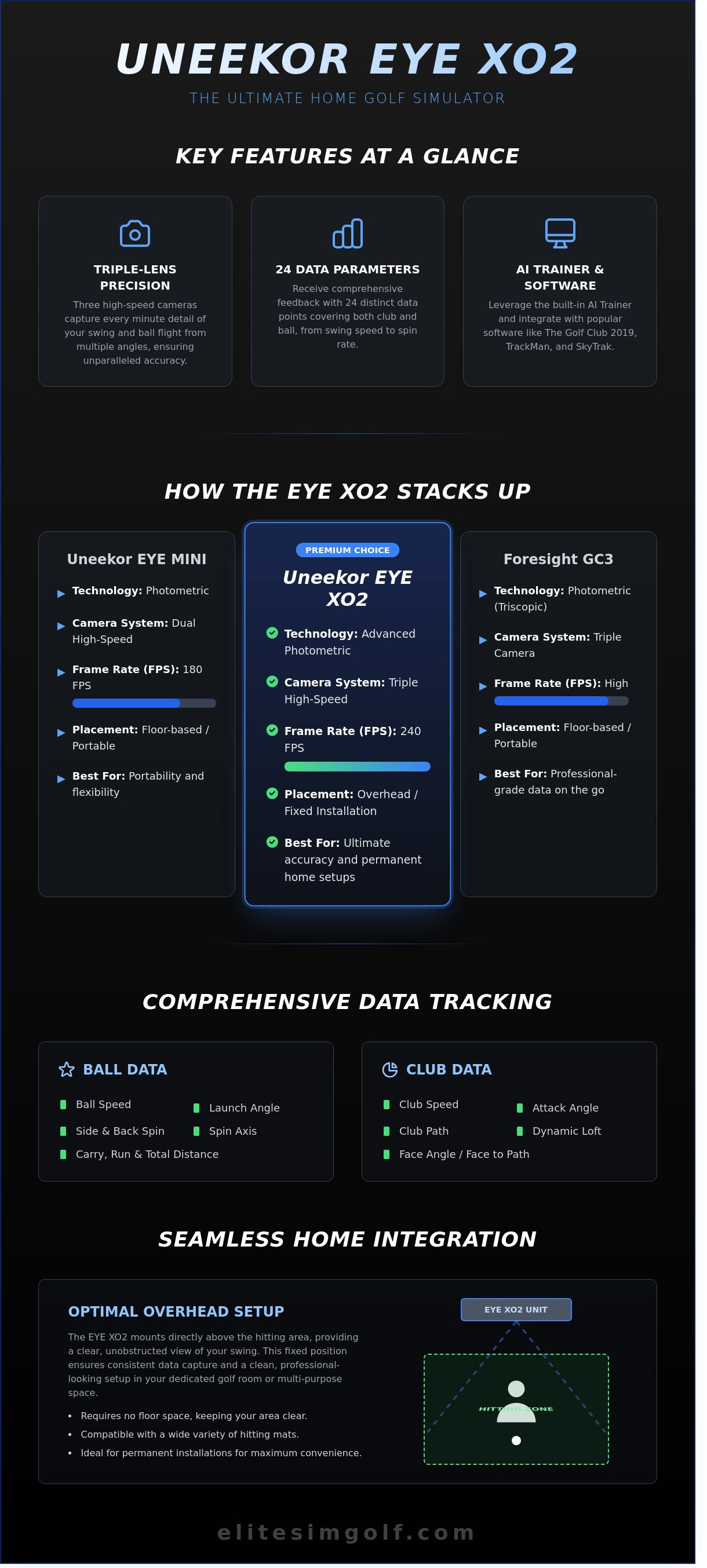
The EYE XO2 is equipped with three high-speed cameras that work together to capture your swing from multiple angles. This setup ensures that every subtle movement is recorded, providing you with accurate feedback. The system measures 24 different data points, including swing speed, launch angle, and ball spin, making it one of the most detailed launch monitors available.
Another advantage of the EYE XO2 is its compatibility with a variety of golf mats and environments. Whether you have a dedicated golf room or just want to practice in your living room, this device adapts to your setup, making it a versatile choice for any golf enthusiast.
Why Choose the EYE XO2?
The EYE XO2 offers several benefits over traditional golf simulators. Unlike many simulators that can feel complicated and overwhelming, this launch monitor features a user-friendly design that makes setup and operation simple. It seamlessly integrates into your home, allowing you to focus on your game without the fuss of complicated technology.
For those looking for an alternative, consider checking out the VTrack Overhead Golf Launch Monitor. This option also provides valuable insights but may differ in features and setup. Ultimately, the EYE XO2 positions itself as a state-of-the-art choice for golfers aiming to enhance their skills while enjoying the convenience of home practice.
Understanding the Technology Behind EYE XO2
The uneekor eye xo2 is a cutting-edge golf simulator that leverages advanced technology to deliver precise feedback and enhance your game. At the heart of its innovation lies photometric technology and artificial intelligence, creating an experience that is tailored to your unique golfing style.
Photometric Technology Basics
Photometric technology may sound complex, but it simply refers to a method of capturing light and using it to gather data about your golf game. This technology accurately tracks both the ball and club movements, allowing for detailed analysis of every swing. By measuring factors such as launch angle, ball speed, and spin rate, it provides real-time insights that can dramatically improve your performance. For example, when you hit a shot, the eye xo2 records how high the ball goes and how quickly it travels, offering invaluable feedback that can help you refine your technique.
AI and Software Integration
The AI Trainer feature of the uneekor eye xo2 takes your practice sessions to the next level. It customizes training routines based on your performance, helping you focus on areas that need improvement. This means you receive personalized tips and exercises that cater specifically to your skill level.
In addition to its built-in capabilities, the eye xo2 is compatible with various third-party software options. These programs can enhance your experience by providing additional metrics, interactive courses, and even virtual competitions. Popular software choices include:
- TrackMan
- SkyTrak
- Golf Club 2019
Installing and updating these programs is straightforward, making it easy for anyone to take full advantage of the technology. With just a few clicks, you can access new features and ensure your setup remains current.
Overall, the combination of photometric technology and AI integration positions the uneekor eye xo2 as an indispensable tool for golfers of all levels. Whether you're a seasoned pro or just starting, this simulator provides the feedback you need to elevate your game. Ready to explore more? Check out Elite Sim Golf for additional insights on golf technology.
Comparing the EYE XO2 with Other Launch Monitors
When evaluating the uneekor eye xo2, it's essential to compare it with other popular launch monitors in the market. This helps potential buyers understand where the EYE XO2 stands in terms of features, performance, and overall value. Below, we will break down the EYE XO2 against two strong competitors: the Uneekor EYE MINI and the Foresight GC3.
EYE XO2 vs. Uneekor EYE MINI
The EYE MINI is another product from Uneekor, making it a natural point of comparison. Both devices utilize advanced camera technology, but the EYE XO2 offers superior camera quality, providing more detailed data points. For instance, the EYE XO2 captures 240 frames per second compared to the EYE MINI's 180 frames per second, resulting in enhanced performance analytics.
In terms of setup, the EYE XO2 shines with its user-friendly installation process. It is designed to be more accessible for beginners, while the EYE MINI may require a bit more technical knowledge to optimize its settings. The EYE XO2 is ideal for serious golfers seeking detailed feedback, while the EYE MINI caters well to casual players or those just starting their golfing journey.
EYE XO2 vs. Foresight GC3
The Foresight GC3 is known for its accuracy and performance. It uses advanced technology to provide precise data, but the EYE XO2 also holds its ground well. Both systems excel in data accuracy, yet the EYE XO2 has a slight edge in capturing diverse shot data, making it a preferred choice for players who want comprehensive insights.
Ease of use is another area where the EYE XO2 stands out. It integrates seamlessly with various software platforms, allowing users to analyze their performance easily. The Foresight GC3, while powerful, can be more complex to navigate for newcomers. Pricing is a significant consideration as well. The EYE XO2 generally offers a better value for the features provided, especially when you consider its robust camera system and user-friendly interface.
In summary, the uneekor eye xo2 boasts unique selling points such as high frame rate, user-friendly setup, and exceptional data collection, making it a compelling choice for golf enthusiasts. Whether you are an aspiring professional or a weekend warrior, understanding these comparisons can help you make an informed decision about your launch monitor investment.
Setup and Installation: A Beginner’s Guide
Setting up your uneekor eye xo2 can seem daunting, but with the right guidance, you’ll be ready to elevate your golf game in no time. This section provides a clear, step-by-step approach to ensure a seamless installation experience.
Pre-Installation Checklist
Before diving into the setup, it’s essential to prepare adequately. Here’s what you’ll need:
- Tools: A wrench, drill, and a screwdriver are typically required for mounting the unit.
- Space: Ensure you have at least 10 feet of space behind the hitting area and 7 feet of width for optimal performance.
- Preparation: Clear the area where you plan to install the uneekor eye xo2. This will create a safe and efficient workspace.
For additional resources on golf monitor setups, check out the VTrack Overhead Golf Launch Monitor.
Step-by-Step Setup
Follow these steps to ensure a successful installation:
- Mounting: Use the included mounting kit to secure the uneekor eye xo2 to your wall or ceiling. Make sure it is level to guarantee accurate readings.
- Alignment: Position the unit so that it’s directly above the hitting area. This is crucial for capturing data accurately.
- Calibration: Once mounted, power on the unit and follow the on-screen instructions for calibration. This process is vital for ensuring that your data is precise.
If you encounter issues during installation, common troubleshooting tips include:
- Check that the power supply is connected.
- Ensure the unit is properly aligned and secure.
- Refer to the user manual for error codes and their meanings.
After installation, it's essential to perform a few checks to ensure everything is functioning correctly. Run a test shot and observe the data displayed on the screen. Confirm that it accurately reflects your swing and ball data. If there are discrepancies, revisit your calibration settings.
In summary, setting up the uneekor eye xo2 isn’t just about following steps; it’s about creating an environment where you can thrive. With the proper setup, your home becomes a training ground, a place where you can refine your skills regardless of external conditions. Ready to enhance your golfing experience? Explore more about our premium solutions today.
Maximizing Your Experience with the EYE XO2
The uneekor eye xo2 is more than just a golf simulator; it’s a tool for serious improvement. To truly elevate your game, consider these strategies for maximizing your experience.
Using Data for Improvement
Understanding the data provided by your EYE XO2 is crucial. Key metrics like ball speed, launch angle, and spin rate offer insights into your swing performance. Here’s how to make sense of this information:
- Ball Speed: Indicates how fast the ball travels after impact. Aim for consistency in your ball speed to improve distance.
- Launch Angle: Affects how high and far your shot goes. Adjust your swing to find the optimal launch angle for your clubs.
- Spin Rate: Influences the ball’s trajectory and stopping power. Monitor this to refine your shots.
Based on these insights, create targeted practice routines. For example, if your launch angle is consistently low, focus on drills that encourage a more upward strike on the ball. To take your analysis further, consider exploring the VTrack Overhead Golf Launch Monitor for advanced metrics that can complement your EYE XO2 experience.
Community and Support
Joining the community of uneekor eye xo2 users can enhance your learning. Online forums and user groups are excellent resources for tips and support. You can connect with fellow enthusiasts who share their experiences and solutions to common challenges. Many users also participate in golf simulation events, where you can test your skills and learn from others.
If you have questions or need assistance, don’t hesitate to reach out to customer support. They can provide guidance on troubleshooting and best practices to ensure your simulator runs optimally.
Sharing your journey with other golf enthusiasts can be immensely rewarding. Whether it’s discussing your latest practice session or seeking advice on improving your game, engaging with the community enriches your overall experience. The combination of data insights, community support, and consistent practice will set you on the path to mastery with the EYE XO2.
For sports enthusiasts who enjoy diving deep into their hobbies, whether it's perfecting a golf swing with a simulator or trying out another fast-growing sport like pickleball, having the right gear is essential. As an example of a specialized supplier for this popular racket sport, Pro Pickleball GmbH offers a wide range of high-quality equipment.
Similarly, for those who balance their time between the indoor golf simulator and the great outdoors, having a reliable source for specialized gear is paramount. For premium hunting equipment and professional storage solutions, Vse za Lov in Prosti Čas serves as an excellent resource for those who value quality in their leisure activities.
For those who carry their appreciation for precision from the golf simulator to their personal style, Luxury Time NYC features a curated collection of high-end timepieces that embody the same spirit of accuracy and luxury.
Just as a premium simulator enhances your home, a high-end transport service elevates your travel experience. For golfers attending events or weddings across the UK, Onyx Rental offers luxury car hire and chauffeur services that reflect the same commitment to quality and precision.
When investing in high-end home technology like a premium golf simulator, ensuring the security of your space is equally important. For expert advice on selecting and installing advanced monitoring systems, Öryggisdeildin offers a comprehensive guide to help you protect your property with the latest camera technology.
The same appreciation for high-tech precision and reliable data feedback found in golf simulators is also fundamental in the healthcare sector. If you're curious about how advanced monitoring equipment works in a medical context, check out Cables and Sensors for professional insights into critical metrics like SpO2 and FiO2.
For homeowners who value a disciplined and harmonious environment while they practice, professional pet training can be just as important as technical golf coaching. To ensure your dog is a well-behaved companion in your home sanctuary, visit JPK9 Academy for expert obedience and behavior transformation services.
Elevate Your Golf Game Today
The uneekor eye xo2 offers a remarkable blend of technology and user-friendliness, making it an essential tool for golfers at any level. With its advanced photometric technology and over 20,000 units sold, you can trust you're investing in a top-tier launch monitor. Setting up is straightforward, allowing you to focus on enjoying the game, whether indoors or outdoors. Plus, Elite Sim Golf provides comprehensive customer support, ensuring you have assistance whenever you need it.
Just as you invest in high-end technology for your personal development, ensuring your business operations are handled with the same level of precision is vital. For commercial clients, Alliance Fleet Solutions offers expert fleet management and leasing services to keep your professional assets running smoothly.
In the world of high-stakes finance, precision and expert oversight are just as critical as they are on the golf course. To find out more about specialised due diligence and project management for complex financial programmes, consulting with an independent advisory firm can provide the clarity you need.
Similarly, for business owners interested in the technological infrastructure behind modern fintech, working with a leading Banking as a Service provider UK allows for the seamless integration of branded financial services into their existing platforms.
Ready to transform your golfing experience? Explore Uneekor EYE XO2 on Elite Sim Golf and take the first step toward mastering your game in a luxurious setting. You've got this!
Frequently Asked Questions
What is the Uneekor EYE XO2?
The Uneekor EYE XO2 is a sophisticated launch monitor designed for golfers looking to enhance their game. It uses advanced photometric technology to provide accurate data about ball flight and club performance. This simulator captures precise measurements, helping players understand their strengths and areas for improvement.
How does the EYE XO2 improve my golf game?
The EYE XO2 helps improve your golf game by providing real-time feedback on your swings. With detailed metrics such as swing speed, launch angle, and ball spin, you can make informed adjustments. This level of insight allows you to practice more effectively and track your progress over time, leading to better performance on the course.
Is the EYE XO2 suitable for beginners?
Yes, the EYE XO2 is suitable for beginners. Its user-friendly interface makes it easy to understand the data it provides. Beginners can benefit from the instant feedback to learn the basics of their swing and develop their skills more quickly.
How difficult is it to set up the EYE XO2?
Setting up the EYE XO2 is straightforward and designed for ease of use. Most users can complete the installation in under an hour, thanks to clear instructions and minimal equipment required. Once set up, you can start enjoying your simulator experience right away.
What software is compatible with the EYE XO2?
The EYE XO2 is compatible with several software options, including Uneekor’s own QED and EYE XO2 applications. These programs offer a range of features, from gameplay simulations to detailed analytics, enhancing your practice sessions and helping you track your improvement over time.
Can the EYE XO2 be used in small spaces?
Yes, the EYE XO2 can be used in small spaces. It requires a minimum ceiling height of 8 feet and a distance of about 10 feet from the simulator to the hitting area. This makes it a great option for home setups, even in limited areas.
What maintenance does the EYE XO2 require?
The EYE XO2 requires minimal maintenance to keep it in optimal condition. Regularly clean the sensors and ensure the software is updated for the best performance. Following the manufacturer’s guidelines will help you maintain the accuracy and longevity of your simulator.
Find similar articles:
uneekor eye xo2
