






What if your home could instantly transform into the 18th green at St. Andrews with just one click? For many golf enthusiasts, the dream of using GSPro Golf Simulation Software often gets stuck behind a wall of technical jargon and confusing equipment requirements. You likely want a seamless experience that feels real, but the fear of buying the wrong computer or getting hit with hidden fees is a common hurdle. It's frustrating to feel like you need a degree in computer science just to play a round of golf in your own basement.
This software is the industry standard for 2026, and it's designed to solve these exact frustrations by acting as the brain of your simulator. In this guide, we'll show you how this unrivaled system provides access to over 2,000 courses while maintaining a clear, honest approach to ownership. You'll discover the specific computer parts required for smooth play and gain the confidence to build a bespoke sanctuary for your game. We'll simplify the technology so you can focus on the mastery of your swing and the joy of a perfect drive. We're going to break down everything from equipment compatibility to course selection so your path to an elite experience is entirely turnkey.
Key Takeaways
- Understand how GSPro Golf Simulation Software acts as the "brain" of your setup, translating your real-world swings into a stunning digital world.
- Learn how the software uses advanced math to make every ball bounce and spin exactly as it would on a real grass fairway.
- Discover how to access over 2,000 world-class courses that have been perfectly recreated using precise laser-mapping technology.
- Find out exactly what kind of computer power you need to run this premium system and start your journey toward mastery.
- See how this turnkey solution transforms your home into a luxury sanctuary where you can practice like a professional any time of day.
What is GSPro Golf Simulation Software?
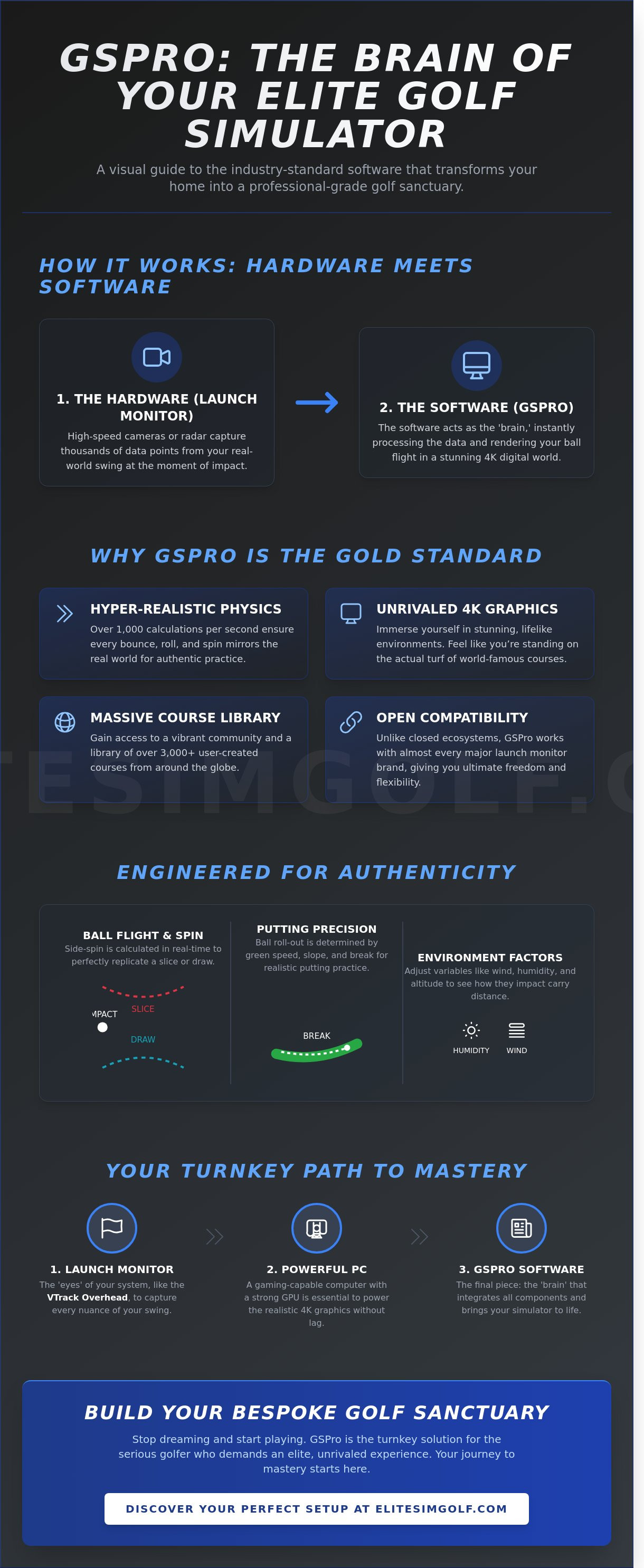
GSPro Golf Simulation Software is the leading program that builds the digital world for your home setup. If you want to play a round of golf in your living room, this software creates the grass, the trees, and the sky. It acts as the brain of your system. It receives complex data from your equipment and instantly shows you where your ball travels on the screen. This is a premium tool designed for serious improvement, not a simple arcade game. It focuses on ultra-realism. This means the ball moves exactly like it does on a real course, reacting to wind, slope, and spin with incredible accuracy.
For those exploring golf simulation technology for the first time, understanding how these parts work together is the first step toward mastery. GSPro is built by golfers who wanted a more authentic experience. They focused on ball physics that mirror reality. When you hit a fade or a draw, the software calculates that movement using advanced math. This ensures your practice at home translates directly to the local country club. It's a seamless bridge between the digital world and the physical game.
The Difference Between Software and Hardware
A complete simulator needs two distinct parts. Hardware, known as a launch monitor, uses cameras or radar to see the ball at the moment of impact. The software takes that information and shows you the result. You need both to have a functional home experience. GSPro is famous for its ability to connect with high-end devices like the VTrack Overhead Launch Monitor. This connection allows for instantaneous feedback. The hardware tracks your swing; the software paints the picture. It's a partnership that creates an elite environment for growth.
Why GSPro is the Top Choice for 2026
GSPro Golf Simulation Software remains the gold standard for several reasons. First, its 4K graphics are unrivaled. You'll feel like you're standing on the actual turf of famous courses. Second, there's a massive community of users. This group has already created over 3,000 courses that you can play anytime. Third, it offers incredible flexibility. It works with almost every major brand of launch monitor on the market today. This open approach means you aren't locked into one specific ecosystem. It's a bespoke experience that fits your personal lifestyle and goals.
- Realistic Physics: The ball reacts to the environment exactly as it would outdoors.
- Vibrant Community: Access thousands of user-created courses from around the globe.
- Professional Grade: Designed for game improvement rather than casual gaming.
The Physics of Realism: Why GSPro Feels Like Real Golf
Stepping into an elite home setup requires more than just a screen; it requires a digital world that reacts exactly like the outdoors. GSPro Golf Simulation Software achieves this through a sophisticated physics engine that mimics the natural world with startling precision. Since its rise to prominence in 2021, this software has become the gold standard for players who demand an unrivaled level of accuracy. It does not just guess where your ball goes. Instead, it performs over 1,000 calculations every second to track every revolution of spin and every degree of launch angle.
Professional players choose this platform because it offers a bespoke practice experience that feels authentic. Your 7-iron will carry the same 150 yards in your simulator as it does at your local country club. You can even adjust environmental variables to suit your needs. If you want to prepare for a humid morning, you can set the humidity to 80% and watch how the heavy air affects your carry distance. This level of detail ensures your hard work translates directly to the actual grass.
Ball Flight and Spin Accuracy
To understand the physics of the game, think of it as the software following the laws of nature. When you hit a "slice," the ball curves away because the software calculates the side-spin in real-time. This is essential for mastery. If you cannot see your mistakes clearly, you cannot fix them. Putting is equally precise. On the digital green, the ball rolls out based on the slope and the speed of the grass, just like a real green would behave. This helps you develop a soft touch for those delicate birdie tries. For the most accurate data, pairing this software with a professional launch monitor ensures every nuance of your swing is captured flawlessly.
The Impact of 4K Graphics on Your Game
Visuals are not just for luxury; they are a vital tool for better performance. GSPro Golf Simulation Software utilizes the Unity gaming engine to deliver a seamless, stutter-free experience. This high-definition clarity allows you to see every ripple in a water hazard and every individual blade of grass. Seeing the course in 4K resolution helps with your depth perception, making it easier to align your body to the target naturally. You can see a detailed walkthrough of these visuals and the user interface in this which showcases the stunning realism of the environment.
Creating a sanctuary for improvement starts with choosing the right technology. If you are ready to build your own premium golf retreat, focusing on these realistic details is the first step toward achieving your dream game.
A World of Courses: 2,000+ Destinations in One Room
Imagine having the keys to every famous golf club in the world. With GSPro Golf Simulation Software, your home becomes a portal to over 2,000 different courses. This is a massive library that offers more variety than almost any other software on the market. You can play famous championship greens in Scotland or discover a hidden gem in a small town you've never visited. You don't need a plane ticket to experience the world's most beautiful fairways.
These courses aren't just guesses or drawings. They're built using "Lidar" data. Think of Lidar as a laser-map of the real earth. Special equipment flies over a golf course and bounces lasers off the ground to measure every hill, slope, and dip with incredible accuracy. When you see a break on a putting green in your simulator, it's exactly what you'd find if you were standing on the real grass. This level of realism is a primary reason why Simulated Golf Is Experiencing Real Growth in premium homes today. People want the authentic feel of the game without the limitations of travel or weather.
How Community-Created Courses Work
The library of destinations stays fresh because of a tool called the "Course Designer." This is a program that allows talented enthusiasts to recreate real-world locations for the community. Because so many people love the sport, new courses are added to the list almost every day. You'll never get bored with your setup because there's always a new challenge waiting. The community maintains an elite standard of quality. These designers ensure that the trees, water hazards, and even the clubhouses look professional and polished.
Playing with Friends: Local and Online Multiplayer
Golf is a social sport, and GSPro Golf Simulation Software makes it easy to share the experience. You can host a bespoke golf night in your own room with up to 8 players at once. It's the ultimate way to entertain friends in a luxury setting. If you want to test your skills against the world, you can join online tournaments. These events let you compete against other golfers across the country from the comfort of your home. To ensure your shots are captured with the precision these courses deserve, many users pair this software with a high-end vTrack Overhead Golf Launch Monitor for a seamless experience.
The software includes several different ways to play, which keeps the game exciting for players of all levels:
- Scramble: Everyone on your team hits a shot, and you pick the best one to play from next.
- Match Play: You compete to win the most individual holes rather than focusing on your total score.
- Stableford: You earn points based on the number of strokes you take at each hole, which is great for friendly competition.
This variety transforms your simulator from a simple practice tool into a centerpiece for social connection and personal mastery. It's a turnkey solution for anyone looking to elevate their lifestyle and their game at the same time.
The Technical Side: Setting Up Your GSPro System
GSPro Golf Simulation Software is a PC-based program. This means it requires a dedicated computer to run rather than a tablet or a phone. You don't need to be a computer genius to get everything running. Think of the computer as the engine of a luxury car. If you have the right "muscles" under the hood, the experience is smooth and breathtaking. Most users find the turnkey installation process takes about 15 minutes from start to finish. You'll also need a stable internet connection. This is necessary to download the massive library of courses and to play against other golfers in real-time.
Understanding the PC Requirements
The most vital part of your computer is the Graphics Card, also known as the GPU. This part does all the heavy lifting to draw the trees, the sand, and the sky. Without a strong GPU, the software might lag or look blurry. We break these requirements down into three simple tiers to help you choose the right fit for your home.
- Good: An NVIDIA RTX 3060 graphics card. This setup provides a great experience in standard high definition. It's reliable and keeps the game moving fast.
- Better: An NVIDIA RTX 4070 graphics card. This is the sweet spot for many owners. It allows for higher detail and very crisp images on a large impact screen.
- Best: An NVIDIA RTX 4080 or 4090 graphics card. This is the elite choice for 4K resolution. It makes every blade of grass and ripple in the water look perfectly real.
A desktop computer is usually the premium choice for a simulator room. Desktops stay cooler during long sessions and offer more power for your money. While a high-end gaming laptop can work, a desktop provides the unrivaled performance that a professional-grade setup deserves.
Connecting to Your Launch Monitor
Your launch monitor is the hardware that tracks your ball. GSPro Golf Simulation Software acts as the brain that turns that data into a flight path. The integration between the two is seamless. Whether you're using the VTrack overhead golf launch monitor or a Garmin device, the software performs a digital handshake to start the data flow. This connection ensures that every fade or draw you hit is mirrored exactly on the screen.
Keeping your system at an elite level is easy because the software handles updates automatically. These updates often include new courses or improved physics. It's a hassle-free way to ensure your home sanctuary for golf stays at the cutting edge of technology. You simply open the program, and it ensures you have the latest version ready for your first tee shot of the day.
Why GSPro is the Ultimate Choice for Your Elite Setup
Choosing GSPro Golf Simulation Software is a significant step toward mastering the game. It isn't just a program on a computer. It's a tool for personal growth that helps you practice with purpose. This software bridges the gap between a simple home gym and a luxury sanctuary. It turns your garage or spare room into a professional training ground where you can relax and improve. Because the developers release updates constantly, the graphics and physics stay current. You won't feel like your system is outdated after a few months. Elite Sim Golf provides the premium hardware and support to make this software truly shine in your home.
The Cost and Value Proposition
Understanding the price of a simulator can be confusing for beginners. GSPro uses an annual subscription model. This means you pay one flat fee each year to keep the software active. In return, you get access to more than 2,000 courses created by a global community. Many other "closed" systems require you to buy courses individually. These individual courses often cost between $50 and $100 each. GSPro offers unrivaled value by giving you thousands of options for one price. You also save money on daily expenses. Think about the cost of driving to a range, paying for gas, and buying a $15 bucket of balls three times a week. Practicing at home eliminates those recurring costs while giving you better data.
- Access to 2,000+ courses: You can play a new course every day for five years without repeating one.
- Open platform: The software works with many different types of launch monitors and computers.
- Community driven: New features and courses are added by users and developers regularly to keep the game fresh.
Your Turnkey Journey Starts Here
Elite Sim Golf helps you build the perfect environment for your software. We specialize in turnkey solutions. This means we provide a complete, bespoke package that's ready to use from day one. You don't have to worry about technical details or matching different parts together. We provide professional-grade enclosures, which are the protective structures that hold the screen and safely stop the ball. We also offer high-impact mats that feel like real grass and protect your joints. For the best experience, you can pair your software with the VTrack Overhead Golf Launch Monitor. This device sits above you and tracks your ball with incredible accuracy. Your dream of owning a world-class home course is just one click away.
Start Your Journey to a Professional Home Golf Experience
You now understand how GSPro Golf Simulation Software transforms a simple room into a world-class training ground. It's a powerful tool that gives you access to over 2,000 digital courses from around the globe. This technology makes every swing feel real by using advanced physics to track your ball's flight with incredible accuracy. You'll have the freedom to practice your game at any time; you won't have to worry about bad weather or long drives to the range ever again.
Setting up a premium system doesn't have to be a confusing process. As an authorized dealer of compatible hardware, Elite Sim Golf provides expert support to handle every technical detail for you. We specialize in bespoke, turnkey installations that are designed to fit the unique style of your home. Our team ensures your setup is both a high-performance training center and a beautiful lifestyle upgrade. It's about creating a seamless experience that's ready for you to enjoy immediately.
Build your dream simulator with GSPro and Elite Sim Golf today
Your path to mastering the game and enjoying a luxury golfing lifestyle starts right in your own sanctuary.
Frequently Asked Questions
Do I have to pay for each course in GSPro?
No, you don't have to pay for individual courses in GSPro. Once you have a subscription, you get access to a library of over 500 courses created by the community. These are included at no extra cost. You can play famous courses or local gems without spending more money. This makes it a very cost-effective way to build an elite home setup that feels truly unrivaled.
Can I run GSPro on a Mac or an iPad?
GSPro only runs on Windows PC computers. It won't work on a Mac, iPad, or iPhone because it needs a powerful graphics card to show the 4K golf courses. To get the best experience, you need a computer with at least 16GB of RAM and a dedicated Nvidia graphics card. This ensures your simulation looks real and runs without any lag during your swing.
Does GSPro work without an internet connection?
You need an active internet connection to use GSPro Golf Simulation Software. The software checks your license every time you open the program to make sure it's valid. While you can play a round if your signal drops briefly, you can't start the game or download new courses without being online. A stable connection ensures your data stays synced and your software stays updated with the latest features.
What is the best launch monitor to use with GSPro?
The best launch monitor depends on your budget, but the Uneekor EYXO and the Bushnell Launch Pro are 2 of the most popular choices. These devices use high-speed cameras to track your ball and club. GSPro Golf Simulation Software works seamlessly with these units to show your shot on the screen. Choosing a high-end monitor ensures your home practice feels like a premium, professional experience every time.
Is GSPro too difficult for a beginner to use?
GSPro is simple enough for any beginner to use. The menus are easy to navigate, and starting a round takes just 3 clicks. You don't need to be a computer expert to enjoy a game. The software handles all the complex physics in the background. This allows you to focus on your swing while the system provides clear, easy-to-read data about your performance on every shot.
How much space do I need on my computer for GSPro?
You should have at least 30GB of free space on your computer's hard drive for the basic installation. However, each individual course you download takes up about 500MB to 1GB of space. If you plan to download 100 different courses, you'll want at least 150GB of storage available. Using a Solid State Drive (SSD) will help the courses load in under 15 seconds for a smoother experience.
Can I use GSPro for putting, or is it just for full swings?
You can use GSPro for every part of the game, including putting and short chips. The software calculates the roll of the ball on the green based on the speed you choose. Many players use a special putting mat to make the experience feel more natural. This creates a complete practice environment where you can work on your 300-yard drives and your 5-foot putts in one session.
Is there a one-time purchase option for the software?
There is no one-time purchase option for this software; it requires a yearly subscription. This model ensures that the developers can provide constant updates and new features throughout the 12-month period. Your subscription gives you access to the latest software version and the entire library of community-built courses. It's a simple way to keep your elite home golf studio running with the most modern technology available.
Find similar articles:
GSPro Golf Simulation Software
