






What if the only thing protecting your home from a 100-mile-per-hour golf ball is a single sheet of fabric? A 2023 industry report found that 40% of home golfers worry most about equipment durability and ball bounce-back when building their first setup. Selecting the right golf impact screen is the difference between a professional-grade sanctuary and a hazardous living room. You shouldn't have to guess if a ball will rebound toward you or if the picture will look grainy and dull.
It's frustrating to feel confused by technical terms like aspect ratios, which describe the screen's shape, or to worry about a screen wearing out after just a few months of practice. We'll help you find a screen that stops every shot safely while providing a crystal-clear image that rivals a modern cinema. This guide explains how to choose the right size for your walls, how to keep the material clean, and how to complete a turnkey installation that transforms your home into an elite training ground for personal growth.
Key Takeaways
- Understand why a high-performance screen is the foundation of a safe and visually stunning home simulator.
- Compare different fabric layers to find the perfect balance between a quiet impact and a professional-quality image.
- Learn how to choose the right size and shape for your golf impact screen to ensure it fits your room perfectly.
- Follow expert tips on installation to achieve the ideal tension for both safety and a smooth, wrinkle-free display.
- Discover how to integrate your screen with the right technology to create a seamless, turnkey golfing experience.
What is a Golf Impact Screen and Why is it Essential?
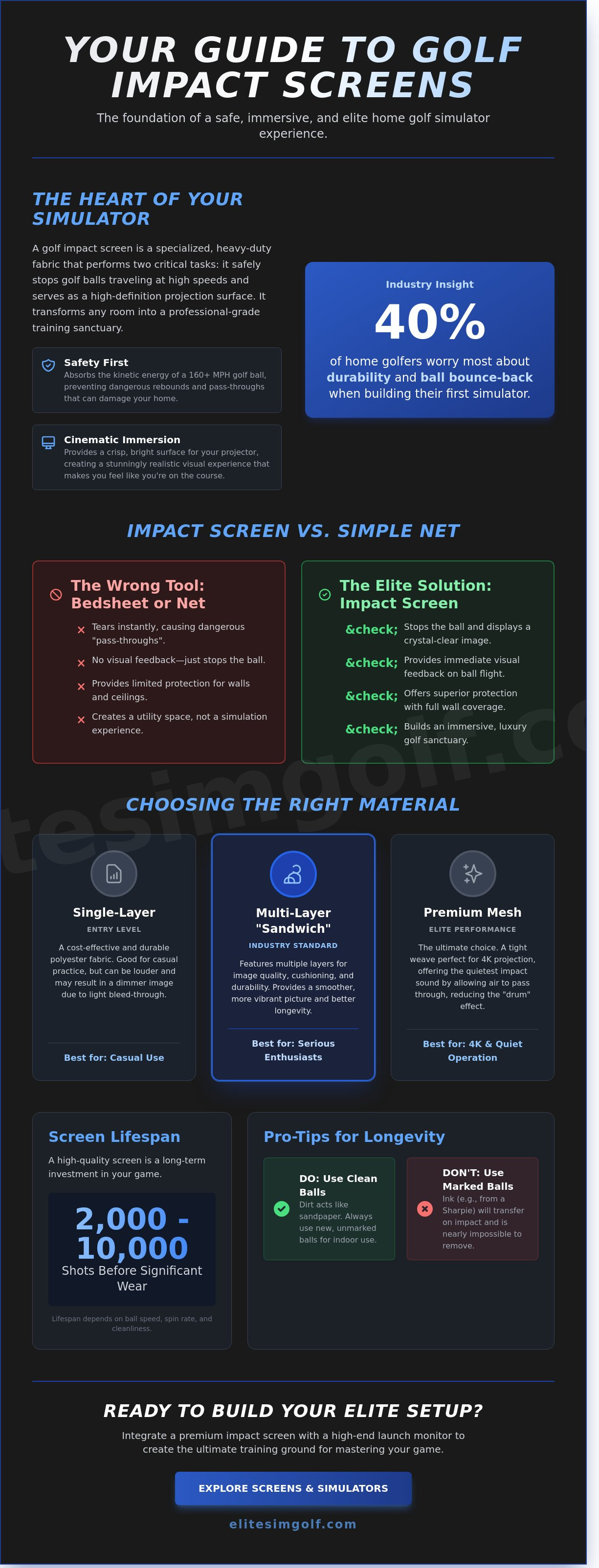
Your home deserves more than a simple net in the garage. To build a truly elite practice space, you need a golf impact screen. This is a specialized, heavy-duty fabric designed to perform two critical tasks at once. It acts as a rugged backstop that stops a golf ball in its tracks, and it serves as a high-definition surface for your projector. Think of it as a premium cinema screen that can withstand a 160-mile-per-hour strike without flinching.
Some beginners wonder if a standard white bedsheet will work. The answer is a firm no. A golf ball carries immense kinetic energy. A regular sheet will tear instantly, leading to a dangerous "pass-through." This happens when the ball rips through the fabric and smashes into your drywall or window. A proper screen uses reinforced polyester or nylon layers to absorb that energy safely. It's the foundation of any Golf simulator, turning a raw practice session into a luxury experience.
The benefits go beyond safety. A high-quality screen creates an immersive atmosphere that allows for year-round practice regardless of the weather. It transforms a basement or spare room into a bespoke sanctuary. When you pair a screen with a high-end device like the VTrack Overhead Golf Launch Monitor, you create a professional-grade environment for game mastery. It's about luxury, convenience, and the pursuit of a perfect swing.
The Difference Between a Net and an Impact Screen
Nets are built for utility, but screens are built for simulation. A net stops the ball, but you lose the visual magic of the game. With a screen, you see the ball fly into a virtual sky. This immediate visual feedback is vital for improving your swing. You can see your "ball flight," which is the path the ball takes in the air. Screens also offer superior protection. They cover a larger surface area than most nets, which keeps your walls and ceilings safe from "skied" shots that go higher than expected.
How Long Does a Quality Screen Last?
A premium screen is an investment in your game. Most high-end versions last between 2,000 and 10,000 shots before they show significant wear. Several factors change this timeline. High ball speeds and high spin rates, such as 10,000 RPM on a wedge shot, create heat and friction that wear down fibers over time. You'll know it's time for a replacement when you see visible fraying, permanent "dimpling," or yellowing of the fabric.
Cleanliness is your best defense. Dirt on a golf ball acts like sandpaper against the screen. Always use new, clean balls for your indoor sessions. One vital pro tip: never use a ball with Sharpie marks on it. The ink will transfer to your golf impact screen the moment it hits. These marks are almost impossible to remove and can ruin a pristine, thousand-dollar screen in a single afternoon.
Choosing the Right Material: From Single-Layer to Premium Mesh
The material you choose for your golf impact screen determines how your simulator feels, looks, and sounds. It's the most hardworking part of your room. It must stop a ball traveling at 150 miles per hour while acting as a high-definition cinema screen. Choosing the right fabric ensures your investment lasts for years rather than months.
Single-layer polyester is the entry point for many beginners. It's a thin, durable fabric that gets the job done for casual practice. While it's cost-effective, it can be a bit noisy and may show some "bleed-through" where the projector light passes right through the holes. This results in a dimmer image that lacks the "pop" of a professional setup.
Multi-layer "sandwich" screens represent the industry standard for serious enthusiasts. These screens feature a front layer for the image, a middle layer for cushioning, and a back layer for strength. This three-layer design helps the screen stay flat and prevents it from stretching out over time. It provides a much smoother surface that makes the virtual grass look vibrant and sharp.
Premium mesh is the choice for those seeking an unrivaled experience. This material uses a very tight weave that is perfect for 4K projectors. It's also the quietest fabric available today. It allows air to pass through easily, which dampens the sound of every drive and prevents the screen from acting like a loud drum.
Image Quality vs. Durability: Finding the Balance
The weave of the fabric is what makes a projector image look "crisp" or "grainy." A tight weave provides a smooth surface that reflects light accurately, ensuring your golf impact screen displays every detail of the course. Thicker screens are often more durable, but they can sometimes have a rougher texture that creates a "screen door" effect. Elite standards focus on fabrics that offer high brightness without sacrificing the strength needed to handle thousands of high-speed impacts. As noted by Forbes, setting up home golf simulators requires choosing components that work together to create a realistic and immersive feel.
Noise Reduction: Keeping the Neighbors Happy
Impact acoustics is a technical term for how much noise the ball makes when it hits the fabric. Some materials sound like a loud gunshot, which can be a problem in a quiet home. Air-flow mesh helps dissipate the energy of the ball quietly by letting air move through the fabric. You can also add heavy foam padding or a secondary "blackout" layer behind the screen. This simple addition can reduce the volume of the "thud" by as much as 40 percent. This ensures your late-night practice sessions don't disturb the rest of the household.
If you're building a professional space, pairing a high-end screen with a vtrack overhead golf launch monitor ensures your data is as accurate as your image is clear. For a truly seamless experience, consider a bespoke turnkey solution that handles every detail of the installation for you.
Sizing and Aspect Ratios: Fitting the Screen to Your Space
Choosing the right size for your golf impact screen is the foundation of a premium home setup. It's about more than just fitting a piece of fabric on a wall. You want a seamless look that feels like a professional studio. To achieve this, you must balance your available floor space with the technical requirements of your projector. A well-planned layout ensures the image is crisp and the environment is safe for every swing.
Measuring Your Room the Right Way
Success starts with three numbers: height, width, and depth. You need to leave at least 12 to 18 inches of empty space between the screen and the wall behind it. This area is called the buffer zone. It allows the fabric to flex when the ball hits it, which keeps your walls safe and prevents the ball from bouncing back too fast. If you're using a metal frame to hold the screen, don't forget to account for the frame's thickness. A frame that is 10 feet wide might only have a 9.5-foot viewing area once you subtract the 2 to 3 inches of pipe and padding on each side. Always measure your ceiling height carefully to ensure your club doesn't strike the top of the enclosure during a full follow-through.
Matching Your Projector to Your Screen Shape
Aspect ratios are simply the shape of the image. A 4:3 ratio is a classic square shape. This is an excellent choice for smaller rooms or garages with limited width. It maximizes the vertical space so you can still see the entire flight of the ball. A 16:9 ratio is the widescreen shape you see on a modern television. This is the gold standard for a 4K golf impact screen because it creates a cinematic experience that fills your vision. Most high-end projectors allow you to toggle between these shapes in their settings menu. Matching the image shape to the fabric shape ensures you don't see distracting black bars on the edges of your display.
If you want a truly bespoke feel, custom-sized screens can be cut to fit your exact wall dimensions. This eliminates gaps and creates an unrivaled, professional appearance in your hitting bay. Standard sizes like 8x8 or 10x12 feet are convenient and ship quickly. However, a custom fit is what defines an elite installation. It ensures the fabric stays tight and flat. A screen that is too large for its frame will sag, which ruins the image and causes the ball to bounce back in unpredictable directions. A perfectly sized screen stays smooth and provides a professional surface for every shot.
Installation and Safety: How to Hang Your Screen Correctly
Setting up your golf impact screen is the final step in creating a professional home sanctuary. It's more than just hanging a piece of fabric; it's about engineering a safe environment for every swing. A well-installed screen provides a crisp image and ensures that 150 mph ball speeds stay contained. Follow these five essential steps to achieve a bespoke, high-end finish.
- Step 1: Use heavy-duty bungees. Secure your screen to the frame using elastic bungee cords. These act as shock absorbers. They allow the fabric to flex when the ball hits, which prevents the material from tearing over time.
- Step 2: Find the Goldilocks tension. You want the screen to be flat enough for a clear projection, but it shouldn't be tight like a drum. If the screen is too stiff, the ball will snap back toward you. If it's too loose, the image will look wavy and distorted.
- Step 3: Eliminate the trampoline effect. This happens when a screen is over-tightened. A safe screen should catch the ball and let it drop gently to the floor. If the ball bounces back more than 2 or 3 feet, you need to loosen the side bungees immediately.
- Step 4: Install edge protection. Cover the metal pipes of your frame with 2-inch thick foam padding. Add side curtains to catch any "shanks" or off-center hits. This keeps your walls and your family safe from stray shots.
- Step 5: Conduct a slow-speed test. Don't start with a full driver swing. Hit a few balls at 20 percent power. Watch how the screen reacts. Gradually increase your speed only when you're sure the ball drops safely every time.
Managing Bounceback for Maximum Safety
Safety is the hallmark of an elite simulator setup. The science is simple: the screen must absorb the ball's energy. You should always maintain at least 12 inches of empty space between the screen and the wall behind it. If you have limited depth, hang a heavy safety baffle or a specialized net behind the impact area. This secondary layer provides peace of mind, acting as a final barrier that prevents the ball from making contact with the drywall.
Maintaining Your Screen for Years of Use
A premium golf impact screen is an investment that deserves careful maintenance. Always use brand-new, clean golf balls. Dirt or sharp marker lines on a used ball will transfer to the fabric, leaving permanent scuffs that ruin the projection quality. If your screen arrives with wrinkles, use a handheld steamer to gently smooth the fibers. Avoid using a traditional iron, as high heat can melt the polyester blends used in high-performance screens. For light dust, a quick vacuum with a soft brush attachment keeps the surface looking pristine for years.
Ready to experience elite accuracy in your new home studio? Explore the vtrack overhead golf launch monitor to pair your perfect screen with world-class data tracking.
The Elite Setup: Integrating Your Screen with a Launch Monitor
Your golf impact screen is the stage, but the launch monitor is the star of the show. While the screen safely stops your ball, the monitor acts as the brain of your simulator. It uses high-speed cameras or radar to track your club and ball. It measures how fast the ball moves and predicts where it would land on a real course. Without this technology, you are just hitting a ball into a sheet. When these two parts work together, they create a turnkey experience. A turnkey setup is a professional system that is ready to use immediately. It removes the stress of trying to make different pieces of equipment talk to each other.
Positioning is a vital part of your build. Most golfers place their hitting mat about 8 to 12 feet away from the golf impact screen. This specific distance gives the launch monitor enough room to see the ball's flight clearly. It also ensures the projector can fill the screen with a bright, sharp image. A premium screen makes the software look like a real fairway. When you hit a shot, the ball disappears into the screen and reappears instantly in the digital world. This seamless transition makes your practice feel like a real round of golf at a luxury resort.
Pairing with the VTrack Overhead Monitor
An overhead system like the VTrack Overhead Golf Launch Monitor is a game changer for home setups. Most monitors sit on the floor, which can be a tripping hazard. The VTrack hangs from the ceiling instead. This keeps your floor space clear and creates a bespoke, professional look. There is zero-interference between the monitor and your golf impact screen because nothing stands between you and the target. You can achieve professional-grade data with 99% accuracy. This allows you to trust every swing you take in your private home sanctuary.
Final Checklist Before You Buy
Before you complete your purchase, take a moment to review your plan. A high-end simulator is an investment in your lifestyle and your game. Consider these final points:
- Review your budget: Balance your spending between the screen, the projector, and the launch monitor to ensure high quality across the board.
- Check for support: Buying from a specialist matters. You want a partner who offers concierge-level service if you need help with installation.
- Measure your space: Confirm you have at least 10 feet of ceiling height for a comfortable, unrestricted swing.
Building a home simulator is about more than just practice. It is about creating a space for social connection and personal growth. You are no longer limited by the weather or the time of day. If you are ready to transform your home, you can build your dream simulator today. Take the next step toward a premium golfing experience that is always available when you are.
Start Your Journey to a Better Golf Game Today
Creating your own home golf studio is an exciting way to practice whenever you want. You now understand that a high-quality golf impact screen needs to be tough enough to handle ball speeds over 150 miles per hour. It's also important to choose the right size so the screen fits your room safely. By following these simple steps, you can build a space that helps you improve your swing without ever leaving the house.
At Elite Sim Golf, we make this process easy for everyone. We provide 100% USA-based expert support to answer your questions. Our "Elite" standard materials are tested for unrivaled durability, and we provide national shipping to all 50 states on all simulator hardware. You don't need to be a professional to enjoy a professional setup. We're here to help you turn your garage or basement into a world-class training center.
Explore Our Premium Golf Impact Screens and Enclosures
Your dream of playing golf every single day is finally within reach. You're going to love seeing your progress!
Frequently Asked Questions
Can I use a regular projector screen for golf?
You cannot use a standard projector screen because it isn't built to withstand the force of a golf ball traveling at 150 miles per hour. While a regular screen is thin like a bedsheet, a high-quality golf impact screen uses triple-layered polyester to absorb energy. Standard screens will likely rip on the first hit, whereas an Elite screen is tested for 10,000 strikes. This durability is essential for safety.
How far away should I stand from my golf impact screen?
You should stand 10 to 12 feet away from the screen to ensure safety and accuracy. This distance prevents the ball from bouncing back and hitting you, which can happen if you're too close. Most professional setups require at least 8 feet of space for a full swing. Keeping 12 feet of distance also helps the launch monitor track your ball flight more precisely for better data.
Will my golf impact screen get holes in it?
All screens eventually show wear, but a premium screen lasts for roughly 5,000 to 15,000 shots before needing a replacement. To prevent early holes, always use clean, new golf balls. Scuffed balls act like sandpaper and can burn through the fabric in under 100 hits. Check your equipment every 2 weeks to keep the surface smooth and hole-free for the best visual experience.
What is the best way to clean a golf impact screen?
The best way to clean your screen is to use a vacuum with a brush attachment and a damp microfiber cloth. Avoid harsh chemicals that can damage the fire-retardant coating found on 90 percent of professional screens. If you see a grass stain, gently dab it with a mixture of 1 part mild soap and 10 parts water. Let the fabric air dry completely before your next session.
Do I need a special projector for my impact screen?
You need a short-throw projector so you don't cast a shadow on the screen while you swing. These devices can display a 150 inch image from just 5 feet away. Look for a model with at least 3,000 lumens of brightness to ensure the picture stays clear even if your room has some light. This setup keeps the equipment safely behind or above you during your practice sessions.
How much tension should a golf impact screen have?
Your golf impact screen should be tight enough to provide a flat image but loose enough to absorb the ball. If it's too tight, like a drum, the ball will bounce back at you at high speeds. Aim for 2 inches of movement when you push on the center. Using adjustable bungee cords allows you to fine-tune this tension to reach the Elite standard of safety and performance.
Can I use my impact screen outdoors?
You can use an impact screen outdoors for a single day, but it shouldn't stay there permanently. UV rays from the sun can weaken the polyester fibers by 30 percent in just 6 months. Moisture from rain also leads to mold growth on the fabric. If you do set it up outside, ensure the wind is under 10 miles per hour to keep the frame stable and secure.
What happens if a golf ball hits the frame instead of the screen?
Hitting the metal frame causes the ball to bounce back toward the golfer at unpredictable angles. This is why 100 percent of professional enclosures use foam padding or safety cushions to cover the poles. These pads are usually 2 inches thick and wrap around the entire perimeter. Adding this layer protects your walls and ensures your home remains a safe sanctuary for personal growth and fun.
Find similar articles:
golf impact screen
