





On a rainy Tuesday evening in November, a golfer named David stepped into his spare room and, with one simple click, stood on the first tee at Pebble Beach. He didn't need a plane ticket or a private club membership; he simply opened e6 connect on his tablet. You likely feel that same desire for a premium home experience, yet the technical side of golf simulators often feels like a barrier. It's completely normal to feel overwhelmed by hardware requirements and confusing subscription models when you're just starting out.
This guide removes that stress by showing you exactly how this software, backed by 27 years of development, turns your home into a sanctuary for improvement. You'll discover how this platform bridges the gap between raw data and a stunning, lifelike environment. We'll walk you through the basic functions, verify if your current hardware is compatible, and show you how to access over 100 world-class courses. By the end of this easy guide, you'll have a clear, bespoke path to a turnkey simulator setup that transcends the limitations of weather or geography.
Key Takeaways
- Understand why the software acts as the "brain" of your simulator, transforming your room into a lifelike virtual fairway.
- Discover how e6 connect links with your hardware to provide a seamless and highly accurate playing experience.
- Learn how to access world-class courses and specialized practice modes to master your swing from the comfort of home.
- Simplify the choices between one-time licenses and flexible subscriptions to find the perfect fit for your lifestyle.
- Identify the essential equipment needed to integrate high-end software into a bespoke, professional-grade golf sanctuary.
What is E6 Connect? The 'Brain' of Your Golf Simulator
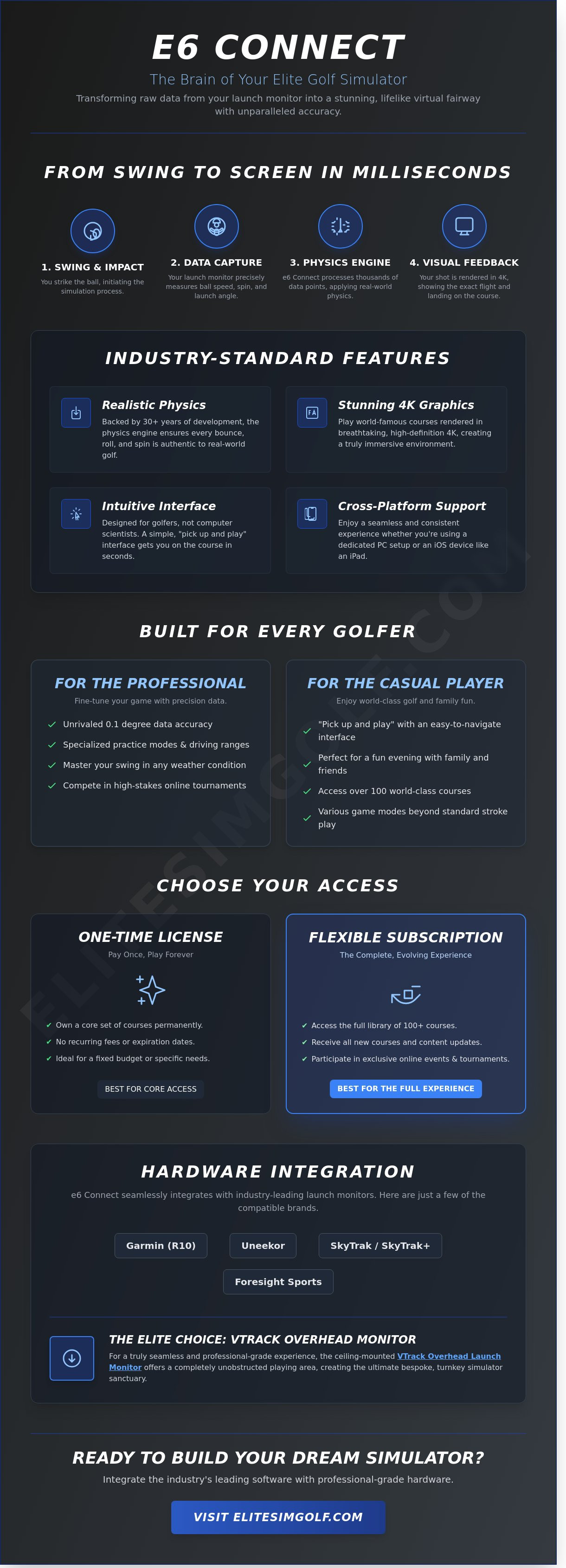
Think of your golf simulator as a two part system. You have the hardware that tracks your swing, and you have the software that shows you where the ball goes. E6 Connect is that software. It is the digital engine that builds the virtual world you see on your screen. Without it, your simulator is just a net and a mat. With it, your garage or basement transforms into a world class course in seconds. It's the most recognized name in the industry for a reason.
To understand this easily, use a video game analogy. If you own a gaming console, the launch monitor is your controller. It tracks your movements and button presses. E6 Connect is the game itself. It provides the grass, the trees, the wind, and the physics that make the experience feel real. While older versions like E6 1.6 were ground breaking at the time, the modern Connect version launched in 2018 to offer a more stable, cloud based platform with vastly improved visuals. It's a premium upgrade for any home setup.
TruGolf, the creators of this software, have spent over 30 years perfecting golf physics. This isn't just a basic animation. It is a sophisticated calculation engine. When you hit a shot, the software processes thousands of data points to ensure the ball reacts exactly as it would on a real fairway. This commitment to accuracy is why it remains the industry standard for golfers who demand an elite experience.
Why You Need Software for Your Simulator
The software performs a digital "handshake" with your hardware. When you strike the ball, a device like the VTrack overhead golf launch monitor captures your ball speed and launch angle. It sends that data to the software instantly. The software then calculates external factors like 10 mph crosswinds or the friction of long heavy grass. It renders these results in high definition 4K graphics. This visual clarity is vital. It creates an immersive environment that makes you forget you're standing in a room. Your dream of a professional practice space is realized through this seamless integration.
Is E6 Connect for Professionals or Casual Players?
This software is built for everyone. It scales perfectly from serious practice sessions to weekend family fun. Professionals appreciate the 0.1 degree accuracy in ball data. Casual players love the "pick up and play" nature of the interface. You don't need to be a tech expert to start a round. The menus are simple and easy to navigate. This accessibility is why it's the most popular choice for bespoke home installations across the country. It offers a turnkey solution for entertainment and improvement. Whether you are chasing a lower handicap or a fun evening with friends, this software delivers an unrivaled experience.
- Realistic Physics: Over 30 years of data ensures every bounce is authentic.
- 4K Graphics: Stunning visuals that make every course look like a photograph.
- User Friendly: A simple interface designed for golfers, not computer scientists.
- Cross Platform: Works across various devices for a consistent feel.
How E6 Connect Works with Your Hardware
Think of your golf simulator as a high-performance team. The launch monitor is the eyes of the operation, while the software acts as the brain. For everything to function, these two parts must speak the same language. Not every piece of hardware is compatible with e6 connect, so verifying your equipment is the first step toward a premium home setup. When you swing, the launch monitor captures data points like ball speed and launch angle. It instantly sends this information to the software, which then draws the flight of your ball on the screen.
A stable internet connection is vital for this process. While you can practice offline, you need the web to access online tournaments or play against friends in different time zones. A connection speed of at least 10 Mbps is recommended to ensure your play remains seamless and lag-free. This reliability transforms a simple practice session into a truly global competitive experience.
Compatible Launch Monitors for E6 Connect
Compatibility varies depending on whether you use a PC or an iOS device. Many industry leaders have built-in support for the software. Here are some of the most common brands you will see:
- Garmin (specifically the R10 model)
- Uneekor (all models)
- SkyTrak and SkyTrak+
- Foresight Sports
For those who desire an unrivaled, professional-grade environment, the VTrack Overhead Golf Launch Monitor stands out as a premier choice. Because it mounts to the ceiling, it stays completely out of the way. This creates a bespoke, turnkey experience where you don't have to move sensors when switching between right-handed and left-handed golfers. It's the ultimate upgrade for a clean, luxury aesthetic.
System Requirements Made Easy
You don't need to be a computer expert to understand the tech requirements. To run e6 connect, you can use a high-end iPad or a dedicated Windows PC. A PC is often the better choice for those who want the most realistic visuals. You should focus on two main parts: the Processor and the Graphics Card.
The Processor is the brain of the computer. It handles all the math and calculations. The Graphics Card is the artist. It's responsible for drawing the grass, the trees, and the water on your screen. If you want to use a 4K projector, you need a powerful Graphics Card to handle the extra detail. A 4K image is four times sharper than standard high definition, making the world's most famous courses look stunningly real in your own home. If you're ready to start your journey, consider a professional overhead sensor to anchor your new sanctuary.
Courses, Games, and Practice: What Can You Actually Do?
Owning a premium simulator means your golf season never ends. With e6 connect, you aren't just hitting balls into a net. You're stepping into a high-definition world where the physics of the ball match reality. This software acts as your personal caddie and coach, providing an elite solution for both entertainment and serious skill building. It transforms a simple room into a global golf destination.
The Virtual Course Library
The library features over 100 world-class courses scanned with 4K laser technology. You can tee off at Pebble Beach or walk the historic fairways of St Andrews without booking a flight. While virtual golf allows you to explore the world's greens, those seeking a similarly regal and curated real-world adventure can visit Golden Chariot India to experience South India's heritage in luxury. The software mimics real-world conditions by offering 18 different weather settings, including adjustable wind speeds and fog levels. You'll see every blade of grass and the exact slope of the green in stunning detail. This level of realism helps you visualize shots just like you would on a physical course. It's a bespoke experience that brings the beauty of the outdoors into your home sanctuary.
Beyond the Round: Games and Training
Improvement happens faster when you have precise data. The 'Bag Mapping' feature is a favorite for serious players because it helps you learn exactly how far you hit every club in your bag. Instead of guessing if your 7-iron goes 150 yards, you'll know your exact average down to the foot. For the most accurate results, pairing this software with a VTrack overhead golf launch monitor ensures every swing is captured with professional-grade precision. Regular practice in this controlled environment can help dedicated players shave 3 to 5 strokes off their real-world handicap within a single season.
For those looking to complement their data-driven golf practice with a structured physical conditioning program, you can learn more about this comprehensive training resource to optimize your athletic performance.
Social connection is a core part of the experience. You can use peer-to-peer play to compete against friends in different states in real-time. If you have guests who don't play golf, the software includes engaging mini-games. These challenges include:
- Long Drive Contests: See who can swing the fastest and hit the furthest.
- Closest to the Pin: A high-stakes test of accuracy on famous par-3 holes.
- Demolition Driving Range: A fun, target-based game that's perfect for kids.
These modes ensure the simulator is a centerpiece for family gatherings. It bridges the gap between a professional training tool and a luxury home theater. For those who enjoy documenting their golf journey or creating a specific atmosphere during sessions, Legis Music offers a professional solution for background audio. Whether you're grinding on your swing path or hosting a neighborhood tournament, e6 connect provides a seamless and unrivaled experience for every skill level.
Understanding E6 Connect Subscriptions and Licenses
Choosing the right way to pay for your e6 connect software is the final step in crafting your premium home retreat. You have two main paths to consider. You can pay a yearly fee through a subscription or buy the software once to keep it forever with a perpetual license. Each option offers a different level of access to the world's most famous fairways, allowing you to tailor the experience to your specific lifestyle.
Basic vs. Expanded: Which is Right for You?
The Basic subscription is a wonderful starting point for the casual player. It provides access to a rotating selection of 27 different golf courses. This means your library stays fresh throughout the year without a massive upfront commitment. It's a great way to enjoy high-end graphics and physics while keeping your options open for future upgrades.
For those who want everything, the Expanded tier is the gold standard. It unlocks the full library of over 100 courses, including world-renowned destinations that every golfer dreams of playing. This tier is essential for the dedicated player who wants to practice on specific professional layouts before a real-world trip. For those planning a journey to the birthplace of golf, McPhail Scottish Tours provides personalized guided excursions to ensure your visit is unforgettable. It turns your simulator into a truly global experience. If your interest in world-class destinations extends to the Mediterranean, DesenzanoLoft provides insights into choosing between Lake Como and Lake Garda for a premium vacation experience.
For golfers in the region who prefer driving to their destinations, such as a trip from Singapore to the courses in Malaysia, you can check out Radiant VEP Solutions to simplify the mandatory Vehicle Entry Permit application process and ensure a smooth journey.
If you host frequent game nights with friends, the Expanded tier is your best friend. Having over 100 courses means you'll never run out of new challenges to show off to your guests. It ensures your home remains the ultimate destination for social connection and competitive fun. Variety is the key to keeping the energy high during a long evening of play.
The 'Perpetual' Option Explained
Opting for a Perpetual license means you buy the software once and own it forever. This is a popular choice for homeowners who want long-term simplicity. You won't have to worry about recurring annual bills or credit cards on file. It offers a sense of permanent ownership that fits perfectly with a high-end home installation. For those who view their residence as a significant asset, you can visit HomesGoFast to explore strategies for managing real estate value and tax implications.
One detail to remember is that a perpetual license usually covers a specific set of content. While you own the core software, some premium courses or new add-ons released in the future might still require a separate fee. It's a "buy once, play forever" model that provides a stable foundation for your practice, though it may lack the automatic variety of the rotating subscription tiers.
Activating your license is a seamless process designed for your convenience. Once you purchase your chosen package, you'll receive a digital activation key via email. You simply download the e6 connect program, log into your account, and enter the key to unlock your virtual clubhouse. It's a quick, turnkey setup that gets you on the first tee in minutes.
Effective software management ensures you get the most value from your investment. For business professionals who apply this same logic to their workplace, LicenseIQ offers an AI-native platform to discover and recover wasted spend on Microsoft 365 licenses.
Setting Up Your Elite Home Simulator Experience
Integrating e6 connect into a bespoke home golf room is the final step in your journey toward mastery. A professional setup is different from a DIY project because it focuses on the total environment. The quality of your impact screen and projector is vital. You need a screen designed with specific impact acoustics to keep the noise of the ball strike low. A high-end projector with at least 4,000 lumens of brightness ensures the virtual fairways look as vibrant as the real thing. When these elements are installed by experts, the experience is seamless. You won't deal with the flickering images or delayed data often found in budget setups. Instead, you get a reliable, high-performance sanctuary that's ready whenever you are.
The Turnkey Solution
Choosing a complete bundle from Elite Sim Golf saves you from the frustration of mismatched hardware. It's the difference between a collection of parts and a finished masterpiece. The VTrack Overhead system creates a concierge-level experience by keeping the floor clear and the sensors out of sight. This overhead technology tracks your club and ball data with 99 percent accuracy. You get a single point of contact for both your hardware and your software needs. This means you spend your time playing golf instead of troubleshooting cables or sensor settings. It's a premium way to enjoy the game without the technical headaches.
Final Checklist for New Owners
Before you begin your installation, you must ensure your room is ready for the technology. Most elite setups require a space that is at least 10 feet wide, 12 feet long, and 9 feet high. This ensures you have enough room to swing every club in your bag safely. Beyond the technical specs, consider the psychological benefit of having a dedicated sanctuary for improvement. It's a private place to master your game without the pressure of a crowded driving range. You can practice at 11:00 PM or during a heavy rainstorm. The convenience of a home setup is unrivaled. Your home becomes the ultimate destination for both social gatherings and personal growth. It's time to stop dreaming and start playing. Explore our premium simulator bundles and E6 integrations today to see how we can transform your space into a world-class golf destination.
Start Your Journey Toward Golfing Mastery
Transforming your home into a professional-grade practice space is easier than you're imagining. By choosing e6 connect, you're investing in software powered by TruGolf, a brand with 30 years of experience in simulator innovation. This software acts as the central brain of your system. It translates your real-world swings into a digital game on over 100 world-famous courses. It's a simple way to practice every day regardless of the weather outside.
Elite Sim Golf makes the entire process seamless. As an authorized dealer, we provide expert technical support for every hardware integration. We focus on premium turnkey solutions, such as overhead monitor setups that keep your floor space clear. You don't need to be a technology expert because we handle the difficult parts for you. It's time to bring the fairway to your favorite room and enjoy a luxury experience that helps you master the sport. Build your dream simulator with E6 Connect today at Elite Sim Golf. You're going to love watching your skills grow in your own private sanctuary.
For professionals who appreciate this level of technical mastery and want to apply it to their business infrastructure, a professional SAP Business One implementace from Versino CZ ensures that your company's digital foundation is as precise and efficient as your swing.
Frequently Asked Questions
Is E6 Connect a one-time purchase or a subscription?
E6 Connect offers both a one-time purchase option and an annual subscription model. You can choose a perpetual license for a single payment or pay a yearly fee to access the full library of courses and features. This flexibility allows you to decide if you want a permanent asset for your home or a lower upfront cost with regular updates. Most users select the subscription to ensure they always have the latest 4K graphics and software improvements.
Can I play E6 Connect on my iPad or do I need a PC?
You can run this software on either an iPad or a powerful Windows PC. The iOS version is popular for its portability and ease of use with mobile launch monitors. However, a high-end PC delivers the most realistic visuals and higher frame rates. For the best experience, ensure your iPad was released after 2017 or your PC has a dedicated graphics card like an NVIDIA RTX 3060 to handle the 3D rendering.
Does E6 Connect work with the Garmin Approach R10?
Yes, e6 connect is fully compatible with the Garmin Approach R10 launch monitor. When you purchase the R10, you typically receive a basic license that includes 5 golf courses for use on your iOS device. This partnership makes it one of the most accessible ways to start your simulator journey. You simply connect your Garmin device to your tablet via Bluetooth to begin playing beautifully rendered courses in your own home sanctuary.
How many golf courses are included in E6 Connect?
The number of courses depends on your specific license, but the software features over 100 world-class golf courses in its full library. A standard subscription often grants access to 27 core courses, including famous destinations like Pebble Beach. These courses are recreated using precise GPS data to ensure every bunker and slope is accurate to within 1 centimeter. This variety ensures your practice sessions never feel repetitive or stale as you pursue mastery.
Can I play with friends online using E6 Connect?
You can definitely play with friends online through the software's peer-to-peer multiplayer mode. This feature allows you to compete against other golfers across the globe in real time. The platform also hosts 12 monthly tournaments where you can test your skills against a global leaderboard. It turns your private practice space into a social hub, connecting you with a community of thousands of active players every day for a truly unrivaled experience.
Do I need an internet connection to use E6 Connect at home?
You need a stable internet connection to get the most out of e6 connect. While some offline play is possible, the software requires a connection to verify your license and save your shot data to the cloud. Online play and software updates also depend on being connected to the web. For a seamless experience, a minimum download speed of 10 Mbps is recommended to prevent any lag during your virtual rounds or practice sessions.
As you increase your online connectivity and cloud-based data usage, it is vital to protect your digital privacy; you can discover deleteme to help remove your personal information from public databases and the web.
What is the difference between E6 Connect and GSPro?
The main difference is that E6 works on iPads while GSPro is strictly for high-end PCs. E6 is widely regarded for its polished, user-friendly interface and official licensing of famous courses. GSPro relies more on community-created content and requires a more powerful computer to run smoothly. If you want a turnkey solution that works on a tablet with a professional aesthetic, E6 is the elite choice for your bespoke home setup.
Is E6 Connect hard to install for someone who isn't good with computers?
No, the installation process is straightforward and designed for users of all technical levels. You simply download the installer from the official website and follow the 5-step guided setup wizard. The software automatically detects your launch monitor and configures the settings for you. If you can install a basic app on your phone, you can successfully set up this premium golf simulator software in under 15 minutes without any stress.
Find similar articles:
e6 connect