





Find the Right Golf Simulator Enclosure
Every Elite Sim Golf enclosure is built for real swings, clean projection, and a finished bay that fits the room. Compare the full lineup — from compact garage bays to premium and commercial-grade builds — and pick the enclosure that matches the space and how it will be used.
Standard, Premium & Commercial
Tight garages to full facilities
Matched to the model
In-stock, not drop-shipped
The Standard Enclosures — Birdie 10, Eagle 12, Albatross 13
The most cost-effective way into a finished bay. All three share a 1-1/4″ powder-coated steel frame, premium velvet lining, and a 4K ULTRA triple-layer impact screen — the difference is bay width and screen ratio. Pick by room width and whether a 4:3 or 16:9 image is preferred.

Birdie 10
10’ W × 8’2″ H × 5’ D
4:3 screen ratio
- Built for single-stall garages and tight rooms
- ~143″ wide triple-layer impact screen
- Tool-free assembly in ~45–60 minutes
- Best for the smallest practical sim footprint

Eagle 12
12’ W × 8’2″ H × 5’ D
4:3 screen ratio
- Built for dedicated sim rooms and standard garages
- ~141″ wide triple-layer impact screen
- Tool-free assembly in ~45–60 minutes
- The most popular all-around bay width

Albatross 13
13’ W × 8’2″ H × 5’ D
16:9 widescreen ratio
- Built for bonus rooms and commercial-style bays
- ~158″ wide 16:9 triple-layer impact screen
- Tool-free assembly in ~60–90 minutes
- Widest standard bay with a true widescreen image
The Step-Up Builds — PRO Series 12x9 & Commercial Series
For buyers who want a fully finished premium bay or a facility-grade build, the PRO Series 12x9 and Commercial Series move up to stronger framing, premium screens, and finishing details included standard.
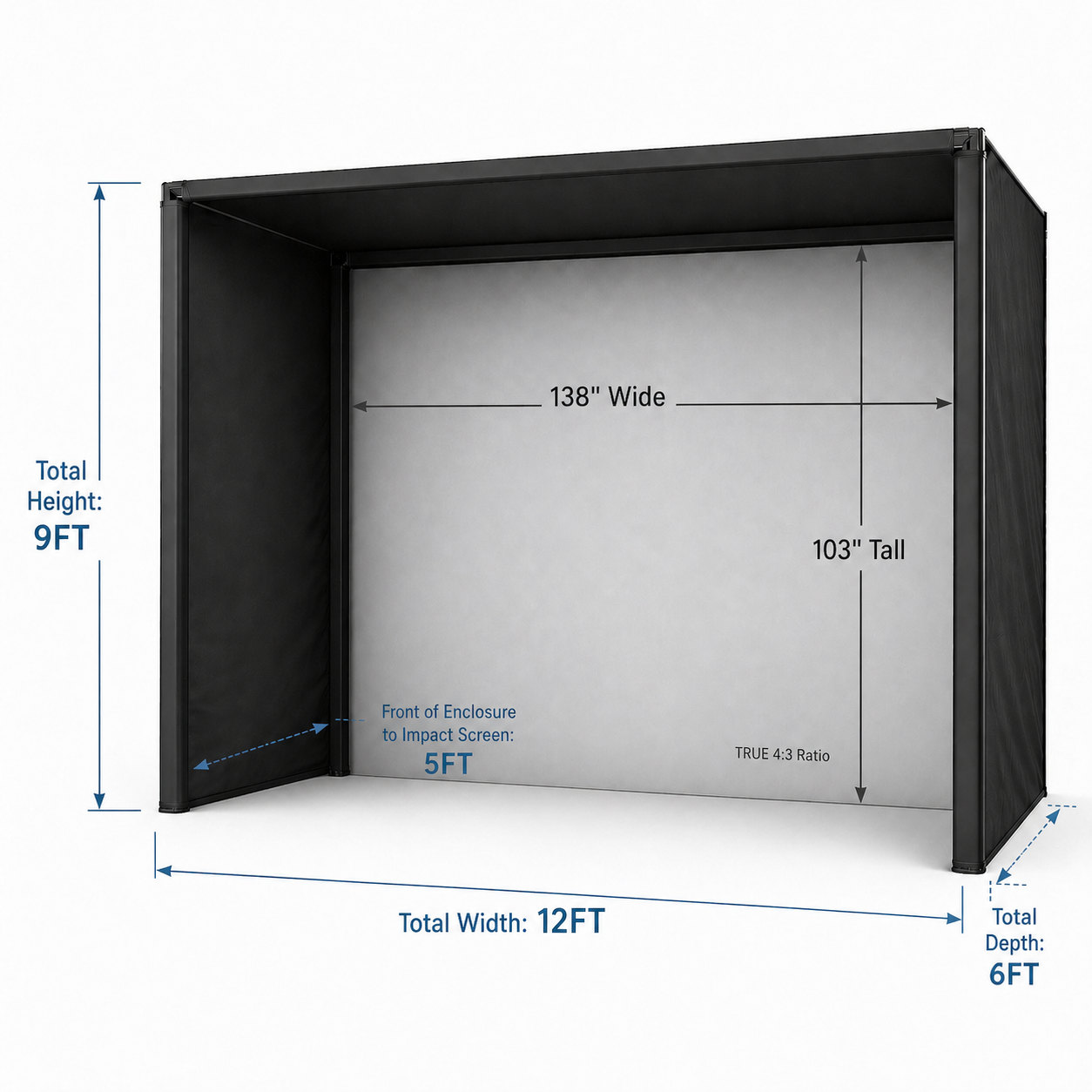
PRO Series 12x9
12’ W × 9’ H × 6’ D
True 4:3 — 138″ × 103″ viewable
- High-contrast gray triple-layer impact screen
- Built-in 1FT wall stand-off — installs against the wall
- RipStop fabric surround and bungee bottom included
- EMT pipe frame available as a $500 add-on

Commercial Series
Up to 18’ W — 6 preconfigured sizes
Custom width, height & depth available
- Heavy-duty 2″ EMT frame for high-traffic use
- Six sizes: 18×10×6 down to 12×9×6
- Custom depth options of 8’, 10’, 12’, and 15’
- Built-in 1FT stand-off and bungee bottom standard
Compare All Five Enclosures
A quick reference across the full lineup. Standard models share the same frame and screen construction; the PRO Series and Commercial Series step up in framing, screen, and included finishing.
| Spec | Birdie 10 | Eagle 12 | Albatross 13 | PRO Series 12x9 | Commercial Series |
|---|---|---|---|---|---|
| Tier | Standard | Standard | Standard | Premium | Commercial |
| Width | 10’ | 12’ | 13’ | 12’ | 12’–18’ (6 sizes) |
| Height | 8’2″ | 8’2″ | 8’2″ | 9’ | 9’–10’ (by size) |
| Depth | 5’ | 5’ | 5’ | 6’ (1FT stand-off) | 6’ standard, custom to 15’ |
| Screen Ratio | 4:3 | 4:3 | 16:9 | True 4:3 | By size |
| Screen | White triple-layer | White triple-layer | White triple-layer | Gray triple-layer | White triple-layer (gray upgrade) |
| Frame | 1-1/4″ steel | 1-1/4″ steel | 1-1/4″ steel | Steel (EMT add-on) | 2″ EMT heavy-duty |
| Custom Sizes | No | No | No | Yes — W, H & D | Yes — W, H & D |
| Best For | Single-stall garages, tight rooms | Dedicated sim rooms, standard garages | Bonus rooms, wide bays | Premium finished home bay | High-traffic & commercial facilities |
| Birdie 10 | Eagle 12 | Albatross 13 | PRO 12x9 | Commercial |
Enclosure Lineup Questions
Which Elite Sim Golf enclosure should I choose?
Start with room width and ceiling height. The Birdie 10 fits single-stall garages and tight rooms, the Eagle 12 is the most popular all-around bay for dedicated sim rooms and standard garages, and the Albatross 13 is the widest standard bay with a 16:9 widescreen image. Step up to the PRO Series 12x9 for a premium finished home bay, or the Commercial Series for facility-grade and custom-sized builds.
What is the difference between the standard enclosures and the PRO Series 12x9?
The standard Birdie 10, Eagle 12, and Albatross 13 use a 1-1/4″ powder-coated steel frame and a white triple-layer impact screen. The PRO Series 12x9 is the premium home tier: a true 4:3 bay with a high-contrast gray triple-layer screen, RipStop fabric surround, a built-in 1FT wall stand-off, and a bungee bottom included standard. An EMT pipe frame is available as a $500 add-on.
How is the Commercial Series different from the rest of the lineup?
The Commercial Series is the top tier, built around a heavy-duty 2″ EMT frame for high-traffic facilities. It is offered in six preconfigured sizes from 18×10×6 down to 12×9×6, and can be built to custom width, height, and depth — with depth options of 8’, 10’, 12’, and 15’ beyond the standard 6’.
What screen aspect ratio does each enclosure use?
The Birdie 10 and Eagle 12 use a 4:3 screen, the Albatross 13 uses a 16:9 widescreen, and the PRO Series 12x9 uses a true 4:3 screen. The Commercial Series screen ratio depends on the selected size. The 4:3 ratio is common for simulator software, while 16:9 suits wider rooms and modern projectors.
Is a hitting mat included with any enclosure?
No. The hitting mat and landing pad are sold separately on all enclosures so each bay can be matched to the buyer’s preferred turf. To build a complete setup, use the SimKit Bundle Builder to pair an enclosure with a launch monitor, projector, and mat.
Can I build a complete simulator with any of these enclosures?
Yes. Every enclosure pairs with a launch monitor, projector, and hitting mat for a complete simulator. Use the Projector Fitment Tool to confirm projector throw for the room, then the SimKit Bundle Builder to configure the full package.
Pick the Enclosure That Fits Your Room
Compare the lineup, choose the bay that matches the space and how it will be used, then pair it with a projector, launch monitor, and mat for a complete build.
Talk to a Simulator Specialist