






The most expensive part of your indoor setup isn't the screen or the software; it's the price of making a mistake. You've likely spent over 20 hours looking at different setups and felt that familiar pang of worry about buying parts that won't work together. We understand that the total golf simulator cost can feel like a moving target when you're faced with technical terms like photometric sensors or launch monitors. It's natural to want a premium experience without the headache of hidden fees or incompatible hardware.
Your dream of a bespoke home sanctuary is closer than you think. This 2026 guide provides a clear, simple breakdown of every dollar you'll spend to create an elite practice space. We've removed the guesswork so you can distinguish between a basic net and a professional-grade suite. We'll walk through the 7 essential components you need, explain the gear in plain English, and show you how to achieve a turnkey result that rivals the pros.
Key Takeaways
- Discover the three distinct price tiers to help you choose between a simple practice area and a bespoke, professional-grade indoor suite.
- Learn why the launch monitor acts as the "brain" of your system and why it is the most critical piece of technology for your improvement.
- Get a clear breakdown of the total golf simulator cost, including hidden essentials like software and high-powered computers.
- Identify the exact room dimensions and ceiling heights required to create a safe, high-end sanctuary for your game.
- Master the art of the "turnkey" bundle to save money on your installation while still achieving an unrivaled home experience.
Understanding the Total Investment: Three Tiers of Golf Simulator Costs
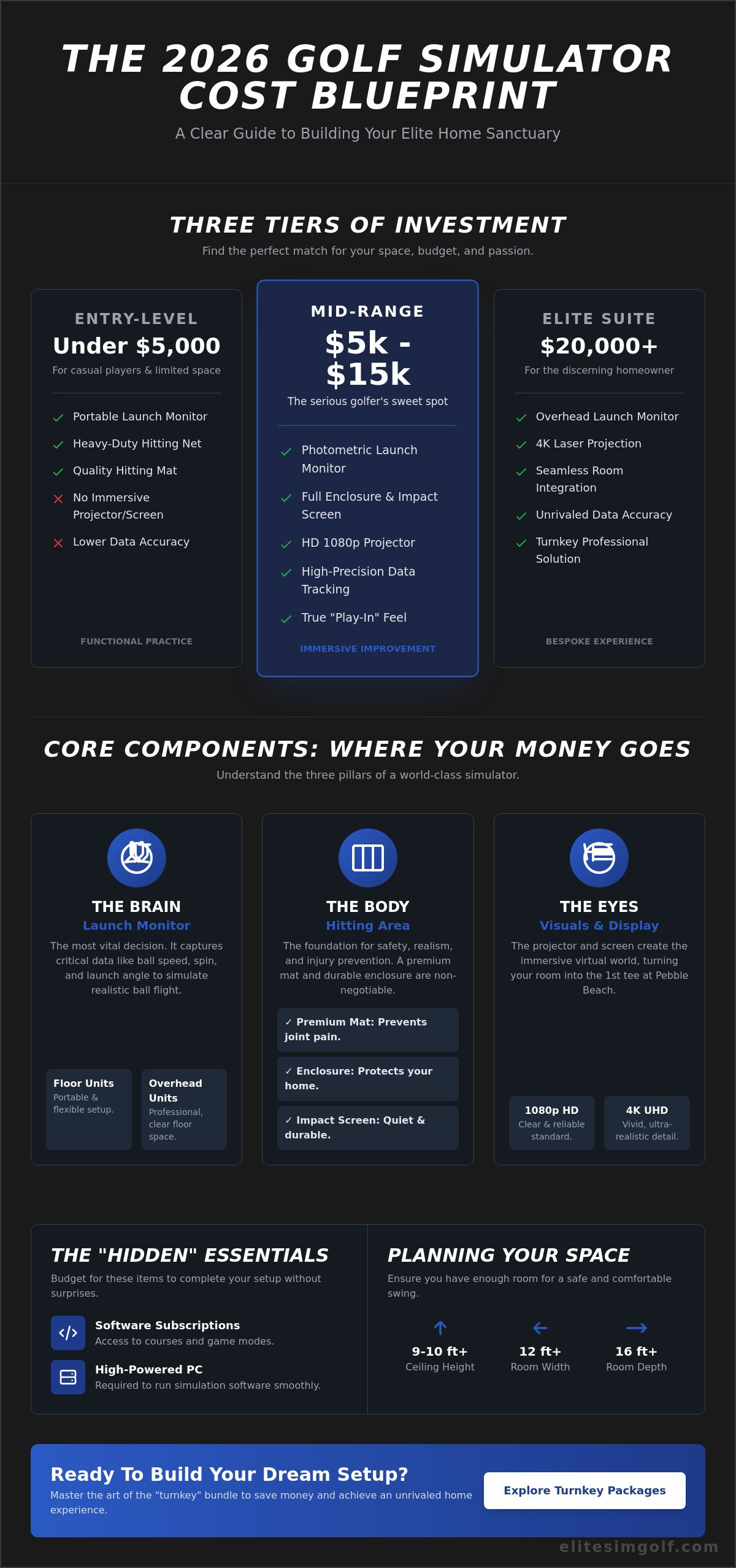
Building a golf sanctuary at home is an exciting journey. It's also a significant financial decision that requires a clear roadmap. To understand the total golf simulator cost, you have to look past the price on a single box. A complete setup is an ecosystem of parts working in harmony. If you are just starting out, you might first want to learn what a golf simulator is and how it tracks your swing. In 2026, high-speed camera technology has become more affordable, allowing even entry-level systems to provide impressive feedback. We categorize these investments into three distinct tiers to help you find your perfect match.
The "all-in" price includes more than just the sensor. You need to account for the hitting mat, the net or screen, the computer, and the software subscriptions. Your dream, realized. It's about creating a space that inspires you to play every single day.
The Entry-Level Setup (Under $5,000)
This tier is perfect for casual players or those with limited square footage. You'll typically get a heavy-duty hitting net, a quality mat, and a portable launch monitor. Most of these systems connect directly to a tablet or phone. You won't have a life-sized image on a screen. Instead, you watch your ball flight on a mobile device. While it's a great way to start, the accuracy is lower than professional systems. It's functional, but it lacks the deep immersion of a full-room build.
The Mid-Range "Sweet Spot" ($5,000 - $15,000)
This is the most popular choice for serious home golfers. It represents a balance of performance and value. At this level, you move away from nets and into full enclosures with impact screens. A dedicated projector displays the course in front of you, creating a true "play-in" feel. These systems use sophisticated photometric sensors to track ball spin and launch angles with high precision. It's a reliable setup for those who want to improve their handicap during the off-season.
The Elite Professional Suite ($20,000+)
Golf without limits. This tier is for the discerning homeowner who demands a bespoke experience. You get 4K laser projection that makes every fairway look vivid and sharp. These installations often feature the vtrack overhead golf launch monitor to keep the floor clear of equipment. Everything is seamless. This tier offers a turnkey solution where the technology disappears into the room's decor. You receive unrivaled data accuracy and a social centerpiece that adds genuine value to your home lifestyle.
Breaking Down the Core Components: Where Your Money Goes
Building a world-class setup is a journey of precision and choice. You don't have to buy every high-end piece on day one. Think of your system as a modular masterpiece. You can start with the essentials and upgrade as your passion grows. Understanding how each part affects the total golf simulator cost helps you spend wisely on what matters most. Your dream, realized, begins with three main pillars: the brain, the body, and the eyes.
The Launch Monitor: Your Data Engine
The launch monitor is the brain of your system. It's a high-tech camera or radar device that watches your club hit the ball. It measures speed, spin, and angle to show you exactly where your shot would land on a real course. Choosing the right one is the most vital decision you'll make. Floor-standing units are portable, but an overhead golf launch monitor provides a seamless, professional feel by keeping the floor clear of cables and clutter. Accuracy prevents frustration. If your data isn't perfect, your practice won't translate to the fairways. High-end sensors ensure that your virtual practice feels like the real thing.
The Hitting Area: Mats and Enclosures
The hitting area serves as the body of your simulator. A premium hitting mat is a non-negotiable health investment. Cheap mats are often too hard; they can cause joint pain in your wrists and elbows after a short 20-minute session. High-quality mats use advanced fibers to mimic the feel of real turf. Surrounding this is the enclosure. This heavy-duty frame and fabric cage keeps your home safe. It stops golf balls traveling at 150 mph from damaging your walls or furniture. When researching a home golf simulator guide, you'll find that impact screens are the final touch. A professional-grade screen is quiet and durable, absorbing the ball's energy without a deafening noise.
Visuals: Projectors and Displays
Your visuals are the eyes of the experience. The projector creates the virtual world on your impact screen. While standard 1080p is clear, 4K resolution offers unrivaled detail that makes every blade of grass pop. Most rooms require a short-throw projector. These units sit just a few feet from the screen to prevent you from casting a shadow during your swing. Light control is also a factor. If your room has many windows, you'll need a brighter projector to keep the image from looking faded. Balancing these parts ensures your golf simulator cost delivers a truly immersive escape. This is golf without limits.
The "Hidden" Expenses: Software, Computers, and Power
Your home simulator is a masterpiece of engineering, but it requires a digital brain to function. Think of the launch monitor as the eyes and the software as the imagination. Many first-time buyers focus solely on the hitting mat and the net, yet the total cost of a home golf simulator often includes these essential digital components. You're building an elite experience that demands more than just a standard plug-and-play setup. Without the right software and hardware, your premium equipment is simply a high-tech camera without a screen.
Simulation Software Fees
Software is what allows you to walk the fairways of Pebble Beach or St. Andrews from your basement. Most high-end systems rely on platforms like GSPro or E6 Connect to render these environments. GSPro currently requires a $250 annual subscription, while other platforms might offer a lifetime license for a one-time fee of $1,000 or more. These fees are vital because they provide the physics engines that make the ball flight look and feel real. Choosing a subscription often ensures you receive the latest course updates and feature enhancements every 12 months.
The Gaming PC: The Unsung Hero
A standard office laptop cannot handle the intense demands of 3D golf simulation. You need a dedicated gaming computer equipped with a powerful Graphics Processing Unit, also known as a GPU. Think of the GPU as the engine that drives the visual quality. If the engine is weak, the picture will stutter or look blurry. For a seamless 4K experience, expect to spend approximately $1,200 on a PC that meets modern specifications. This investment ensures that every blade of grass and every ripple in the water hazard appears in stunning, lifelike detail.
Electrical and Room Adjustments
The physical space requires its own set of technical upgrades to support an elite environment. You'll need multiple power outlets to support the projector, the PC, and the launch monitor simultaneously. If you're using an overhead system like the VTrack Overhead Golf Launch Monitor, you may need to hire an electrician to install a ceiling-mounted outlet for a clean, wire-free look. Consider these additional factors for your room:
- Specialized Lighting: Camera-based monitors often require 3,000 to 5,000 lumens of consistent light to track ball spin accurately.
- Acoustic Management: Impact screens are loud. Adding foam wall panels can reduce noise by 15 decibels, keeping the rest of the house quiet.
- Premium Consumables: High-quality "Titleist Pro V1" or "RCT" balls are necessary for data accuracy, and they typically need replacement every 300 to 500 strikes to avoid marking your screen.
When calculating your total golf simulator cost, these smaller details often represent the difference between a basic practice area and a bespoke sanctuary. Every cord, bulb, and software update contributes to a turnkey solution that works perfectly every time you step up to the tee.
Planning Your Space: How Room Size Impacts Your Final Price
Your room's physical dimensions are the silent partners in your total investment. Many beginners assume any spare corner will work, but the wrong space creates hidden expenses. If a room is too cramped, you can't swing naturally. This leads to a "hidden" cost where you might spend thousands on equipment you can't actually use. Choosing the right space from the start protects your budget and ensures your golf simulator cost remains predictable.
Ceiling Height and Swing Clearance
The "10-foot rule" is the gold standard for home setups. A ceiling height of 10 feet allows almost any player to swing a driver without fear. If your ceiling is lower, such as 8 or 9 feet, you'll likely hit the top of the room. This frustration often forces homeowners to pay for expensive structural modifications. A 2025 industry survey suggested that ceiling height is the number one reason for installation returns. Avoiding these "modifying" costs is easier if you select a room with ample vertical clearance or opt for a portable, outdoor-friendly setup instead.
Depth and Width Requirements
Room depth is vital for the technology to track your ball accurately. You generally need 12 to 15 feet of depth to ensure enough space between the ball, the screen, and the back wall. If the room is too shallow, certain radar-based sensors won't function. Width is equally important for comfort and safety. A standard room needs to be at least 10 feet wide. However, if you want to host both left-handed and right-handed players, you should aim for a width of 14 feet. This prevents the need for custom-sized, bespoke impact screens that can drive up the price significantly compared to standard sizes.
Retractable vs. Permanent Enclosures
The type of enclosure you choose determines if your room has one purpose or many. Retractable systems are an Elite solution for multi-purpose spaces like garages. These screens roll up into a housing unit, allowing you to park your car when you aren't playing. Permanent bays are different. They create a dedicated sanctuary for golf with fixed frames and heavy-duty side padding. While a DIY pipe frame might seem cheaper, a turnkey luxury box provides unrivaled sound dampening and a seamless look. These professional installations turn a simple room into a high-end home feature.
Ready to maximize your space with professional-grade technology? Discover how the VTrack overhead golf launch monitor provides a seamless, space-saving experience for your home sanctuary.
Choosing Your Path: How to Build a High-End Setup for Less
Building your dream practice space doesn't have to mean wasting money on unnecessary extras. Many beginners find that purchasing a "bundle" or "all-in-one" package is the smartest financial move. These packages usually offer a significant discount compared to buying every cable, mat, and net separately. More importantly, every piece is guaranteed to work together. It removes the stress of wondering if your projector is compatible with your software or if your hitting mat is thick enough for your floor.
When you evaluate your total golf simulator cost, put your money where it matters most. The launch monitor is the "brain" of the system. It's the piece of technology that measures your swing and ball flight. If this part is low quality, your practice sessions won't help your game. You can save money on the projector by choosing a high-quality 1080p model instead of a 4K version. Your eyes might not notice a slight difference in screen pixels, but your game will definitely notice inaccurate data from a cheap sensor.
Think about the long-term return on your investment. In 2024, industry data showed that the average cost of a single round of golf can range from $38 to $61, not including travel or cart fees. If you play twice a week, a home simulator often pays for itself within 36 to 48 months. You save on gas, expensive clubhouse meals, and the five hours it takes to complete a round at a busy public course. Your home becomes a sanctuary where you can improve your skills in just twenty minutes before dinner.
The Value of Overhead Systems
Overhead units are the gold standard for a clean and functional home setup. These overhead launch monitors stay mounted on the ceiling, completely out of the way of your clubs and feet. This is a huge benefit if you have both left-handed and right-handed players in your home. You don't have to move a device back and forth across the floor every time a different person hits a shot. This "out of the way" technology creates a professional look that makes your room feel like a private club rather than a cluttered garage.
Getting a Custom Consultation
Buying a generic kit from a big-box store often leads to wasted money. Every room is different. Your ceiling might have a low beam, or your walls might be a specific width that requires a custom-sized screen. A "concierge" approach ensures you only pay for what fits your specific space. By getting a custom quote, you avoid the frustration of buying equipment that is too big or too small for your room. This bespoke service turns a complicated project into a seamless transition. It's time to stop dreaming and start building. Reach out today to get a plan tailored to your home and start your journey toward an elite golfing experience.
Start Your Journey Toward an Unrivaled Home Experience
Understanding the golf simulator cost shouldn't feel like a chore. You've learned that your total investment depends on three main tiers, ranging from basic practice setups to premium, bespoke suites. It's clear that the launch monitor and your specific room dimensions are the most important factors in your budget planning. By accounting for software fees and hitting mats early, you avoid any surprises during the build. Elite Sim Golf is an authorized dealer for industry leaders like Garmin, Uneekor, and BenQ. This ensures you're getting tested, high-quality technology for your home. Our US-based expert support team and reliable shipping make the entire process seamless. You don't need to be a technology expert to build something amazing. Use our custom builder tool to see how your vision becomes a reality today. It's time to transform your home into a sanctuary for the game you love.
Build Your Dream Setup with a Custom Quote from Elite Sim Golf
Your dream of playing any course at any time is closer than you think.
Frequently Asked Questions
Is a $1,000 golf simulator worth it for a beginner?
A $1,000 setup is a great starting point for a beginner who wants to practice basic swing mechanics at home. At this price, you usually get a portable launch monitor like the $600 Garmin Approach R10 and a simple hitting net. While it lacks the deep immersion of a full room, it provides 10 or more data points to help you learn. It's a smart way to test the waters before committing to a larger investment.
How much ceiling height do I really need for a golf simulator?
You need at least 9 feet of ceiling height to swing most clubs safely without hitting the top of the room. If you're taller or use a driver with a long shaft, 10 feet is the gold standard for a comfortable experience. Many users find that 9.5 feet provides the perfect balance for a safe swing path. This ensures your golf simulator cost includes a safe environment for every player in your house.
Do I need a special computer to run golf simulation software?
You need a computer with a dedicated graphics card to handle the realistic 3D visuals of the software. A basic office laptop won't work because it lacks the processing power to show the ball flying in real time. Most popular software brands recommend at least an NVIDIA RTX 3060 graphics card for a smooth experience. This hardware ensures the grass and trees look premium and the game runs at 60 frames per second without lagging.
Can I use my existing golf balls and clubs with a simulator?
You can use 100 percent of your current golf clubs, but you must use clean, unmarked golf balls. Dirt or sharp scuff marks on a ball act like sandpaper and will ruin your expensive impact screen quickly. Many players buy a fresh box of premium balls specifically for indoor use to keep the screen pristine. This keeps your equipment in top shape and ensures the sensors track your shots with 99 percent accuracy.
What is the most expensive part of a home golf simulator setup?
The launch monitor is the most expensive part of any setup because it is the brain of the entire system. This device uses high speed cameras or radar to track your ball with professional precision. While entry level units exist, elite photometric monitors often cost between $2,000 and $20,000. Investing in a high quality monitor ensures your data is reliable, making the overall golf simulator cost a long term investment in your personal growth.
Are there monthly fees associated with owning a golf simulator?
Most systems involve annual subscription fees to access premium courses and online play with other golfers. These fees usually range from $100 to $800 per year depending on the software package you choose. For example, some brands offer a basic free tier but charge for advanced data or 4K graphics. It's important to check the specific requirements of your launch monitor brand so you aren't surprised by recurring costs.
Can I build a golf simulator in my garage for under $5,000?
You can definitely build a high quality garage setup for under $5,000 by choosing DIY components. A mid range launch monitor for $2,000, a $500 impact screen, and a $1,000 projector fit well within this budget. You'll have enough left over for a durable hitting mat and basic side netting to protect your walls. This approach turns your garage into a private sanctuary for improvement without the price tag of a bespoke installation.
How long does it typically take to set up a home golf simulator?
A typical DIY installation takes between 4 and 8 hours to complete from start to finish. Most of this time is spent mounting the projector and hanging the impact screen to ensure the surface is flat and smooth. If you choose a turnkey professional service, the team usually finishes the entire build in a single 8 hour day. Once the hardware is in place, the software calibration takes about 30 minutes before you're ready to tee off.
Find similar articles:
golf simulator cost