






VTrack Overhead Golf Launch Monitor Review: GSPro Setup, Ceiling Height, Data & Simulator Compatibility
If you are building a golf simulator and want a clean overhead launch monitor with full ball and club data, markerless tracking, and no required subscription for core functionality, the VTrack Overhead Golf Launch Monitor deserves a serious look.
Built by Laon Swingcraft, VTrack is a ceiling-mounted, camera-based launch monitor designed for home golf simulators and private studios. It delivers a large hitting zone, fast shot feedback, slow-motion impact video, and strong simulator compatibility with platforms like GSPro, E6 Connect, and E6 Apex.
What is the VTrack Launch Monitor?
The VTrack launch monitor is an overhead golf launch monitor that uses dual high-speed cameras to measure ball and club data through impact. It is designed for golfers who want a permanent, clean simulator setup with strong data, impact video, left- and right-handed compatibility, and simulator software support without the clutter of a floor unit.
Watch: How to Set Up VTrack for GSPro
Want to see the VTrack GSPro setup process in action? This Elite Sim Golf walkthrough covers VTrack ToolKit setup, calibration, ball check procedure, area settings, tee configuration, testing, and GSPro connection.
Shop the VTrack here: VTrack Overhead Golf Launch Monitor
VTrack Overhead Design: Clean, Safe, and Easy to Live With
One of the biggest reasons golfers choose VTrack is the ceiling-mounted overhead design. Nothing sits on the floor near the golf ball, which means there is no launch monitor to aim around, no extra hardware to trip over, and no expensive box to accidentally hit with a poor swing.
That overhead layout makes a simulator bay feel more like a permanent studio and less like a temporary setup. It also keeps the hitting area cleaner for families, guests, and golfers who use the simulator often.
Because VTrack sits overhead and in front of the hitting area, it is also naturally left- and right-handed friendly. You do not need to move the unit when players switch sides, which is a major benefit in shared simulator rooms.
Minimum Ceiling Height for VTrack: 106"
The most important room requirement is simple: VTrack requires a minimum ceiling height of 106 inches.
That height allows the cameras to sit at the correct angle and distance for reliable ball tracking, club tracking, and impact video. If your room is below 106", VTrack should not be your first choice. If your room clears that threshold, VTrack becomes a very compelling overhead option.
Large 31" x 24" Hitting Zone
VTrack offers a generous 31" x 24" hitting zone, which gives golfers more flexibility in ball position and stance than many smaller hitting windows.
In real-world use, that means less stress about placing the ball in one tiny spot and a better experience for multi-player rooms, families, and simulator bays where comfort matters.
Dual High-Speed Cameras and Fast Shot Feedback
VTrack uses dual high-speed stereoscopic cameras instead of radar. This is a photometric launch monitor, meaning it captures the ball and club visually through impact and turns that information into shot data.
In practice, VTrack is known for roughly 200–250 millisecond shot feedback, helping simulator play feel responsive and connected. That quick response makes a noticeable difference during both practice sessions and full simulator rounds.
Markerless Tracking: No Dots, No Stickers, No Special Balls
A major VTrack advantage is that it delivers its core experience without requiring club-face stickers, reflective dots, or special marked golf balls.
For home golfers, that means a cleaner and simpler setup. You can drop a standard golf ball, swing, and play without adding extra prep work every time you use your simulator.
VTrack Ball and Club Data: What Does It Measure?
The VTrack launch monitor tracks 25+ ball and club parameters, making it a serious performance tool for golfers who want more than just carry distance and shot shape.
That combination of ball flight data and club delivery information makes VTrack useful not only for simulator golf, but also for practice, instruction, and gapping work.
Slow-Motion Impact Video
One of the most compelling VTrack features is its slow-motion impact video. Because the system is already using high-speed cameras to observe impact, it can show what actually happened at contact instead of forcing you to rely on feel alone.
That is especially useful for diagnosing strike quality, understanding gear-effect misses, and matching poor results to poor contact. For many golfers, this “feel vs real” feedback is one of the biggest reasons to choose VTrack over simpler systems.
VTrack GSPro and E6 Compatibility
Out of the box, VTrack includes its own software tools for setup, analysis, and practice. That includes the VTrack ToolKit for settings and calibration plus the VTrack Practice Range for structured training sessions and data review.
For simulator play, VTrack is compatible with leading third-party software platforms including GSPro, E6 Connect, and E6 Apex.
Many golfers looking for a VTrack GSPro setup are drawn to the combination of a clean overhead launch monitor with one of the most popular simulator software platforms available today.
DIY-Friendly Setup, but Proper Calibration Matters
If you are comfortable with a projector, enclosure, or ceiling-mounted simulator equipment, VTrack is generally a realistic DIY install.
The key is getting the unit mounted square to the hitting area and going through the proper calibration process in the ToolKit. Once installed correctly, VTrack is designed to be straightforward to live with day to day.
No Required Subscription Fees
Another major VTrack selling point is long-term ownership value. There is no required recurring subscription just to keep using the launch monitor’s core functionality.
You can choose the simulator software that makes sense for your build, such as GSPro or E6, without paying a recurring fee simply to unlock the hardware you already own.
Protect Your Investment with the Elite Sim Golf VTrack Protector
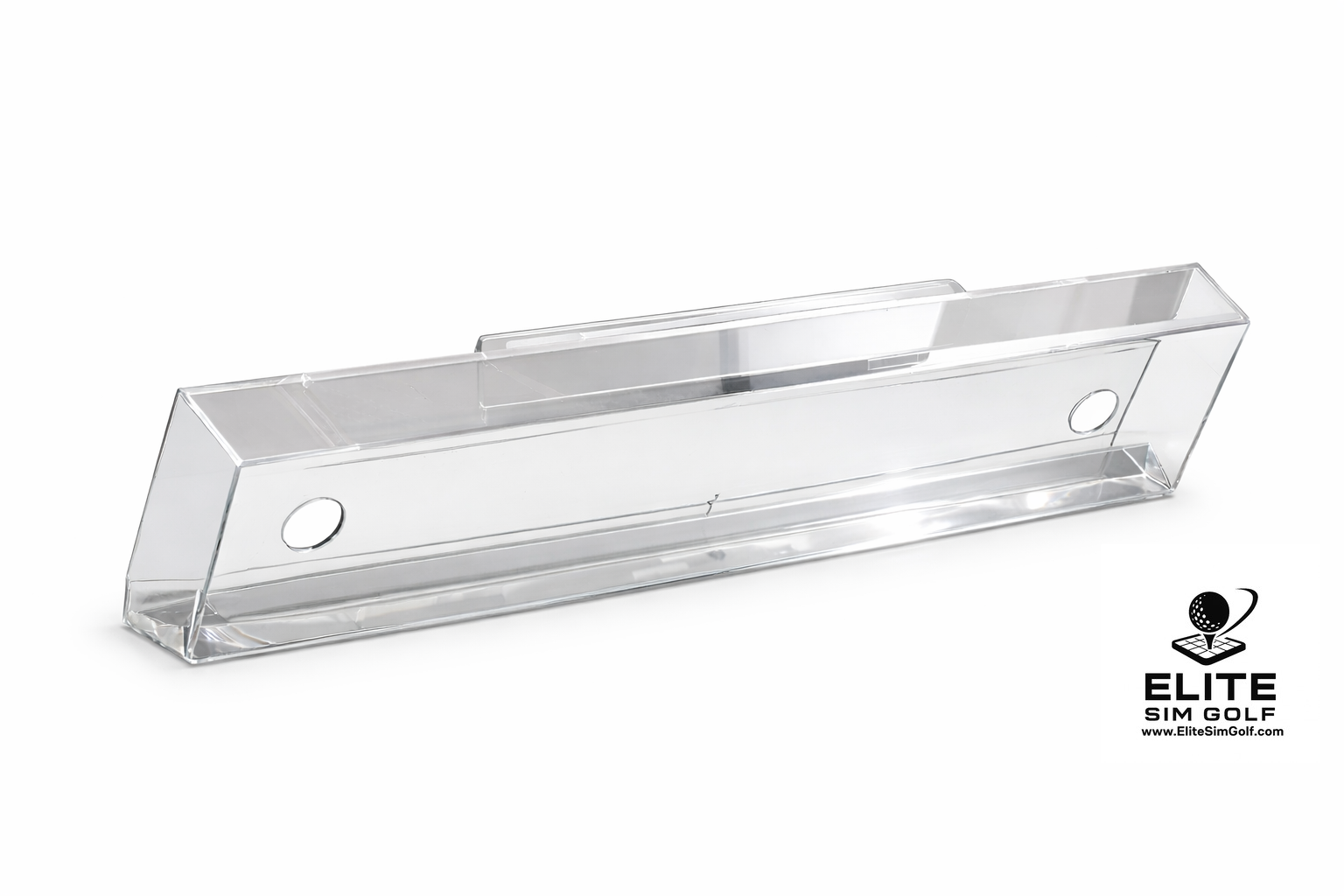
If you are installing a VTrack Overhead Golf Launch Monitor, adding a dedicated shield is one of the smartest upgrades you can make. The Elite Sim Golf VTrack Protector is designed specifically to help protect the VTrack unit from accidental impact and ricochet damage while maintaining a clean, professional overhead look.
Even with proper room planning, overhead launch monitors live in a space where mishits, rebounds, and unexpected ball movement can happen. A dedicated VTrack impact protector adds peace of mind and helps protect one of the most important components in your simulator build.
If you are investing in a premium overhead launch monitor, protecting it is just as important as choosing the right enclosure, projector, or hitting mat. You can view the protector here: VTrack Protector by Elite Sim Golf.
Who Should Buy the VTrack Launch Monitor?
VTrack makes the most sense for golfers who want:
- a clean overhead golf simulator setup
- markerless play with normal golf balls and clubs
- deep ball and club data for practice and game improvement
- slow-motion impact video for better strike feedback
- GSPro or E6 compatibility
- a lefty/righty-friendly simulator space
- a one-time hardware purchase mindset instead of mandatory ongoing monitor fees
Turnkey VTrack Bundles with Eagle 12 Enclosure
If you already know VTrack is the right fit, the next decision is whether to build your simulator piece by piece or start with a more complete package. Elite Sim Golf offers premium VTrack bundles that simplify the process.
Prefer to build your own package? Start with the VTrack Overhead Golf Launch Monitor product page.
VTrack vs ProTee VX vs Uneekor Eye XO2
VTrack sits in a strong middle ground for many home simulator buyers. It offers the overhead design most golfers want, markerless convenience, deep enough data for serious practice, and a cleaner long-term cost structure than some competing systems.
ProTee VX can make sense for buyers already committed to that ecosystem, but many golfers find VTrack delivers the core overhead experience they want at a more attractive overall value.
Uneekor Eye XO2 is a high-end overhead option with very deep data and premium studio appeal, but for many home golfers the extra cost can be hard to justify when VTrack already covers the features that matter most for simulator play and improvement.
VTrack FAQ
Does VTrack work with GSPro?
Yes. VTrack is compatible with GSPro and is a strong option for golfers who want an overhead launch monitor for GSPro simulator play.
What ceiling height is required for VTrack?
VTrack requires a minimum ceiling height of 106 inches for proper installation and performance.
Does VTrack require marked golf balls or club stickers?
For core use, VTrack is designed to work without special marked golf balls, reflective dots, or club-face stickers.
Does VTrack require a subscription?
There is no required recurring subscription for the launch monitor’s core functionality. Third-party simulator software may have its own license requirements.
Is VTrack good for left- and right-handed golfers?
Yes. Because it is an overhead launch monitor, VTrack supports left- and right-handed golfers without moving the unit.
Should I add a protector to my VTrack?
Yes, adding a dedicated shield like the Elite Sim Golf VTrack Protector is a smart way to help protect the unit from accidental impact and ricochet damage.
Is the VTrack Launch Monitor Worth It?
If your room meets the 106" ceiling requirement and you want a clean overhead golf simulator setup with markerless tracking, full ball and club data, slow-motion impact video, and strong GSPro compatibility, VTrack is one of the most compelling overhead launch monitors available for home simulators today.
It delivers a premium-style overhead experience without forcing you into the highest pricing tier or a required recurring subscription model for core functionality.
And if you want to better protect your investment from day one, pairing the launch monitor with the Elite Sim Golf VTrack Protector is a smart addition to a serious simulator build.

